
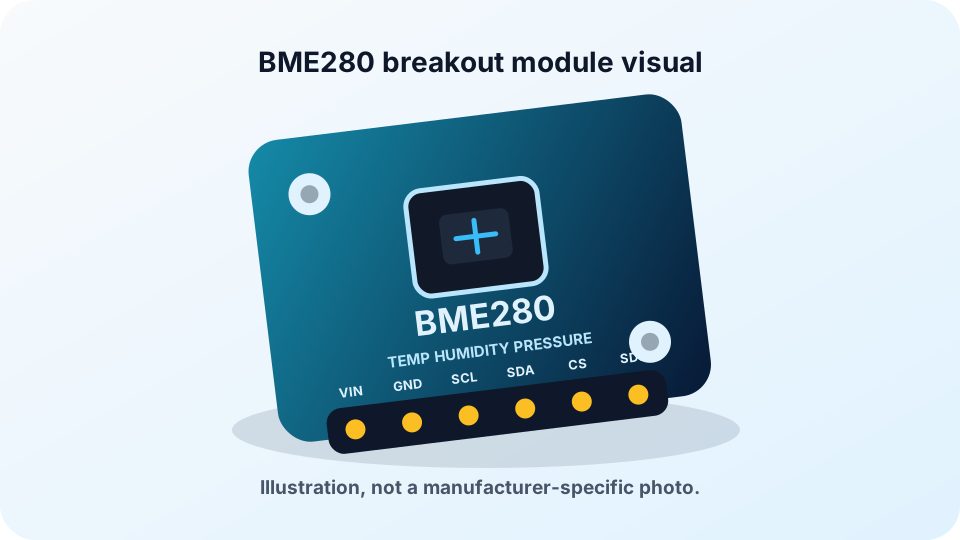
Plain-English Overview
The BME280 is a small I2C environmental sensor. With ESP32 it measures temperature, humidity, and local air pressure over four wires: 3.3 V, GND, SDA, and SCL.
Most ESP32 Arduino examples use GPIO21 for SDA and GPIO22 for SCL, and most BME280 modules answer at I2C address 0x76 or 0x77. Temperature tells you how warm the air is. Humidity tells you how much water vapor is in the air. Pressure tells you how hard the air is pushing on everything around it.
BME280 is different from BMP280, even though breakout boards can look very similar. BMP280 measures temperature and pressure only; BME280 also measures humidity. Use the BME280 for weather stations, room monitors, pressure trend logs, approximate altitude experiments, and OLED dashboards, but do not treat it as a lab-grade weather instrument.
Where You Use It
- ESP32 weather station
- Indoor climate monitor
- Greenhouse environment logger
- Barometric pressure trend tracker
- Approximate altitude monitor
- OLED weather dashboard
- Classroom atmosphere experiment
- Home automation sensor node
Quick Facts
- Measures Temperature, humidity, and barometric pressure
- Interface I2C on SDA and SCL
- Common address 0x76 or 0x77
- ESP32 pins GPIO21 SDA, GPIO22 SCL defaults
- BME280 vs BMP280 BME280 adds humidity
- Library Adafruit BME280 plus Unified Sensor
How It Works
The BME280 contains three sensing systems inside one chip. Its temperature sensor measures the chip temperature, its humidity sensor responds to water vapor in the air, and its pressure sensor measures tiny deflections caused by atmospheric pressure.
The pressure part is the most interesting engineering idea. Air pressure pushes on a microscopic structure inside the chip. That structure changes electrically when it bends. The BME280 converts that tiny change into a local station-pressure reading measured in pascals or hectopascals. Weather apps often show sea-level adjusted pressure instead, so their numbers may differ from your raw sensor reading.
The raw measurements are not directly useful on their own. Bosch stores calibration constants inside each sensor during manufacturing. The Arduino library reads those constants and uses compensation formulas to turn raw ADC values into temperature, humidity, and pressure.
The ESP32 talks to the BME280 over I2C. SDA carries data and SCL carries the clock. GPIO21 and GPIO22 are common Arduino-ESP32 defaults on classic ESP32 boards, not fixed electrical pins. If your board uses different pins, Wire.begin(SDA, SCL) must match the GPIO numbers you actually wired.
Every I2C device has an address, so the ESP32 can ask the BME280 for data while other devices, such as an SSD1306 OLED display, share the same two wires. BME280 modules commonly use 0x76 or 0x77. SSD1306 OLED modules commonly use 0x3C and sometimes 0x3D, so an I2C scanner is the fastest way to confirm the real bus.
Pressure can also estimate altitude, but altitude is only approximate unless you know the current sea-level pressure for your location. The common 1013.25 hPa value is a standard reference, not a promise about your current weather. For weather projects, pressure trends over time are usually more useful than a single pressure number.
Technical Specifications
Arduino library: Adafruit BME280 Library plus Adafruit Unified Sensor
| Specification | Value | Why it matters |
|---|---|---|
| Supply voltage | Low-voltage chip; use 3.3 V breakout power with ESP32 unless the exact module documentation says otherwise | Some breakouts add regulators or level shifting and some do not, so 3.3 V is the safest beginner choice. |
| Temperature range | -40 C to 85 C | Covers indoor rooms, outdoor shaded enclosures, greenhouses, and many classroom experiments. |
| Temperature accuracy | Typically about +/-1 C | Good for trend monitoring; avoid treating the module as a calibrated thermometer. |
| Humidity range | 0 to 100 percent RH, non-condensing | Lets the same board detect dry rooms, comfortable air, and humid greenhouse conditions without exposing the sensing element to liquid water. |
| Humidity accuracy | Typically about +/-3 percent RH | Useful for comfort and trends, but not a laboratory humidity reference. |
| Pressure range | 300 to 1100 hPa | Covers normal weather pressure and altitude changes from below sea level to mountain elevations. |
| Pressure accuracy | About +/-1 hPa absolute, better relative resolution | Relative pressure changes are excellent for weather trend and altitude experiments. |
| Interface | I2C by default; SPI on some breakout boards | This ESP32 guide uses I2C because it needs only two shared signal wires. |
| I2C address | 0x76 or 0x77 | The SDO/address pin decides the address; code must match the actual module. |
| Default ESP32 I2C pins | SDA GPIO21, SCL GPIO22 | These are common Arduino core defaults and match most ESP32 tutorials, but they can be changed in Wire.begin(SDA, SCL). |
| Pull-up resistors | Usually included on breakout boards | I2C lines need pull-ups; bare sensors need an external circuit, and multiple modules can place pull-ups in parallel. |
| Current consumption | Very low; depends on sampling mode and oversampling | Good for battery projects when paired with ESP32 deep sleep and low sample rates. |
| Response behavior | Temperature and humidity change gradually; pressure changes slowly indoors | Environmental sensors should be read as trends, not instant switches. |
Pinout
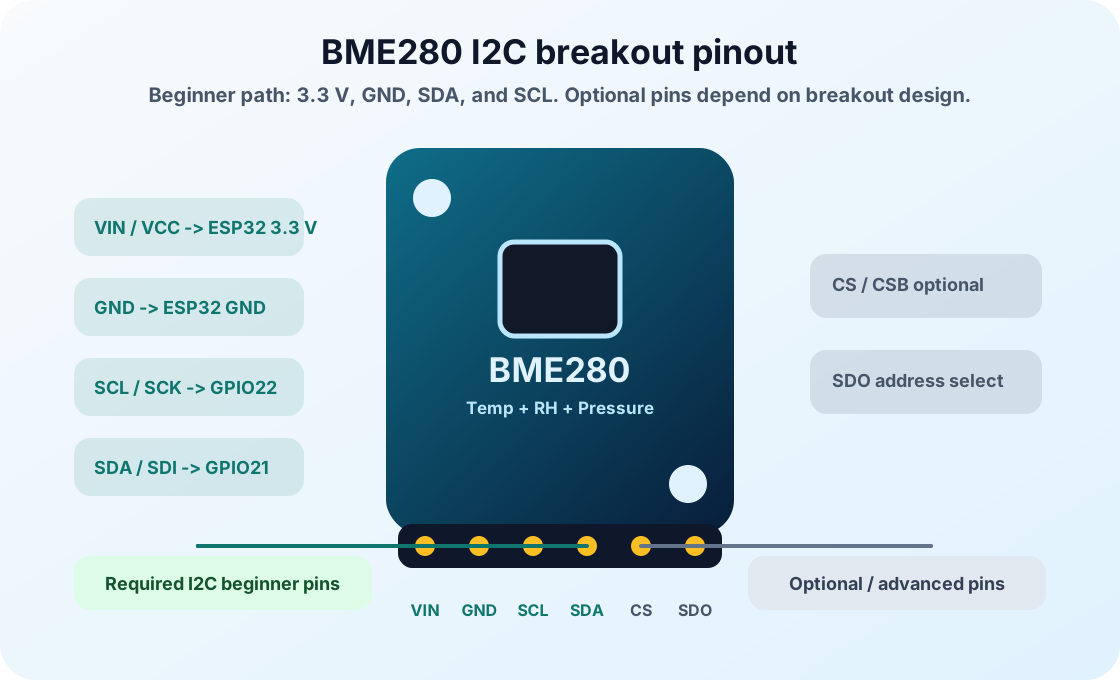
- VIN / VCC Power input ESP32 3.3 V Use 3.3 V unless the exact breakout documentation confirms other input support. Do not assume VIN is 5 V tolerant.
- GND Ground reference ESP32 GND Ground must be shared with the ESP32 and every other I2C device.
- SDA / SDI I2C data ESP32 GPIO21 Bidirectional data line. GPIO21 is the common Arduino-ESP32 default; follow GPIO numbers, not another board's physical layout.
- SCL / SCK I2C clock ESP32 GPIO22 Clock line generated by the ESP32 master. GPIO22 is common by default, but Wire.begin() can choose other pins.
- SDO Address select or SPI data output Usually left as breakout default On many boards, SDO selects I2C address 0x76 or 0x77. Check your module if scanning fails.
- CS / CSB SPI chip select or I2C mode select Usually tied HIGH on I2C breakouts If exposed, keep CS high for I2C mode. Pulling it low selects SPI mode on the chip.
Wiring Diagram
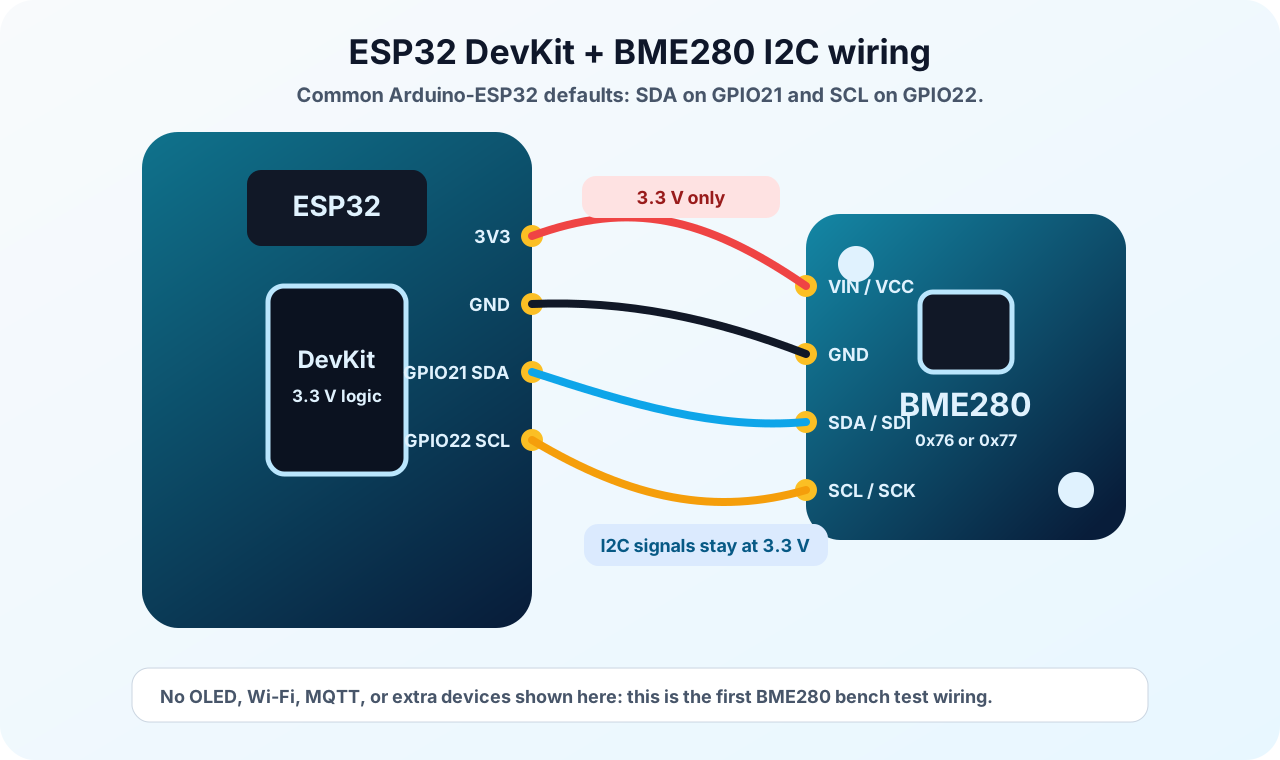
The BME280 breakout uses I2C, so it needs power, ground, data, and clock. The common ESP32 Arduino defaults are GPIO21 for SDA and GPIO22 for SCL, but they are not fixed pins. Your wiring and Wire.begin(SDA, SCL) must agree.
Most breakout boards already include I2C pull-up resistors. If you build with a bare BME280 chip, you must add the correct external circuit and follow the datasheet carefully. Beginners should use a 3.3 V breakout module, keep wires short, and run an I2C scanner when the address is uncertain.
| BME280 Pin | ESP32 Pin | Purpose / Notes |
|---|---|---|
| VIN / VCC | 3.3 V | Power the breakout from 3.3 V unless that exact module documents safe 5 V input and level shifting. |
| GND | GND | Shared ground is required for reliable I2C communication. |
| SDA / SDI | GPIO21 | I2C data line in the site's ESP32 Arduino examples. |
| SCL / SCK | GPIO22 | I2C clock line in the site's ESP32 Arduino examples. |
| SDO | Breakout default | Often selects address 0x76 or 0x77; follow your module labels and scan the bus if unsure. |
| CS / CSB | Breakout default | Usually kept high for I2C mode on breakout boards; do not guess if your board exposes this pin. |
-
1
Unplug the ESP32 USB cable before wiring.
-
2
Place the BME280 breakout on the breadboard so each pin is in a separate row.
-
3
Connect VIN or VCC to ESP32 3.3 V unless your exact breakout documentation confirms another safe input.
-
4
Connect GND to ESP32 GND.
-
5
Connect SDA or SDI to ESP32 GPIO21, following the GPIO number printed for your board.
-
6
Connect SCL or SCK to ESP32 GPIO22, following the GPIO number printed for your board.
-
7
Leave SDO and CS at their breakout defaults unless your board documentation says otherwise.
-
8
Plug in USB, upload the scanner or example code, and confirm whether the module responds at 0x76 or 0x77.
Code Examples
Use the same wiring with Arduino IDE, PlatformIO, or ESP-IDF. Start with Arduino, then graduate when you need a larger project structure.
#include <Wire.h>
#include <Adafruit_Sensor.h>
#include <Adafruit_BME280.h>

// ESP32 Arduino default I2C pins.
#define I2C_SDA 21
#define I2C_SCL 22

// Standard sea-level pressure, not necessarily today's local sea-level pressure.
// Update this value for better altitude estimates.
#define SEALEVELPRESSURE_HPA 1013.25

const unsigned long READ_INTERVAL_MS = 1000;

Adafruit_BME280 bme;
unsigned long lastReadTime = 0;
bool sensorReady = false;

bool beginBME280() {
  if (bme.begin(0x76)) {
    Serial.println("BME280 found at I2C address 0x76");
    return true;
  }

  if (bme.begin(0x77)) {
    Serial.println("BME280 found at I2C address 0x77");
    return true;
  }

  return false;
}

void setup() {
  Serial.begin(115200);
  delay(1000);

  Wire.begin(I2C_SDA, I2C_SCL);

  Serial.println("BME280 ESP32 environmental sensor test");
  sensorReady = beginBME280();

  if (!sensorReady) {
    Serial.println("BME280 not found at 0x76 or 0x77.");
    Serial.println("Check 3.3 V, GND, SDA=GPIO21, SCL=GPIO22, module address, and run an I2C scanner.");
  }
}

void loop() {
  if (!sensorReady) {
    delay(2000);
    return;
  }

  if (millis() - lastReadTime < READ_INTERVAL_MS) {
    return;
  }
  lastReadTime = millis();

  float temperatureC = bme.readTemperature();
  float humidity = bme.readHumidity();
  float pressureHpa = bme.readPressure() / 100.0F;
  float altitudeM = bme.readAltitude(SEALEVELPRESSURE_HPA);

  if (isnan(temperatureC) || isnan(humidity) || isnan(pressureHpa)) {
    Serial.println("Read failed: check I2C wiring, address, and power.");
    return;
  }

  Serial.print("Temperature: ");
  Serial.print(temperatureC, 1);
  Serial.print(" C  |  Humidity: ");
  Serial.print(humidity, 1);
  Serial.print(" %  |  Pressure: ");
  Serial.print(pressureHpa, 1);
  Serial.print(" hPa  |  Altitude estimate: ");
  Serial.print(altitudeM, 1);
  Serial.println(" m");
}#include <Arduino.h>
#include <Wire.h>
#include <Adafruit_Sensor.h>
#include <Adafruit_BME280.h>
// ESP32 Arduino default I2C pins.
#define I2C_SDA 21
#define I2C_SCL 22
// Standard sea-level pressure, not necessarily today's local sea-level pressure.
// Update this value for better altitude estimates.
#define SEALEVELPRESSURE_HPA 1013.25
const unsigned long READ_INTERVAL_MS = 1000;
Adafruit_BME280 bme;
unsigned long lastReadTime = 0;
bool sensorReady = false;
bool beginBME280() {
if (bme.begin(0x76)) {
Serial.println("BME280 found at I2C address 0x76");
return true;
}
if (bme.begin(0x77)) {
Serial.println("BME280 found at I2C address 0x77");
return true;
}
return false;
}
void setup() {
Serial.begin(115200);
delay(1000);
Wire.begin(I2C_SDA, I2C_SCL);
Serial.println("BME280 ESP32 environmental sensor test");
sensorReady = beginBME280();
if (!sensorReady) {
Serial.println("BME280 not found at 0x76 or 0x77.");
Serial.println("Check 3.3 V, GND, SDA=GPIO21, SCL=GPIO22, module address, and run an I2C scanner.");
}
}
void loop() {
if (!sensorReady) {
delay(2000);
return;
}
if (millis() - lastReadTime < READ_INTERVAL_MS) {
return;
}
lastReadTime = millis();
float temperatureC = bme.readTemperature();
float humidity = bme.readHumidity();
float pressureHpa = bme.readPressure() / 100.0F;
float altitudeM = bme.readAltitude(SEALEVELPRESSURE_HPA);
if (isnan(temperatureC) || isnan(humidity) || isnan(pressureHpa)) {
Serial.println("Read failed: check I2C wiring, address, and power.");
return;
}
Serial.print("Temperature: ");
Serial.print(temperatureC, 1);
Serial.print(" C | Humidity: ");
Serial.print(humidity, 1);
Serial.print(" % | Pressure: ");
Serial.print(pressureHpa, 1);
Serial.print(" hPa | Altitude estimate: ");
Serial.print(altitudeM, 1);
Serial.println(" m");
}// ESP-IDF starter structure for this component.
// Keep the wiring from the pinout section, then move the read/write logic into app_main().
#include <stdio.h>
#include "freertos/FreeRTOS.h"
#include "freertos/task.h"
void app_main(void) {
printf("BME280 ESP32 Sensor Wiring and Code ready\n");
while (true) {
// Add component read/write code here.
vTaskDelay(pdMS_TO_TICKS(1000));
}
}Wire.h starts the ESP32 I2C bus on GPIO21 and GPIO22. Adafruit_BME280 gives your sketch access to compensated temperature, humidity, and pressure readings.
setup() starts Serial Monitor, starts I2C, and tries both common BME280 addresses. If the sensor is not found, the code prints practical wiring checks instead of failing silently.
loop() reads the sensor once per second using millis(). Pressure is divided by 100 because the library returns pascals and weather reports usually use hectopascals. The altitude value is an estimate based on a standard sea-level pressure; it is useful for experiments, not precise navigation.
Expected Output
Open Serial Monitor at 115200 baud. A working BME280 usually prints the detected I2C address first:
BME280 found at I2C address 0x76
Then it prints one reading about every second:
Temperature: 24.1 C | Humidity: 48.7 % | Pressure: 1012.6 hPa | Altitude estimate: 5.4 m
Humidity may rise if you breathe near the board. Temperature changes slowly because the chip and breakout board need time to settle. Pressure usually changes slowly indoors, so watch its trend over minutes or hours.
The pressure value printed here is local station pressure. A weather app may show sea-level adjusted pressure, so a difference can be normal. The altitude value is an estimate based on the reference pressure in the sketch, not a GPS or survey measurement.
Common Mistakes
- Swapping SDA and SCL.
- Using 0x76 in code when the module is actually 0x77.
- Assuming VIN means every breakout is 5 V tolerant.
- Forgetting that I2C requires common ground.
- Treating GPIO21 and GPIO22 as fixed pins instead of common Arduino defaults.
- Comparing raw local pressure directly with sea-level adjusted weather app pressure.
- Treating calculated altitude as GPS-level accuracy.
- Assuming invalid humidity always proves the board is a BMP280.
- Connecting an OLED and BME280 without checking both I2C addresses.
- Placing the sensor next to a warm voltage regulator, USB chip, OLED display, direct sun, or enclosed warm board.
- Using long jumper wires without understanding I2C pull-ups.
Troubleshooting
| Problem | Possible cause | Solution |
|---|---|---|
| Serial Monitor says "BME280 not found" | Wrong I2C address, SDA/SCL swapped, no 3.3 V power, no shared ground, wrong bus pins, or a module fault. | Check 3.3 V and GND, confirm SDA on GPIO21 and SCL on GPIO22, try both 0x76 and 0x77, and run an I2C scanner. |
| I2C scanner shows no devices | Sensor is unpowered, GND is not shared, SDA/SCL are on the wrong ESP32 pins, or the module is damaged. | Measure 3.3 V at the module, confirm GPIO21/GPIO22, and test with short wires. |
| I2C scanner shows 0x76 or 0x77 but the sketch still fails | The sketch may be using different SDA/SCL pins, a different Wire bus, the wrong library, or loose wiring. | Confirm Wire.begin(21, 22) matches the breadboard, use Adafruit_BME280, and test with short jumper wires. |
| Humidity is missing, invalid, or unrealistic | You may have a BMP280, the wrong library or sensor object, failed initialization, wiring trouble, or a moisture-contaminated sensor. | Confirm the board is BME280, check that initialization succeeds, rerun the scanner, and remember that BMP280 measures temperature and pressure only. |
| Temperature reads too high | Heat from the ESP32 board, voltage regulator, USB chip, OLED display, enclosure, direct sun, your fingers, or your breath warms the module. | Move the sensor away from electronics, allow airflow, avoid touching the board, shade it from sun, and let it stabilize. |
| Pressure seems different from weather websites | Weather reports often show sea-level adjusted pressure, while the sensor measures local station pressure. | Compare trends or apply sea-level correction for your altitude. |
| Altitude estimate is wrong | Altitude calculation depends on current sea-level pressure, which changes with weather. | Update SEALEVELPRESSURE_HPA from a local weather source or use altitude only for relative experiments. |
| Readings are noisy | Loose wiring, long I2C lines, weak pull-ups, or airflow/heat around the sensor. | Shorten wires, secure connections, keep the sensor away from heat, and average readings if needed. |
| ESP32 resets when Wi-Fi starts | USB power is weak or wiring causes voltage dips. | Use a reliable USB cable and power supply; keep sensor power wiring solid. |
| OLED works but BME280 does not | The BME280 may be at a different address, wired to the wrong bus, using swapped SDA/SCL, or affected by bus pull-up issues. | Run an I2C scanner with both devices connected. Expect BME280 at 0x76 or 0x77 and SSD1306 OLED commonly at 0x3C or sometimes 0x3D. |
| BME280 works alone but fails with another I2C device | Bus wiring is too long, pull-ups are too strong/weak, or two devices share the same address. | Shorten wires, check addresses, and avoid stacking many pull-up resistors on one bus. |
| Code will not compile | Missing Adafruit BME280 or Adafruit Unified Sensor library. | Install both libraries from Arduino Library Manager and restart Arduino IDE if needed. |
| Output appears as unreadable characters | Serial Monitor baud rate does not match Serial.begin(115200). | Set Serial Monitor to 115200 baud. |
| Sensor fails after being touched or exposed to moisture | Static discharge, condensation, or contamination can affect the sensing element. | Remove power, let the module dry in clean airflow, and replace it if readings remain unrealistic. Do not heat or wash the sensor. |
| SPI pins are confusing | Some breakout boards expose both I2C and SPI labels. | For this guide, use I2C only: VCC, GND, SDA/SDI, and SCL/SCK. Leave CS/SDO at breakout defaults. |
Related Guides
Related Projects
FAQ
It measures temperature, relative humidity, and barometric pressure. Pressure can also be used to estimate altitude.
It is digital. ESP32 reads it over I2C or SPI, not with analogRead().
No. BMP280 measures temperature and pressure only. BME280 adds humidity, although many breakout boards look very similar.
BME280 is usually chosen for weather projects because it adds pressure and uses I2C. DHT22 is simpler for first humidity lessons but has no pressure reading.
Most modules use 0x76 or 0x77. The address depends on the SDO pin or breakout board design.
Use GPIO21 for SDA and GPIO22 for SCL when following common ESP32 Arduino examples. Match GPIO numbers, not physical pin positions from another board.
Yes. ESP32 can map I2C to other pins, but you must call Wire.begin(SDA, SCL) with the pins you wired.
I2C needs pull-ups on SDA and SCL. Most breakout boards include them, but bare chips do not.
Only if your breakout board is designed for 5 V input and level shifting. For ESP32 beginners, use 3.3 V.
Yes. Connect both devices to the same SDA and SCL lines as long as their I2C addresses are different. BME280 is commonly 0x76 or 0x77, while SSD1306 OLED modules are commonly 0x3C or sometimes 0x3D.
The sketch may be using different SDA/SCL pins, the wrong library, or a different Wire bus. Match Wire.begin() and the BME280 address to the scanner result.
1013.25 hPa is standard sea-level pressure, not the value every room should show. The BME280 reads local station pressure, while weather apps often show sea-level adjusted pressure.
Altitude estimates require current sea-level pressure. If you use a default value, weather changes create altitude error.
It cannot predict rain by itself, but falling pressure over time can be a useful weather trend signal.
Once per second is fine for beginner displays. Slower intervals are better for battery logging.
Yes, the sensor can be very low power, but the ESP32 must use deep sleep and avoid always-on Wi-Fi for long battery life.
Yes, if protected from rain and direct sun while still allowing airflow. Do not seal it in an airtight box.
Humidity sensing depends on moisture exchange with the sensing material and surrounding air, so it naturally settles over time. Breath, condensation, and contamination can also disturb readings.
Yes. MicroPython has BME280 drivers, but this page focuses on Arduino for beginner consistency.
No. It does not measure VOCs, CO2, smoke, or dust. Use a dedicated air-quality sensor for those.
No. Keep the chip dry. Use a ventilated weather shield for outdoor air measurements.
The ESP32 and regulator warm nearby air. Put the sensor away from the board or on a short cable for better ambient readings.
Barometric pressure is the air pressure around the sensor. Weather stations use its trend to understand changing conditions.
It is the small bus number, usually 0x76 or 0x77 for BME280, that lets the ESP32 choose this sensor on SDA and SCL.
Use 3.3 V, short I2C wires, and Serial Monitor before adding an OLED, Wi-Fi, or weather-station enclosure.
Do not call it an air-quality, gas, smoke, CO2, or rain sensor because it only measures temperature, humidity, and pressure.
It connects weather concepts with I2C addressing, unit conversion, calibration limits, and data logging.
Ask students to compare scanner address, sketch address, local pressure, weather-app pressure, and sensor placement.
Move the sensor away from the ESP32 heat source and compare readings before and after the placement change.
Add an SSD1306 OLED on the same SDA/SCL lines and confirm the OLED and BME280 addresses are different.
Altitude estimates depend on current sea-level pressure, so using a default value can create a large error.
It confirms wiring and tells the exact BME280 address before you troubleshoot library or code settings.
BME280 ESP32 Sensor Wiring and Code is a sensors part used with the ESP32. Learn its job first, then connect power, ground, and signal pins exactly as the wiring table shows.
A signal pin is the wire that carries information between the ESP32 and the component. It may be digital, analog, I2C, SPI, PWM, or another protocol depending on the part.
For a beginner ESP32 lesson, this component is suitable when an adult checks the wiring, keeps the project at low voltage, and unplugs USB before moving jumper wires.
Watch for reversed power pins, loose jumper wires, and children touching the circuit while it is powered. Most beginner ESP32 mistakes are wiring mistakes, not broken parts.
Use BME280 ESP32 Sensor Wiring and Code to connect one visible hardware behavior to one software concept. Ask students to predict the reading or output first, then test it on real hardware.
Assess whether students can explain the wiring, identify the ESP32 pins used, run the example, describe the expected output, and troubleshoot one intentional mistake.
Change one variable at a time: move to another valid GPIO, adjust the timing, display the value on an OLED, or combine the component with a related project.
Disconnect one wire, predict the failure, observe the output, then explain why the failure happened before reconnecting the circuit.
Unplug USB power first. Then check the pin labels, voltage level, and ground connection before powering the ESP32 again.
Common ground gives the ESP32 and the component the same voltage reference. Without it, signal readings can be wrong or unstable.
Review, Testing, and References
Author: Abdul Mubeen and the ESP32 Engine editorial team. Last updated: 2026-08-22. Reviewed: wiring, code, beginner safety, and ESP32 compatibility. Educational level: Beginner.
Use this component page as an educational starting point. Check official documentation before using the part in production, high-current, outdoor, battery, or safety-critical hardware.
Downloads
Official Bosch BME280 datasheet for electrical limits, calibration behavior, I2C/SPI protocol, and measurement accuracy.
Download Datasheet (PDF)