
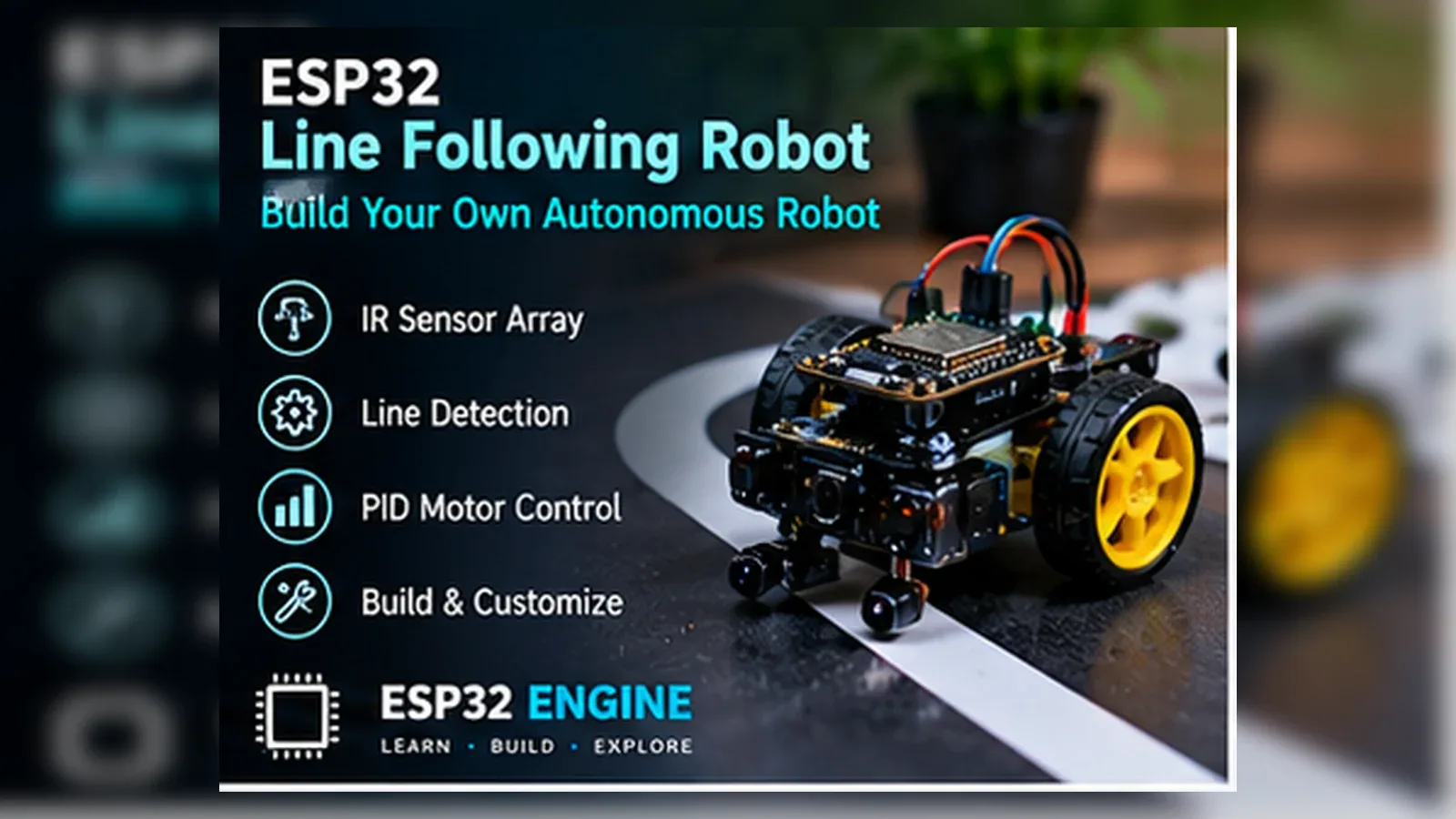
Build Your Line Following Robot
The Story
ESP32 Line Following Robot reads two IR reflectance sensors, compares each sensor with its calibrated line threshold, and drives the left and right motor-driver inputs so the chassis can steer back toward the track.
The important lesson is not only the finished line-following robot. You learn to record raw GPIO34/GPIO35 values, choose separate thresholds for the actual floor and line, then test motor direction with the wheels lifted before a floor run.
Explain Like I'm 12
Think of the ESP32 as the brain. The left and right IR sensors are its eyes looking at the floor. The motor driver is the muscle that turns the wheels. The code reads both eyes, decides where the dark line is, and nudges the robot back onto the track.
Safety Standards
- Unplug USB and the motor supply before changing IR sensor or motor-driver wiring.
- ESP32 GPIO pins provide control signals only; never power DC motors directly from a GPIO pin or the 3.3 V pin.
- Power the motors through the dual H-bridge driver from a suitable low-voltage motor supply.
- Share a ground/reference between the ESP32 and the driver control side when your module requires it.
- Test with the wheels lifted before floor runs because motor startup current can reset the ESP32 if the supply is weak.
What You Will Build
A working ESP32 line following robot that reads two analog IR reflectance sensors, calibrates separate left and right thresholds, drives a dual H-bridge motor driver, and prints raw sensor readings in Serial Monitor.
Learning Objectives
- Wire analog IR sensor outputs to GPIO34 and GPIO35 and print raw ADC readings.
- Calibrate separate left and right thresholds from the actual track surface.
- Map each signal to a named ESP32 GPIO and keep the code constants readable.
- Control a dual H-bridge motor driver on GPIO16-GPIO19 using simple two-sensor steering logic.
- Use Serial Monitor as an engineering tool, not only as a success message.
- Identify sensor, steering, motor direction, and power faults using a repeatable test checklist.
Components List
- ESP32 DevKit boardReads analog sensors and commands the motor driver
- Two analog IR reflectance sensor modulesLeft and right line sensors
- Dual H-bridge motor driverDirection-control inputs for two DC motors
- Breadboard and jumper wiresPrototype wiring
- USB data cableProgramming and testing
Bill of Materials
| Part | Qty | Estimated Cost | Notes |
|---|---|---|---|
| ESP32 DevKit | 1 | $6-$10 | USB board |
| Analog IR reflectance sensor modules | 2 | $2-$10 | Use analog AO outputs for this build |
| Dual H-bridge motor driver | 1 | $3-$12 | Direction-input style such as TB6612FNG or L298N-compatible modules |
| Breadboard and wires | 1 set | $3-$5 | Prototype wiring |
Wiring
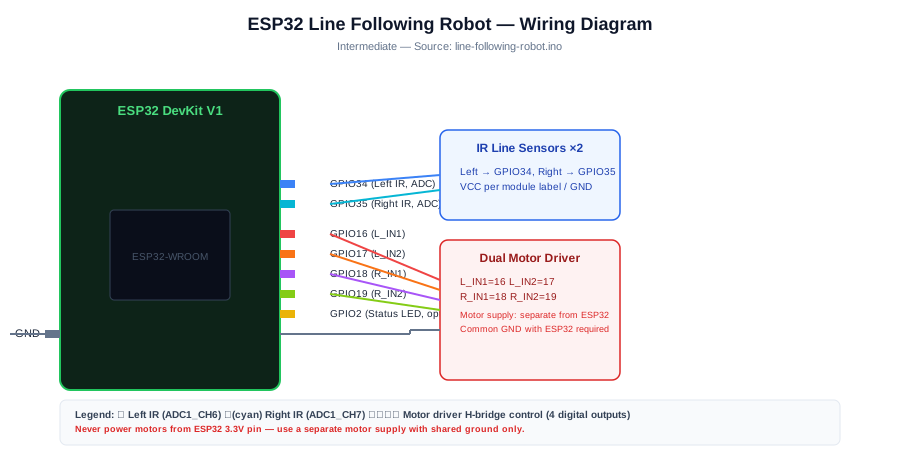
Wire the analog outputs of two IR reflectance sensors first, calibrate raw readings over your track, then connect the dual H-bridge motor driver direction inputs.
-
1
Unplug USB before placing modules on the breadboard.
-
2
Connect both IR sensor modules to the voltage recommended by the module, but keep any signal sent to the ESP32 within 3.3 V.
-
3
Connect the left sensor analog output AO to GPIO34 and the right sensor analog output AO to GPIO35.
-
4
Leave digital DO outputs disconnected for this build; DO-only modules need different digital reading logic.
-
5
Connect left motor direction inputs to GPIO16 and GPIO17, and right motor direction inputs to GPIO18 and GPIO19.
-
6
Power motors through the motor driver from an appropriate low-voltage motor supply, not from ESP32 GPIO pins.
-
7
Share a ground/reference between the ESP32 and motor driver control side when your driver module requires it.
-
8
Upload the sketch with the robot lifted first, record raw line/background readings, then place it on the floor.
GPIO Mapping
| Signal | ESP32 Pin | Direction | Notes |
|---|---|---|---|
| Left IR sensor AO | GPIO34 | Analog input | ADC1 input-only pin for raw reflectance reading |
| Right IR sensor AO | GPIO35 | Analog input | ADC1 input-only pin for raw reflectance reading |
| Left motor IN1 / IN2 | GPIO16/GPIO17 | Output | Direction inputs on a dual H-bridge motor driver |
| Right motor IN1 / IN2 | GPIO18/GPIO19 | Output | Direction inputs on a dual H-bridge motor driver |
| Serial Monitor | USB | Debug | 115200 baud |
Circuit Explanation
The core build assumes two compatible IR reflectance modules using their analog AO outputs. The left sensor AO goes to GPIO34 and the right sensor AO goes to GPIO35. On the classic ESP32, GPIO34 and GPIO35 are input-only ADC1 pins, which makes them suitable for sensor inputs. GPIO34-GPIO39 do not provide internal pull-up or pull-down resistors on the classic ESP32, but this analog sensor build normally does not need internal pulls because the module drives an analog output voltage.
If your module exposes only a digital DO output, use a different sketch that reads HIGH/LOW with digitalRead(). This tutorial is teaching analog calibration with analogRead().
The motor side assumes a dual H-bridge motor driver with two direction inputs per motor. The left motor uses GPIO16/GPIO17 and the right motor uses GPIO18/GPIO19. TB6612FNG-style and L298N-compatible boards may use this kind of direction-control idea, but their pin labels and enable pins are not identical, so follow your module's datasheet.
ESP32 GPIO pins provide control signals only. Do not power DC motors directly from a GPIO. Power motors through the driver from an appropriate low-voltage motor supply, and share a ground/reference between the ESP32 and driver control side when your module requires it. Motor startup current can reset the ESP32 if power is poorly designed.
Engineering Explanation
Calibrate before driving. Upload the sketch with the robot lifted so the wheels cannot run away. Record LEFT and RIGHT raw readings over the dark line, then over the light background, at the actual sensor mounting height. Choose LEFT_THRESHOLD and RIGHT_THRESHOLD roughly between each sensor's dark-line and light-floor readings, then re-test under the room lighting where the robot will run.
The value 1800 is only a starter value. Real readings vary with sensor module, mounting height, surface color, glossy or matte material, ambient light, and individual sensor variation. The two sensors may not match, so separate thresholds are safer than one universal number.
Steering table: left LINE and right LINE means drive forward. Left LINE and right FLOOR means the line is under the left sensor, so stop the left motor and run the right motor to correct left. Left FLOOR and right LINE means stop the right motor and run the left motor to correct right. FLOOR/FLOOR means stop because the line is lost.
Motor orientation varies by chassis. If the robot corrects away from the line, reverse one motor direction or swap the relevant driver outputs after confirming the sensor readings are correct.
Code
Copy into Arduino IDE. Install any libraries noted in the component guides first.
const int LEFT_SENSOR = 34;
const int RIGHT_SENSOR = 35;

const int L_IN1 = 16;
const int L_IN2 = 17;
const int R_IN1 = 18;
const int R_IN2 = 19;

// Calibrate these from your own dark line and light floor readings.
const int LEFT_THRESHOLD = 1800;
const int RIGHT_THRESHOLD = 1800;

// Set false if your sensors produce lower values on the dark line.
const bool LINE_IS_HIGH = true;

bool isOnLine(int value, int threshold) {
  return LINE_IS_HIGH ? value > threshold : value < threshold;
}

void leftMotor(bool forward) {
  digitalWrite(L_IN1, forward ? HIGH : LOW);
  digitalWrite(L_IN2, forward ? LOW : HIGH);
}

void rightMotor(bool forward) {
  digitalWrite(R_IN1, forward ? HIGH : LOW);
  digitalWrite(R_IN2, forward ? LOW : HIGH);
}

void stopLeftMotor() {
  digitalWrite(L_IN1, LOW);
  digitalWrite(L_IN2, LOW);
}

void stopRightMotor() {
  digitalWrite(R_IN1, LOW);
  digitalWrite(R_IN2, LOW);
}

void stopMotors() {
  stopLeftMotor();
  stopRightMotor();
}

void setup() {
  Serial.begin(115200);
  analogReadResolution(12);
  pinMode(L_IN1, OUTPUT); pinMode(L_IN2, OUTPUT);
  pinMode(R_IN1, OUTPUT); pinMode(R_IN2, OUTPUT);
  stopMotors();
  Serial.println("ESP32 line follower ready");
  Serial.println("Record raw values over LINE and FLOOR before running motors.");
}

void loop() {
  int leftValue = analogRead(LEFT_SENSOR);
  int rightValue = analogRead(RIGHT_SENSOR);

  bool leftOnLine = isOnLine(leftValue, LEFT_THRESHOLD);
  bool rightOnLine = isOnLine(rightValue, RIGHT_THRESHOLD);

  if (leftOnLine && rightOnLine) {
    leftMotor(true);
    rightMotor(true);
  } else if (leftOnLine && !rightOnLine) {
    stopLeftMotor();
    rightMotor(true);
  } else if (!leftOnLine && rightOnLine) {
    leftMotor(true);
    stopRightMotor();
  } else {
    stopMotors();
  }

  Serial.printf("L:%4d %s | R:%4d %s\n",
                leftValue, leftOnLine ? "LINE" : "FLOOR",
                rightValue, rightOnLine ? "LINE" : "FLOOR");
  delay(40);
}
Code Explanation
The sketch reads raw ADC values first: leftValue from GPIO34 and rightValue from GPIO35. It converts those readings into leftOnLine and rightOnLine using LEFT_THRESHOLD, RIGHT_THRESHOLD, and LINE_IS_HIGH.
Do not assume every IR module reports the same polarity. If your dark line gives lower readings than the floor, set LINE_IS_HIGH to false instead of rewriting the steering logic.
Serial Monitor prints both the raw numbers and the interpreted state, for example "L:2350 LINE | R: 900 FLOOR". The motor code then follows the same four-row state table explained above.
Expected Output
Serial Monitor should show raw left and right analog readings plus LINE or FLOOR labels, such as "L:2350 LINE | R: 900 FLOOR".
With both sensors on the line the robot moves forward. With one sensor on the line it corrects toward that side. With both sensors on the floor it stops because the line is lost.
Troubleshooting
- Both sensors always read the same Confirm the left AO wire goes to GPIO34 and the right AO wire goes to GPIO35, then test each sensor over the line and floor separately.
- Sensor readings barely change between black and white Adjust sensor height, improve track contrast, avoid glossy material, and test under the same room lighting used for driving.
- Robot turns the wrong direction If left LINE / right FLOOR makes the robot turn away from the line, swap the left/right sensor wires or reverse the correction actions.
- Robot oscillates left and right Calibrate separate LEFT_THRESHOLD and RIGHT_THRESHOLD values, slow the robot mechanically, or add PWM speed control later.
- Robot loses the line on sharp curves Use wider curves, lower motor speed as an upgrade, and keep the sensors close to the floor but not scraping.
- Readings change when room lighting changes Re-test thresholds under real lighting, shade the sensors from direct sunlight, and avoid shiny track surfaces.
- One motor spins backwards Reverse that motor's two output wires or swap its two motor-driver direction inputs; motor orientation varies by chassis.
- Motors run but ESP32 resets Power motors through the driver from a suitable low-voltage motor supply and use common ground only as required by the module.
- Robot works while lifted but fails on the floor Recheck traction, battery voltage under motor load, sensor height at driving height, and threshold values measured on the actual floor.
Common Mistakes
- Using the digital DO pin from the IR module while the sketch expects analog AO on GPIO34/GPIO35.
- Treating LEFT_THRESHOLD and RIGHT_THRESHOLD starter values as universal instead of calibrating each sensor.
- Expecting an ESP32 GPIO to power a DC motor directly.
- Forgetting the shared ground/reference between ESP32 and the motor driver control side.
- Testing floor movement before raw sensor readings and motor direction are verified.
Testing Checklist
- ESP32 appears on the correct port and accepts a basic blink upload.
- Ground is shared between every module that exchanges signals with the ESP32.
- Each GPIO in the code matches the wire connected on the breadboard.
- Serial Monitor prints startup text at 115200 baud.
- Raw left and right ADC readings are recorded over both dark line and light background before floor testing.
- LEFT_THRESHOLD and RIGHT_THRESHOLD are set between each sensor's measured line and floor values.
- LINE_IS_HIGH matches the actual sensor polarity seen in Serial Monitor.
- The dual H-bridge direction inputs match GPIO16/GPIO17 for the left motor and GPIO18/GPIO19 for the right motor.
- The robot drives forward on LINE/LINE, corrects left or right on single-sensor line detection, and stops on FLOOR/FLOOR.
- The motor supply does not reset the ESP32 when the wheels start.
- The circuit still behaves correctly after power is removed and restored.
Upgrade Ideas
- Add PWM speed control after the steering logic works.
- Show raw left/right sensor values on an OLED for debugging.
- Add buttons or stored settings for calibration.
- Try PID control later with more sensors, after the two-sensor robot is reliable.
Real-World Applications
- Classroom line-following robot trainer
- STEM lab calibration demonstration
- Robotics steering logic practice
- Motor driver wiring exercise
- Beginner robotics portfolio project
Downloads
- ESP32 Line Following Robot Arduino sketchUse the code section as the downloadable source until file downloads are published.
- Wiring checklistMatch the GPIO table and wiring steps before powering the circuit.
- Troubleshooting worksheetRecord symptoms, Serial output, voltage checks, and fixes.
FAQs
Why does my ESP32 line follower threshold not work?
The starter value is not universal. Print raw GPIO34/GPIO35 readings over the dark line and light floor, then choose separate LEFT_THRESHOLD and RIGHT_THRESHOLD values between your measured readings.
Can I use digital DO outputs instead of analog AO outputs?
Only with different code. This project uses analogRead() on GPIO34 and GPIO35 so you can calibrate raw sensor values. DO-only modules require digitalRead() logic.
Why does the robot turn the wrong way?
First confirm the left and right sensor readings in Serial Monitor. Then reverse one motor's direction or swap the relevant motor-driver outputs because chassis wiring and motor orientation vary.
Why does the motor driver not respond?
Confirm shared ground/reference, motor supply, and GPIO16-GPIO19 direction wiring. The ESP32 GPIO pins control the driver; they do not power the motors directly.
Why does the robot reset when motors start?
Motor startup current can pull the supply down. Use a separate motor supply with common ground and test sensor readings before enabling movement.
Review, Testing, and References
Author: Abdul Mubeen and the ESP32 Engine editorial team. Last updated: 2026-06-29. Reviewed: wiring logic, Arduino code structure, beginner safety, and learning sequence.
Educational level: Intermediate. Estimated completion time: 90-150 min. This project is for learning and prototyping; production or unattended hardware needs additional engineering review.
Project Complete!
You built a real line-following robot and learned how to connect sensing, decision logic, and output control in one ESP32 project.
- Wire and test left and right IR line sensors
- Control motor driver from ESP32
- Debug hardware with Serial Monitor
- Improve the project safely