
What You Will Build
A three-item menu: Interval, Threshold and Save settings. Turn to navigate, press to edit a value, turn to adjust and press to return to navigation. Select Save and press to persist. The numbers are configuration demonstrations only: no sensor, sampling task or actuator is connected to them.
Before You Start
Classic ESP32-WROOM DevKit and Arduino-ESP32 3.3.2 review baseline. Bare Bourns PEC11R switch-equipped encoder with 24 pulses/24 detents per revolution; one complete quadrature cycle produces one step. A different pulse-to-detent ratio needs an explicitly reviewed decoder change. This is not a universal KY-040 module pinout. OLED is a verified 3.3 V-compatible SSD1306 128x64 I2C module, not SH1106 or an arbitrary SPI display. Documentation and code-structure review only; compilation and physical hardware testing have not been performed.
Parts
- Classic ESP32-WROOM DevKit3.3 V GPIO; Arduino-ESP32 3.3.2 baseline.
- Bourns PEC11R quadrature encoder with switch24 pulses and 24 detents per revolution, for example PEC11R-4215F-S0024. Verify actual order code and terminal drawing.
- SSD1306 128x64 I2C OLEDDocumented 3.3 V-compatible four-pin module; verify 0x3C address.
- Three 10 kΩ resistorsExternal pull-ups for encoder A, B and switch to 3V3.
- Breadboard, short jumper wires and USB data cableNo 5 V encoder module is assumed.
Wiring
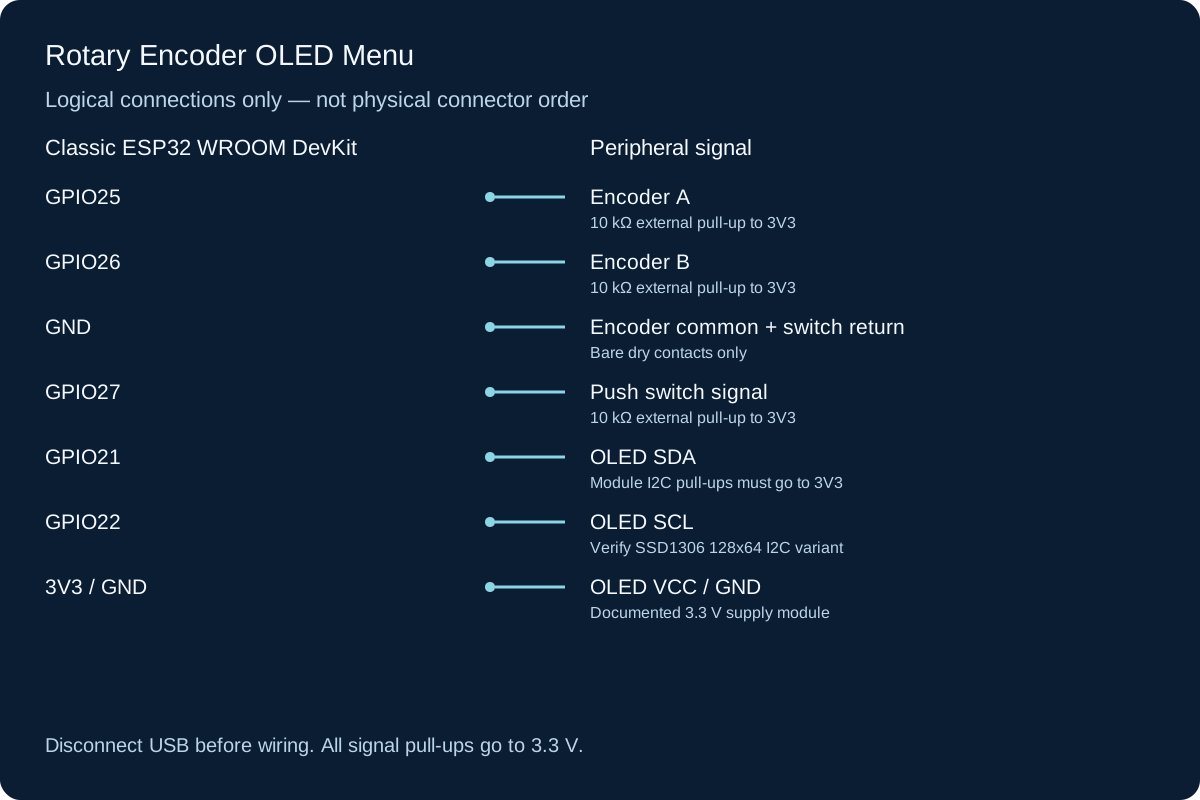
Identify encoder A, common C, B and the separate push-switch contacts from the actual manufacturer drawing; do not infer them from shaft orientation. A/B go to GPIO25/26, common to GND. One switch contact goes to GPIO27 and the other to GND. Add 10 kΩ pull-ups from all three inputs to 3V3. The OLED uses SDA21/SCL22 and a verified 3.3 V supply; module pull-ups must not go to 5 V. The illustration is a signal map, not a physical connector drawing.
-
1
Unplug USB. Identify A/C/B and switch terminals using the order-code drawing and continuity checks.
-
2
Connect A25, B26 and switch27, with common/switch return to GND. Fit the three pull-ups to 3V3.
-
3
Wire OLED VCC/GND/SDA/SCL by its actual labels; verify pull-up voltage.
-
4
Reconnect USB, run the existing I2C scanner to determine the address, then upload this full menu sketch.
Wiring Reference
| Signal | ESP32 Pin | Direction | Notes |
|---|---|---|---|
| Encoder A | GPIO25 | Input | 10 kΩ external pull-up to 3V3 |
| Encoder B | GPIO26 | Input | 10 kΩ external pull-up to 3V3 |
| Encoder common + switch return | GND | Ground | Bare dry contacts only |
| Push switch signal | GPIO27 | Input | 10 kΩ external pull-up to 3V3 |
| OLED SDA | GPIO21 | Bidirectional | Module I2C pull-ups must go to 3V3 |
| OLED SCL | GPIO22 | Output | Verify SSD1306 128x64 I2C variant |
| OLED VCC / GND | 3V3 / GND | Power | Documented 3.3 V supply module |
Libraries and Setup
- Install Adafruit SSD1306 2.5.13, Adafruit GFX 1.11.11 and Adafruit BusIO 1.17.0 through Library Manager.
- Wire and Preferences are built into Arduino-ESP32 3.3.2. No encoder library or network service is used.
Configure the Example
Set OLED_ADDRESS to the verified address, typically 0x3C for the specified module. An address ACK does not prove controller identity or dimensions. Upload and use Serial at 115200 for initialization diagnostics. Interval is bounded to 1–60 seconds; Threshold is a unitless 0–100 example. Defaults are 10 and 50. A successful Preferences load is not evidence that a previous user saved those defaults.
Control and Recovery Behavior
| Condition | Result |
|---|---|
| Navigation | One completed four-transition quadrature cycle advances one item; swapping A/B reverses direction. |
| Editing | Press Interval or Threshold to toggle edit mode; changes are RAM-only until Save. |
| Switch bounce | 30 ms stable transition gate generates one action on each stable press. Holding does not repeat. |
| Save | Only an explicit Save selection writes NVS. Two setting writes are separate operations, not a power-fail-atomic transaction. |
| OLED failure | Serial shows a diagnostic; no false message claims the panel is working. Correct wiring/address/type and reset. |
Code
Install the libraries above and match the configuration and wiring before uploading.
encoder-menu.ino
#include <Arduino.h>
#include <Wire.h>
#include <Adafruit_GFX.h>
#include <Adafruit_SSD1306.h>
#include <Preferences.h>

constexpr uint8_t ENC_A = 25, ENC_B = 26, BUTTON = 27, OLED_ADDRESS = 0x3C;
Adafruit_SSD1306 display(128, 64, &Wire, -1);
Preferences prefs;
portMUX_TYPE encoderMux = portMUX_INITIALIZER_UNLOCKED;
volatile int pending = 0;
volatile int quarter = 0;
volatile uint8_t previousAB = 0;
int intervalSeconds = 10, threshold = 50, selected = 0;
bool editing = false, dirty = false, displayReady = false, storeReady = false, redraw = true;
bool rawButton = HIGH, stableButton = HIGH;
uint32_t buttonChanged = 0, lastDraw = 0;
const char* notice = "RAM settings";

void encoderChanged() {
  uint8_t current = (digitalRead(ENC_A) << 1) | digitalRead(ENC_B);
  portENTER_CRITICAL_ISR(&encoderMux);
  uint8_t changed = current ^ previousAB;
  if (changed == 3) quarter = 0; // Both bits changed: missed/invalid transition.
  else if (changed != 0) {
    // Positive cycle: 11 -> 10 -> 00 -> 01 -> 11.
    int delta = ((previousAB == 3 && current == 2) || (previousAB == 2 && current == 0) ||
                 (previousAB == 0 && current == 1) || (previousAB == 1 && current == 3)) ? 1 : -1;
    quarter += delta;
    if (quarter >= 4) { if (pending < 32) ++pending; quarter = 0; }
    if (quarter <= -4) { if (pending > -32) --pending; quarter = 0; }
  }
  previousAB = current;
  portEXIT_CRITICAL_ISR(&encoderMux);
}
void saveSettings() {
  if (!storeReady) { notice = "NVS unavailable"; return; }
  size_t a = prefs.putInt("interval", intervalSeconds);
  size_t b = prefs.putInt("threshold", threshold);
  if (a == sizeof(int32_t) && b == sizeof(int32_t)) {
    dirty = false; notice = "Saved";
  } else notice = "Save failed"; // Two separate writes are not a transaction.
}
void drawMenu() {
  display.clearDisplay(); display.setTextSize(1); display.setTextColor(SSD1306_WHITE);
  display.setCursor(0, 0); display.print(editing ? "EDIT  press to exit" : "MENU  press to edit");
  display.setCursor(0, 16); display.print(selected == 0 ? "> " : "  ");
  display.print("Interval: "); display.print(intervalSeconds); display.print("s");
  display.setCursor(0, 28); display.print(selected == 1 ? "> " : "  ");
  display.print("Threshold: "); display.print(threshold);
  display.setCursor(0, 40); display.print(selected == 2 ? "> Save settings" : "  Save settings");
  display.setCursor(0, 54); display.print(notice);
  display.display();
}
void setup() {
  Serial.begin(115200);
  pinMode(ENC_A, INPUT_PULLUP); pinMode(ENC_B, INPUT_PULLUP); pinMode(BUTTON, INPUT_PULLUP);
  previousAB = (digitalRead(ENC_A) << 1) | digitalRead(ENC_B);
  attachInterrupt(digitalPinToInterrupt(ENC_A), encoderChanged, CHANGE);
  attachInterrupt(digitalPinToInterrupt(ENC_B), encoderChanged, CHANGE);
  rawButton = stableButton = digitalRead(BUTTON);
  storeReady = prefs.begin("menu-demo", false);
  if (storeReady) {
    intervalSeconds = constrain(prefs.getInt("interval", 10), 1, 60);
    threshold = constrain(prefs.getInt("threshold", 50), 0, 100);
  }
  Wire.begin(21, 22);
  Wire.beginTransmission(OLED_ADDRESS);
  bool acknowledged = Wire.endTransmission() == 0;
  displayReady = acknowledged && display.begin(SSD1306_SWITCHCAPVCC, OLED_ADDRESS, true, false);
  Serial.println(displayReady ? "Menu ready; turn slowly, press to edit, select Save to persist" :
    "OLED unavailable; verify SSD1306 128x64 I2C module and address, then reset");
  if (!storeReady) notice = "NVS unavailable";
}
void loop() {
  portENTER_CRITICAL(&encoderMux);
  int steps = pending; pending = 0;
  portEXIT_CRITICAL(&encoderMux);
  if (steps) {
    if (!editing) selected = ((selected + steps) % 3 + 3) % 3;
    else {
      if (selected == 0) intervalSeconds = constrain(intervalSeconds + steps, 1, 60);
      if (selected == 1) threshold = constrain(threshold + steps, 0, 100);
      dirty = true; notice = "Unsaved";
    }
    redraw = true;
  }
  uint32_t now = millis();
  bool value = digitalRead(BUTTON);
  if (value != rawButton) { rawButton = value; buttonChanged = now; }
  if (now - buttonChanged >= 30 && stableButton != rawButton) {
    stableButton = rawButton;
    if (stableButton == LOW) {
      if (selected == 2) saveSettings();
      else editing = !editing;
      redraw = true;
    }
  }
  if (displayReady && redraw && now - lastDraw >= 40) {
    lastDraw = now; redraw = false; drawMenu();
  }
  delay(1);
}How the Code Works
Two CHANGE interrupts capture A/B transitions even during the OLED transfer. Reverse bounce transitions cancel partial movement and invalid two-bit jumps clear the partial cycle. A critical section transfers accumulated steps to loop; the ISR never draws or writes flash. Pending steps are capped at 32 in either direction, so very rapid movement can be lost rather than grow without bound. The display redraws only when something changes and no faster than every 40 ms. These design choices do not guarantee bounce-free operation for every encoder or noisy cable.
Expected Output
The OLED should show Interval, Threshold and Save settings. The arrow moves when you turn slowly. In edit mode a value changes within its bounds. Unsaved marks RAM edits; Save should show Saved after both writes succeed. After reset, saved values should reload. This is a verification procedure, not a record of observed hardware operation.
Troubleshooting
- Turning skips or reverses unexpectedly Check A/B/common, pull-ups, short leads and the specified pulse/detent ratio. Swap A/B only to reverse intentional direction. Hardware noise filtering may be required by the actual encoder.
- Two clicks needed for one step Your encoder likely has a different cycle/detent relationship. This decoder deliberately counts full cycles; do not silently claim universal support.
- OLED ACKs but stays blank ACK is not identity or framebuffer proof. Verify SSD1306, 128x64 dimensions, address, supply and any reset requirements. begin success alone is not a visible display test.
- Settings revert after reset Edits in RAM are not saved automatically. Select Save; inspect NVS unavailable or Save failed feedback. Flash erase/repartitioning can remove Preferences.
- One button press triggers repeatedly Verify switch terminal pairing, ground and external pull-up. Test slowly and inspect contact noise rather than removing the debounce gate.
Checks to Perform on Your Build
- Confirm the physical encoder pin labels by continuity before powering it.
- Navigate all three items in both directions, then edit each bound and verify it clamps.
- Press and hold once: exactly one edit/navigation action should occur.
- Change values without saving and reset; compare with previous persisted/default values.
- Save, reset and verify both values; do not interpret a power interruption between writes as atomic saving.
Practical Design Notes
Preferences uses the board flash; writing every encoder tick would add unnecessary writes and lag. This example saves deliberately, checks returned byte counts and validates loaded ranges. Separate writes can leave a mixture of old/new values after interrupted power. Store a versioned single record with an integrity/commit strategy if consistency matters. Encoder contact ratings describe permitted contacts, not a need for 5 V logic. No motors or high-current paths belong on these inputs.
Review, Testing, and References
Author: Abdul Mubeen and the ESP32 Engine editorial team. Last updated: 2026-10-24. Reviewed: wiring logic, Arduino code structure, beginner safety, and learning sequence.
Educational level: Intermediate. Estimated completion time: Varies by build. This project is for learning and prototyping; production or unattended hardware needs additional engineering review.