
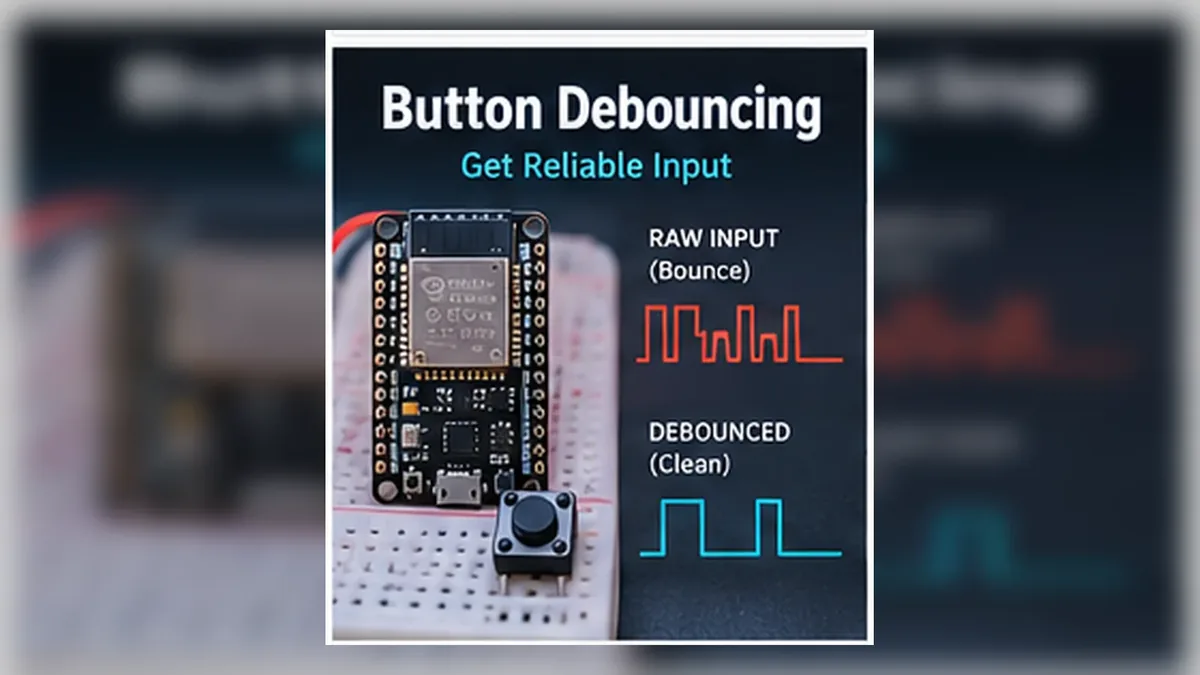
Count One Clean Button Press
The Story
Mission 04 gave your button a reliable default state. Released is HIGH, pressed is LOW, and the input no longer floats.
Button debounce fixes the next problem: one physical press can create several fast HIGH/LOW transitions before the contacts settle. The practical software fix is to notice the first raw change, wait for the reading to stay unchanged for a short debounce window, then count only the stable pressed state.
That is why this mission uses INPUT_PULLUP wiring on GPIO27 and a millis() timer instead of delay(). Your finger feels one press. The ESP32 may see many raw changes, but your program will accept one clean event.
Explain Like I'm 12
Pressing a button feels simple because your finger is slow compared with electronics. To the ESP32, that same press can look like a rapid burst: pressed, released, pressed, released, pressed.
Debouncing means the ESP32 waits a short moment before trusting the final answer. It is like saying, 'I saw the first change. Now I will ignore the tiny shaking and count this as one real press.'
Mission Goal
Build a button counter that increases by exactly one count for each intentional button press, even though the physical button contacts bounce for a few milliseconds.
Estimated Time
20-25 min
Difficulty
Beginner
Prerequisites
Skills You'll Learn
- Explain why one physical button press can create many electrical changes
- Describe switch bounce in plain English
- Use millis() to debounce without freezing the ESP32
- Count one clean press instead of every contact bounce
- Choose a practical debounce delay and test it in Serial Monitor
Components Required
- ESP32 DevKit boardRuns the debounce timing logic
- Push buttonAny standard tactile button works
- BreadboardHolds the button firmly
- Jumper wiresFor GPIO27 and GND
- USB data cableUpload code and watch Serial Monitor
Why Buttons Bounce
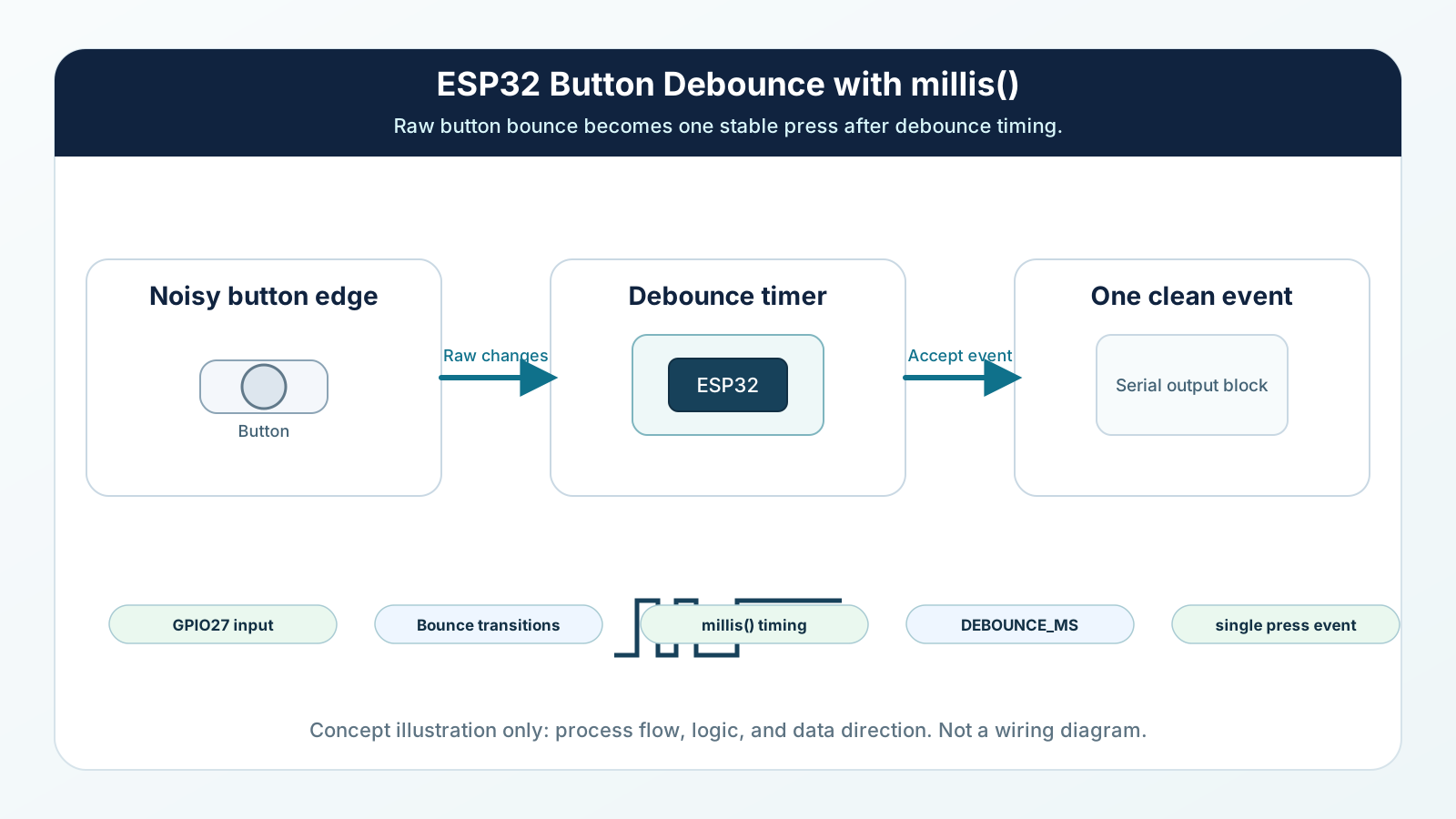
A button is a mechanical part. Inside it, two small metal contacts touch when you press down. They do not always land perfectly on the first try.
For a few milliseconds, the contacts can chatter: touch, separate, touch again, separate again, then finally settle. That chatter is switch bounce.
Humans cannot feel these tiny movements, but the ESP32 can read GPIO pins thousands of times per second. If your code trusts every change immediately, one press can look like many presses.
Engineering Explanation
A pull-up resistor gives the input a default HIGH state. Pressing the button connects the GPIO to GND, so the intended pressed state is LOW. That solves floating, but it does not solve bounce.
During a real press, the raw input may jump LOW-HIGH-LOW-HIGH-LOW before settling LOW. During release, it may jump HIGH-LOW-HIGH before settling HIGH. Each jump is real electricity, not a software mistake.
Software debounce uses time as a filter. When the raw reading changes, the code starts a timer. Only if the new reading remains stable for the debounce window does the program accept it as the real button state. This lets the ESP32 ignore contact chatter while still responding quickly to normal button presses.
Hardware debounce can also reduce bounce with an RC filter or dedicated debounce circuit, but this mission keeps the wiring simple and teaches the firmware method first. Professional firmware still debounces physical switches because any button that controls a lock, menu, relay, alarm, counter, or robot mode should trigger once per intentional press.
Real-World Analogy
Drop a basketball on the floor. You dropped it once, but it touches the floor several times before it stops bouncing. A button contact behaves the same way electrically: one press can create several tiny touches before the final stable touch.
A light switch can do something similar. When metal contacts close, they may flicker for a split second before staying connected. Your eyes may not notice, but a microcontroller can.
A car going over a speed bump is another version of the same idea. The bump is one event, but the car suspension moves up and down before settling. Debounce waits for the settling before making a decision.
Wiring Diagram
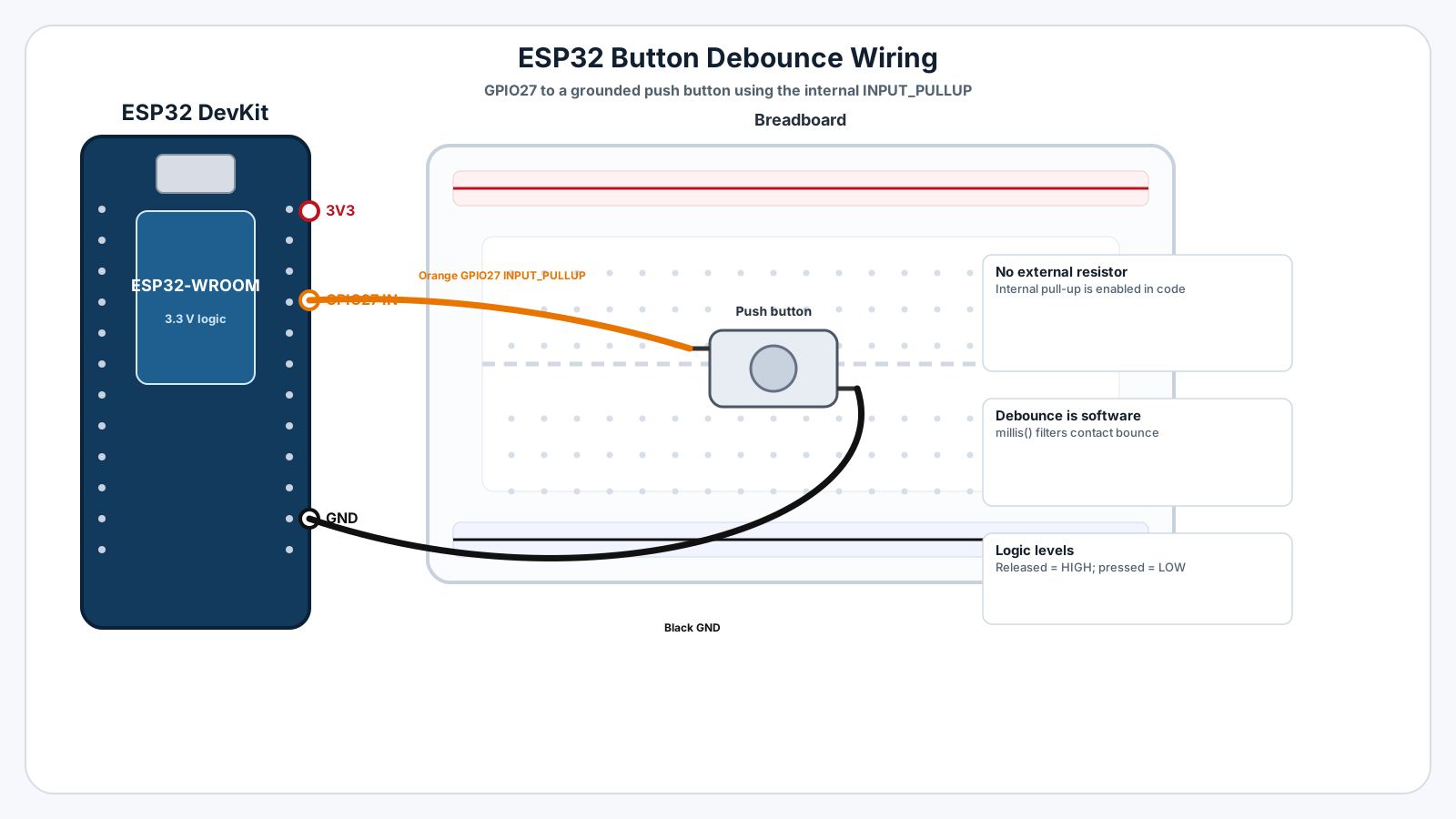
Follow these steps in order. Unplug USB before you change any wires.
-
1
Unplug the ESP32 USB cable before wiring.
-
2
Place the push button across the breadboard center gap.
-
3
Connect one side of the button to ESP32 GPIO27.
-
4
Connect the opposite side of the button to ESP32 GND.
-
5
Leave out the external resistor because this mission uses INPUT_PULLUP.
-
6
Plug USB back in and upload the debounce sketch.
-
7
Open Serial Monitor at 115200 baud.
-
8
Press the button several times and watch the counter increase once per press.
GPIO Table
| Signal | ESP32 Pin | Mode | Notes |
|---|---|---|---|
| Button input | GPIO27 | INPUT_PULLUP | Released reads HIGH. Pressed reads LOW. |
| Button ground | GND | Ground | Pressing the button connects GPIO27 to GND. |
| Serial debug | USB | Serial | Shows raw changes, stable state, and press count. |
Arduino Code
Copy this into Arduino IDE, then click Upload.
const int BUTTON_PIN = 27;

const unsigned long DEBOUNCE_DELAY = 50;

int lastRawReading = HIGH;
int stableButtonState = HIGH;
unsigned long lastChangeTime = 0;
int pressCount = 0;

void setup() {
  Serial.begin(115200);
  pinMode(BUTTON_PIN, INPUT_PULLUP);
  Serial.println("Mission 05: Button debounce counter ready");
  Serial.println("Press the button and watch the count increase once.");
}

void loop() {
  int rawReading = digitalRead(BUTTON_PIN);

  if (rawReading != lastRawReading) {
    lastChangeTime = millis();
    lastRawReading = rawReading;
  }

  bool readingHasSettled = (millis() - lastChangeTime) > DEBOUNCE_DELAY;

  if (readingHasSettled && rawReading != stableButtonState) {
    stableButtonState = rawReading;

    if (stableButtonState == LOW) {
      pressCount++;
      Serial.print("Clean press count: ");
      Serial.println(pressCount);
    } else {
      Serial.println("Button released cleanly");
    }
  }
}- INPUT_PULLUP keeps the released button stable at HIGH.
- The raw reading can still bounce during press and release.
- millis() measures time without freezing the whole program.
- The counter increases only when a debounced press is accepted.
Line-by-line Explanation
- BUTTON_PIN is GPIO27, the same safe button input used in earlier missions.
- DEBOUNCE_DELAY is the waiting window. 50 ms is a reliable beginner starting point for many tactile buttons.
- lastRawReading stores the most recent immediate reading from digitalRead().
- stableButtonState stores the trusted debounced state that the program believes.
- lastChangeTime records when the raw input last changed.
- If the raw reading changes, the timer restarts because the contact may still be bouncing.
- readingHasSettled becomes true only after the raw reading stays unchanged longer than the debounce delay.
- The counter increases only when the debounced state becomes LOW, which means a clean press in INPUT_PULLUP wiring.
Expected Behaviour
When you press the button once, Serial Monitor should show one count:
Clean press count: 1 Button released cleanly Clean press count: 2 Button released cleanly
If the debounce delay is too short, you may see one physical press count twice. If the delay is too long, the button may feel slow or miss very fast presses.
Common Mistakes
Using delay() for debounce
delay() is simple, but it freezes the whole loop while waiting.
Thinking INPUT_PULLUP fixes bounce
INPUT_PULLUP fixes floating, not mechanical contact chatter.
Debouncing only the press
Release can bounce too, especially with older or loosely pressed buttons.
Setting the debounce delay too short
Bounce may still be happening when the code accepts the reading.
Setting the debounce delay too long
A long delay can make the interface feel slow or miss very fast taps.
Troubleshooting
Most ESP32 problems are wiring, power, library, or timing issues. Check these first.
Counter still jumps by 2 or 3
Likely cause: The debounce delay may be too short or the wiring may be loose.
Fix: Increase DEBOUNCE_DELAY to 80 ms, press the button firmly, and check GPIO27/GND wiring.
The button reads backwards
Likely cause: INPUT_PULLUP logic is active LOW: released is HIGH and pressed is LOW.
Fix: Keep the button wired between GPIO27 and GND, and count the press when the debounced stable state becomes LOW.
Counter never increases
Likely cause: The button may not connect GPIO27 to GND, or Serial Monitor may be on the wrong baud rate.
Fix: Confirm one button side goes to GPIO27, the opposite side goes to GND, and Serial Monitor is set to 115200 baud.
Button feels slow
Likely cause: The debounce delay may be too long for the way you are pressing.
Fix: Try reducing DEBOUNCE_DELAY from 120 ms to 50 ms or 30 ms.
Released prints many times
Likely cause: The code may have been changed to print every loop instead of only when the stable state changes.
Fix: Keep the print statements inside the stable state change block.
Upload fails after wiring
Likely cause: The board, port, cable, or wiring may be wrong.
Fix: Unplug, check wiring, reconnect USB, select the ESP32 port, and upload again.
Engineer Tip
Professional embedded systems never trust a mechanical button immediately. Every physical button bounces, so firmware treats the raw GPIO as a noisy signal and waits for a stable answer before triggering an action.
Remember This Forever
Your finger presses once.
The metal contacts may answer several times.
Debouncing teaches the ESP32 to wait for the answer that stays.
Mini Challenge
No wrong answers — experiment and have fun!
- Change DEBOUNCE_DELAY to 10 ms and press quickly. Watch whether extra counts appear.
- Change it to 50 ms and compare the count reliability.
- Change it to 120 ms and notice whether the button feels slower.
- Find the shortest debounce delay that still counts one physical press as one clean press.
FAQs
What is button debounce?
Debounce is the process of ignoring the tiny rapid HIGH/LOW changes that happen when a mechanical button contact is settling.
Is button bounce a hardware fault?
No. Bounce is normal in mechanical switches. Even good buttons can bounce for a few milliseconds.
Why does one press trigger multiple times?
The ESP32 reads the pin much faster than your finger moves. If the contacts touch, separate, and touch again during one press, software can see several changes.
How long does button bounce last?
Many small buttons settle within about 5 to 50 milliseconds. The exact time depends on the switch, wiring, and how it is pressed.
Do pull-up resistors fix bounce?
No. Pull-ups and pull-downs fix floating inputs. Debouncing fixes contact chatter after the input already has a stable default state.
Should I use delay() for debounce?
Avoid delay() in real projects because it freezes the whole program. Using millis() lets the ESP32 keep doing other work.
Do I need to debounce button release too?
Yes. The contacts can bounce when they open as well as when they close.
Can hardware debounce solve the problem?
Yes. Resistor-capacitor filters or dedicated circuits can reduce bounce, but software debounce is easier for beginners and common in firmware.
Is 50 ms a good debounce delay?
50 ms is a safe starting point for many beginner projects. You can tune it shorter after testing your actual button.
Does debounce make the ESP32 slower?
No. Good debounce logic only delays trusting that one input. The rest of the program can keep running.
Why does my counter jump by 2 or 3?
That is usually switch bounce. The software is counting several contact changes from one physical press.
Do all physical buttons bounce?
Yes. Every mechanical button has some contact settling. The amount may be tiny, but professional firmware still accounts for it.