ESP32 Greenhouse Automation Controller

AgricultureBeginnerIntermediateAdvanced

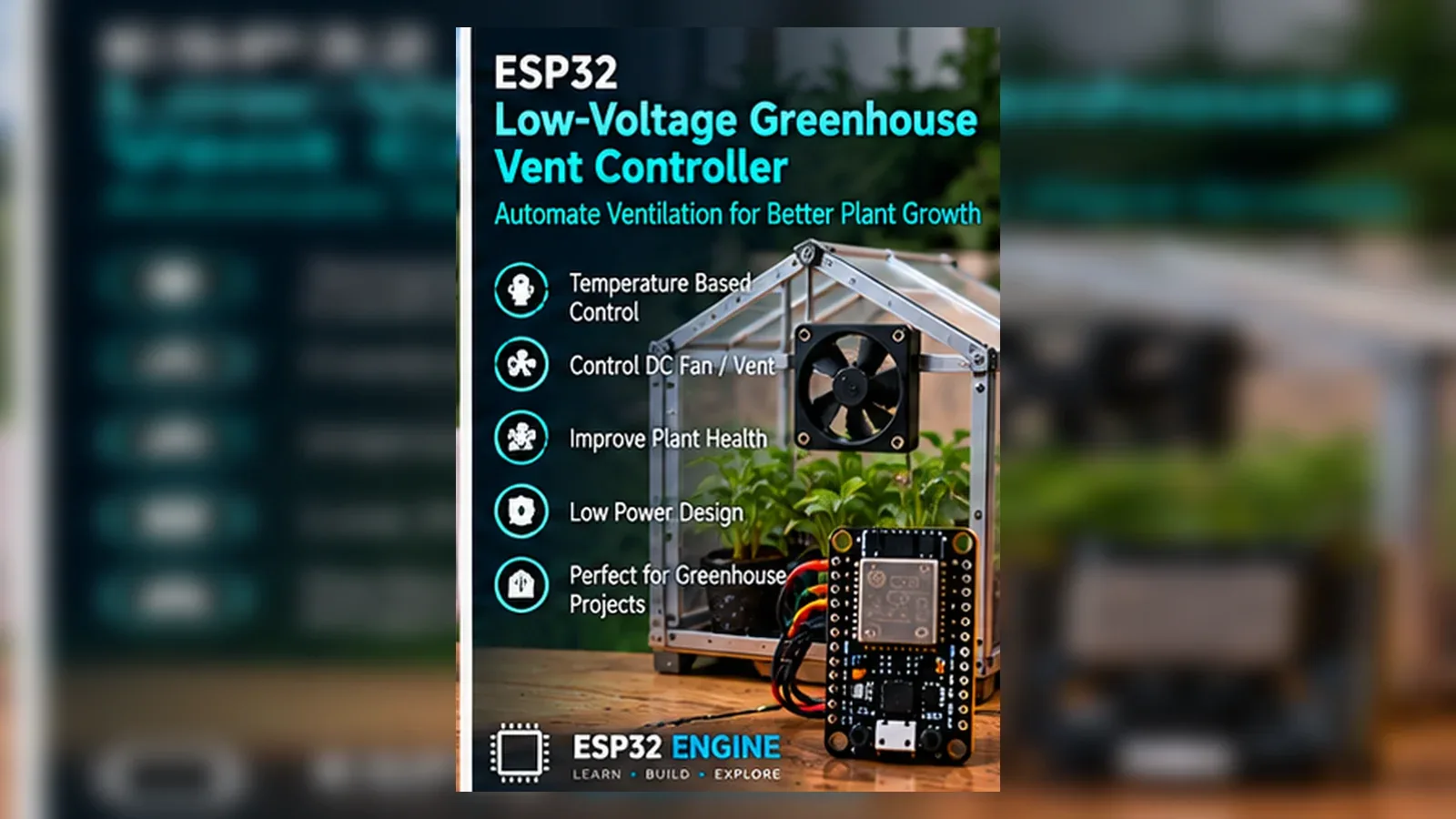
Automate a greenhouse or grow tent with the ESP32 by monitoring temperature, humidity, and CO2, then controlling exhaust fans, grow lights, and nutrient pumps on schedule and threshold. Scale from a simple climate relay to a full PID-controlled CO2 enrichment system with MQTT integration.

Overview

In this beginner project you will connect a DHT22 temperature and humidity sensor to the ESP32 and control a 12 V exhaust fan via a relay. When temperature rises above a configurable threshold the fan switches on; when humidity exceeds a set limit the fan also activates for air exchange. An OLED displays live readings and relay state. No Wi-Fi is needed.

Components
  • 1× ESP32 DevKit V1
  • 1× DHT22 temperature and humidity sensor
  • 1× 12 V exhaust fan — 100-200 mm; 12 V DC or AC with relay
  • 1× Relay module (5 V) — Controls fan power
  • 1× SSD1306 OLED 128x64 I2C
Wiring
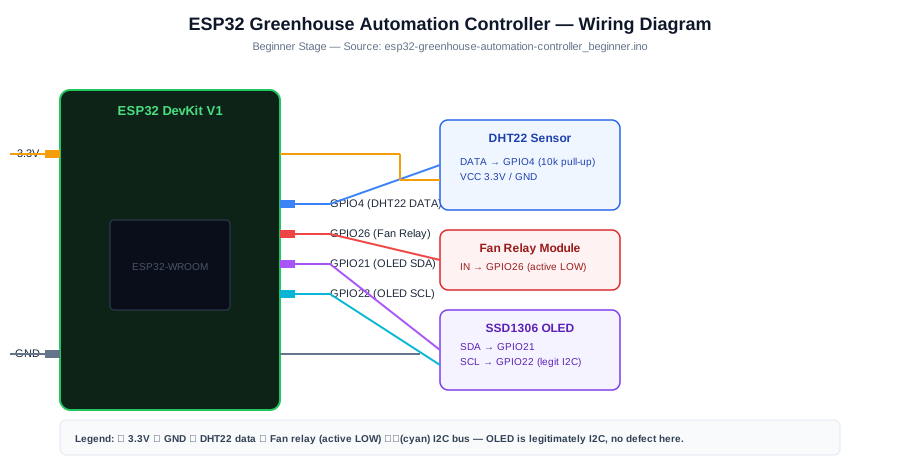
Component PinESP32 PinNotes
DHT22 DATAGPIO 410 kohm pull-up to 3.3 V
Relay INGPIO 26Active LOW; fan relay
OLED SDA/SCLGPIO 21/22
Arduino Code
esp32-greenhouse-automation-controller_beginner.ino
// ESP32 Greenhouse Controller - Beginner
// DHT22 temperature + humidity -> exhaust fan relay threshold control

#include <Wire.h>
#include <Adafruit_SSD1306.h>
#include <DHT.h>

DHT dht(4, DHT22);
Adafruit_SSD1306 oled(128, 64, &Wire, -1);

const int FAN_RELAY = 26;
const float TEMP_ON  = 28.0f; // fan on above 28 C
const float HUM_ON   = 80.0f; // fan on above 80 % RH

void setup() {
  Serial.begin(115200);
  Wire.begin(21, 22);
  dht.begin();
  oled.begin(SSD1306_SWITCHCAPVCC, 0x3C); oled.setTextColor(WHITE);
  pinMode(FAN_RELAY, OUTPUT); digitalWrite(FAN_RELAY, HIGH); // fan off
  Serial.println("Greenhouse controller ready.");
}

void loop() {
  float temp = dht.readTemperature();
  float hum  = dht.readHumidity();
  if (isnan(temp) || isnan(hum)) { delay(2000); return; }

  bool fanOn = (temp > TEMP_ON || hum > HUM_ON);
  digitalWrite(FAN_RELAY, fanOn ? LOW : HIGH);

  Serial.printf("Temp: %.1fC  Hum: %.1f%%  Fan: %sn",
    temp, hum, fanOn ? "ON" : "off");

  oled.clearDisplay(); oled.setCursor(0, 0); oled.setTextSize(1);
  oled.printf("Temp: %.1f Cn", temp);
  oled.printf("Hum:  %.1f %%n", hum);
  oled.printf("Fan:  %sn", fanOn ? "ON" : "off");
  oled.printf("T>%.0fC | H>%.0f%%", TEMP_ON, HUM_ON);
  oled.display();
  delay(5000);
}
How It Works
01

DHT22 Dual-Parameter Sensing: The DHT22 uses a capacitive humidity element and a thermistor packaged together. A single-wire serial protocol transmits 40 bits of data: 16 bits each for humidity and temperature plus 8-bit checksum. The DHT library handles protocol timing and checksum validation. Readings update approximately every 2 seconds.

02

OR Logic Fan Trigger: The fan activates when temperature exceeds 28 C OR humidity exceeds 80 percent. OR logic means either condition independently triggers ventilation. High humidity without high temperature (condensation on cold nights) still triggers the fan to remove moisture-laden air and prevent fungal disease.

03

Active-LOW Relay Control: The relay module activates when GPIO 26 is pulled LOW (a sink current triggers the optocoupler). On startup the relay is set HIGH (fan off) to prevent accidental startup. The fan relay should control a 12 V solid-state relay if the fan motor draws more than 10 A.

04

OLED Status Display: The OLED shows current temperature, humidity, fan state, and the active thresholds. This allows a grower to read the current state without a phone or computer when physically inspecting the greenhouse. Thresholds displayed prevent confusion about when the fan will activate.

Applications
  • Hobby grow tent temperature and humidity ventilation control
  • Small greenhouse automatic climate management
  • Seedling propagation chamber humidity control
  • Drying room humidity-triggered ventilation for herbs and flowers
Troubleshooting

DHT22 returns NaN readings

Add a 10 kohm pull-up resistor between the DHT22 DATA pin and 3.3 V. Ensure the DHT22 VCC is 3.3 V (the module version) or 5 V (bare sensor). Add at least 2 seconds between readings to allow the sensor measurement cycle to complete.

Fan runs continuously even when cool

Check DHT22 wiring. A disconnected sensor returns values that may appear as very high temperature. Use Serial output to verify the actual temperature reading before trusting the relay state.

Fan cycles on and off rapidly near the threshold

Add hysteresis: turn the fan on at TEMP_ON and off at TEMP_ON - 2. A static bool fanState tracks the current state; update it only when the temperature crosses the appropriate boundary in the correct direction.

Upgrades
  • Add a second relay for a heater that activates when temperature drops below a minimum
  • Add a grow light relay controlled by an RTC for photoperiod scheduling
  • Add a DHT22 inside and outside the greenhouse to calculate temperature differential
  • Add Wi-Fi to view sensor readings from a phone browser anywhere on the network
FAQ

You need an ESP32 DevKit, DHT22 DATA, Relay IN, a breadboard, jumper wires, and a USB cable for power and programming.

Only the Advanced stage uses Wi-Fi. Beginner and Intermediate builds run offline on the ESP32 with USB power.

Start with Beginner if you are new to Agriculture. Use Intermediate for OLED feedback and Advanced for dashboards or connected monitoring.

Overview

The intermediate build adds an MH-Z19B CO2 sensor and a second relay for a CO2 enrichment valve (from a compressed CO2 cylinder). CO2 is injected when concentration falls below 800 ppm (plants deplete CO2 during photosynthesis) and stops above 1200 ppm. A grow-light relay follows a configurable photoperiod schedule via NTP. A web dashboard shows live temperature, humidity, CO2 and relay states.

Components
  • 1× ESP32 DevKit V1
  • 1× DHT22 sensor
  • 1× MH-Z19B NDIR CO2 sensor — UART; 400-5000 ppm
  • 1× 3-channel relay module — Fan / CO2 valve / grow light
  • 1× CO2 solenoid valve — 12 V; normally-closed; on CO2 cylinder regulator
  • 1× Wi-Fi router — NTP + web dashboard
Wiring
Component PinESP32 PinNotes
DHT22 DATAGPIO 4
MH-Z19B TX/RXGPIO 16/17 (Serial2)9600 baud
Fan relay INGPIO 26Active LOW
CO2 valve relay INGPIO 27Active LOW
Grow light relay INGPIO 14Active LOW
Arduino Code
esp32-greenhouse-automation-controller_intermediate.ino
// ESP32 Greenhouse - Intermediate (CO2 enrichment + grow light schedule + web)
#include <WiFi.h>
#include <WebServer.h>
#include <DHT.h>
#include <time.h>

DHT dht(4, DHT22);
WebServer server(80);
const char* SSID="YourSSID", *PASS="YourPass";

const int R_FAN=26, R_CO2=27, R_LIGHT=14;
const float TEMP_ON=28.0f, HUM_ON=80.0f;
const int CO2_LOW=800, CO2_HIGH=1200;
// Photoperiod: lights on at 06:00, off at 22:00
const int LIGHT_ON=6, LIGHT_OFF=22;

int readCO2(){
  uint8_t cmd[9]={0xFF,0x01,0x86,0,0,0,0,0,0x79};
  Serial2.write(cmd,9); delay(100);
  if(Serial2.available()<9) return -1;
  uint8_t r[9]; Serial2.readBytes(r,9);
  return (r[0]==0xFF&&r[1]==0x86)?(r[2]<<8)|r[3]:-1;
}

float curTemp=0,curHum=0; int curCO2=0;
bool fanOn=false,co2On=false,lightOn=false;

void serveStatus(){
  char html[512];
  snprintf(html,sizeof(html),
    "<html><body><h2>Greenhouse</h2>"
    "<p>Temp: %.1f C | Hum: %.1f %% | CO2: %d ppm</p>"
    "<p>Fan: %s | CO2 valve: %s | Light: %s</p>"
    "</body></html>",
    curTemp,curHum,curCO2,
    fanOn?"ON":"off",co2On?"ON":"off",lightOn?"ON":"off");
  server.send(200,"text/html",html);
}

void setup(){
  Serial.begin(115200);
  Serial2.begin(9600,SERIAL_8N1,16,17);
  dht.begin();
  pinMode(R_FAN,OUTPUT); digitalWrite(R_FAN,HIGH);
  pinMode(R_CO2,OUTPUT); digitalWrite(R_CO2,HIGH);
  pinMode(R_LIGHT,OUTPUT); digitalWrite(R_LIGHT,HIGH);
  WiFi.begin(SSID,PASS);
  while(WiFi.status()!=WL_CONNECTED) delay(500);
  configTime(0,0,"pool.ntp.org");
  server.on("/",serveStatus); server.begin();
  Serial.printf("Greenhouse: http://%s/n",WiFi.localIP().toString().c_str());
}

void loop(){
  server.handleClient();
  curTemp=dht.readTemperature(); curHum=dht.readHumidity();
  curCO2=readCO2();
  struct tm ti; getLocalTime(&ti);

  fanOn=(curTemp>TEMP_ON||curHum>HUM_ON);
  digitalWrite(R_FAN,fanOn?LOW:HIGH);

  if(curCO2>0){
    co2On=(curCO2<CO2_LOW&&!fanOn); // no enrichment while fan vents
    digitalWrite(R_CO2,co2On?LOW:HIGH);
  }

  lightOn=(ti.tm_hour>=LIGHT_ON&&ti.tm_hour<LIGHT_OFF);
  digitalWrite(R_LIGHT,lightOn?LOW:HIGH);

  Serial.printf("T:%.1fC H:%.1f%% CO2:%d Fan:%d CO2v:%d Light:%dn",
    curTemp,curHum,curCO2,fanOn,co2On,lightOn);
  delay(10000);
}
How It Works
01

CO2 Enrichment Logic: Plants consume CO2 during photosynthesis; in a sealed greenhouse CO2 can drop to 200 ppm, severely limiting growth. The CO2 valve opens when concentration falls below 800 ppm and closes above 1200 ppm. Importantly, the valve stays closed when the fan is running to prevent expensive CO2 gas from being exhausted outdoors immediately.

02

NTP Photoperiod Control: Most crops require 16-18 hours of light for maximum vegetative growth (long-day plants) or exactly 12 hours for flowering (short-day plants). The NTP clock drives the grow light relay, turning it on at LIGHT_ON and off at LIGHT_OFF. No RTC module is needed as NTP provides accurate time.

03

Fan and CO2 Interlock: Running the exhaust fan while the CO2 valve is open wastes CO2. The co2On variable evaluates to true only when CO2 is low AND the fan is off. This interlock prevents the CO2 enrichment system from working against the ventilation system.

04

Web Status Dashboard: The web server serves a simple HTML status page showing all current sensor readings and relay states. Any browser on the local network can view live greenhouse conditions. This is sufficient for monitoring; a mobile app or MQTT integration adds notifications and remote control.

Applications
  • Commercial hydroponic grow room CO2 enrichment management
  • Cannabis cultivation climate control (where legally permitted)
  • Orchid or tropical plant grow tent controller
  • Propagation cloning chamber with precise humidity and lighting
Troubleshooting

CO2 stays at 400 ppm even with valve open

Verify the CO2 cylinder regulator is open and the solenoid valve clicks when the relay activates. Also confirm the MH-Z19B auto-calibration has not reset the baseline. CO2 concentration in a sealed space should rise measurably within 5 minutes of CO2 injection.

Grow light turns on at wrong time

Verify the NTP time is synced by printing the tm struct to Serial. Check the UTC offset in configTime(). LIGHT_ON and LIGHT_OFF use 24-hour local time after the UTC offset is applied.

Fan and CO2 valve activate simultaneously

The interlock logic uses the current fanOn boolean. Verify the fan relay is checked before the CO2 valve decision and that the CO2 relay logic includes &&!fanOn in its condition.

Upgrades
  • Add PID control for the fan speed using a PWM-controlled variable fan instead of on/off
  • Add a nutrient pump relay on a timed dosing schedule for hydroponic feeding
  • Add a capacitive soil moisture sensor to trigger irrigation alongside climate control
  • Add MQTT to publish all sensor readings to Home Assistant for mobile monitoring
FAQ

You need an ESP32 DevKit, DHT22 DATA, Relay IN, a breadboard, jumper wires, and a USB cable for power and programming.

Only the Advanced stage uses Wi-Fi. Beginner and Intermediate builds run offline on the ESP32 with USB power.

Start with Beginner if you are new to Agriculture. Use Intermediate for OLED feedback and Advanced for dashboards or connected monitoring.

Overview

The advanced build adds a PID controller for CO2 level using a proportional-integral-derivative algorithm that modulates a PWM-controlled CO2 solenoid valve for precise ppm targeting. All sensor data and relay states are published to MQTT every 30 seconds. A Node-RED flow provides a colour-coded greenhouse dashboard, email alerts on sensor faults, and a multi-day temperature and CO2 trend chart.

Components
  • 1× ESP32 DevKit V1
  • 1× DHT22 or SHT31 sensor — SHT31 recommended for higher accuracy
  • 1× MH-Z19B CO2 sensor
  • 1× PWM-capable CO2 solenoid valve — 12 V; duty-cycle modulated via MOSFET gate
  • 1× IRF540N MOSFET + 10 kohm gate resistor — PWM control of valve duty cycle
  • 1× MQTT broker + Node-RED
Wiring
Component PinESP32 PinNotes
DHT22 DATAGPIO 4
MH-Z19B TX/RXGPIO 16/17
MOSFET gate via 10 kohmGPIO 25 (LEDC PWM)Source to GND; Drain to valve -
Fan relay / Light relayGPIO 26 / 27Active LOW
Arduino Code
esp32-greenhouse-automation-controller_advanced.ino
// ESP32 Greenhouse - Advanced (PID CO2 + MQTT telemetry)
#include <WiFi.h>
#include <PubSubClient.h>
#include <ArduinoJson.h>
#include <DHT.h>
#include <time.h>

DHT dht(4,DHT22);
WiFiClient wc; PubSubClient mqtt(wc);
const char* SSID="YourSSID", *PASS="YourPass";
const char* MQTT_HOST="192.168.1.100";

const int CO2_VALVE_PWM=25, R_FAN=26, R_LIGHT=27;
const int LIGHT_ON=6, LIGHT_OFF=22;
const float CO2_TARGET=1000.0f; // ppm setpoint

// Simple PID for CO2 valve duty cycle
float pidKp=0.5f, pidKi=0.05f, pidKd=0.1f;
float pidIntegral=0, pidPrevErr=0;

float computePID(float measured, float dt){
  float err=CO2_TARGET-measured;
  if(measured>CO2_TARGET) err=0; // only inject, never extract
  pidIntegral+=err*dt;
  pidIntegral=constrain(pidIntegral,-200,200);
  float derivative=(err-pidPrevErr)/dt;
  pidPrevErr=err;
  float out=pidKp*err+pidKi*pidIntegral+pidKd*derivative;
  return constrain(out,0,255);
}

int readCO2(){
  uint8_t cmd[9]={0xFF,0x01,0x86,0,0,0,0,0,0x79};
  Serial2.write(cmd,9); delay(100);
  if(Serial2.available()<9) return -1;
  uint8_t r[9]; Serial2.readBytes(r,9);
  return (r[0]==0xFF&&r[1]==0x86)?(r[2]<<8)|r[3]:-1;
}

void publishTelemetry(float t,float h,int co2,int duty){
  StaticJsonDocument<192> doc;
  doc["temp"]=t; doc["hum"]=h; doc["co2"]=co2; doc["co2_duty"]=duty;
  char buf[192]; serializeJson(doc,buf);
  mqtt.publish("greenhouse/telemetry",buf);
}

void setup(){
  Serial.begin(115200);
  Serial2.begin(9600,SERIAL_8N1,16,17);
  dht.begin();
  ledcSetup(0,1000,8); ledcAttachPin(CO2_VALVE_PWM,0);
  pinMode(R_FAN,OUTPUT); digitalWrite(R_FAN,HIGH);
  pinMode(R_LIGHT,OUTPUT); digitalWrite(R_LIGHT,HIGH);
  WiFi.begin(SSID,PASS);
  while(WiFi.status()!=WL_CONNECTED) delay(500);
  configTime(0,0,"pool.ntp.org");
  mqtt.setServer(MQTT_HOST,1883);
}

unsigned long lastT=0;
void loop(){
  if(!mqtt.connected()) mqtt.connect("Greenhouse");
  mqtt.loop();
  unsigned long now=millis();
  float dt=(now-lastT)/1000.0f; lastT=now;

  float temp=dht.readTemperature(), hum=dht.readHumidity();
  int co2=readCO2();
  bool fanOn=(temp>28||hum>80);
  digitalWrite(R_FAN,fanOn?LOW:HIGH);

  int co2Duty=0;
  if(co2>0&&!fanOn) co2Duty=(int)computePID((float)co2,dt);
  ledcWrite(0,co2Duty);

  struct tm ti; getLocalTime(&ti);
  bool lightOn=(ti.tm_hour>=LIGHT_ON&&ti.tm_hour<LIGHT_OFF);
  digitalWrite(R_LIGHT,lightOn?LOW:HIGH);

  publishTelemetry(temp,hum,co2,co2Duty);
  Serial.printf("T:%.1f H:%.1f CO2:%d duty:%dn",temp,hum,co2,co2Duty);
  delay(30000);
}
How It Works
01

PID CO2 Valve Control: A proportional-integral-derivative controller computes the CO2 valve duty cycle based on the error between the CO2 setpoint (1000 ppm) and current measurement. The proportional term responds immediately to large errors; the integral term eliminates steady-state offset; the derivative term damps oscillation. Kp=0.5, Ki=0.05, Kd=0.1 are starting values for tuning.

02

PWM MOSFET Valve Modulation: The IRF540N MOSFET converts the ESP32 LEDC PWM signal into a variable duty cycle current through the solenoid valve coil. At 100 percent duty the valve is fully open; at 0 percent it is closed. Intermediate duty cycles create a restricted flow rate proportional to duty, enabling fine-grained CO2 injection control rather than bang-bang on/off.

03

Integral Wind-Up Protection: When the CO2 error persists for a long time (valve at maximum duty, CO2 still below target), the integral term accumulates without bound — called integral wind-up. Clamping pidIntegral to +/-200 prevents the accumulated integral from causing a large overshoot when the error finally resolves.

04

MQTT Telemetry for Node-RED: Every 30 seconds a JSON payload containing temperature, humidity, CO2, and valve duty cycle is published to greenhouse/telemetry. Node-RED subscribes and routes each field to a dashboard gauge. Function nodes detect out-of-range values (CO2 over 2000 ppm, temperature under 10 C) and send email alerts via Gmail SMTP.

Applications
  • Commercial greenhouse CO2 enrichment system with precision ppm control
  • Medical cannabis cultivation climate management system
  • Research grow chamber with data logging for plant physiology studies
  • Automated vertical farm cell with complete environmental parameter control
Troubleshooting

CO2 oscillates above and below setpoint continuously

Reduce Kp (proportional gain) by half and increase Ki slightly. Oscillation indicates the proportional response is too aggressive. Add derivative gain Kd to damp the response. Alternatively use a simpler two-step control with 50 ppm hysteresis around the target if PID tuning proves difficult.

MOSFET overheats during operation

The IRF540N in linear mode (partial duty cycle) dissipates significant power as heat. Attach a heatsink to the MOSFET and ensure airflow over it. If overheating persists, add a 100 Hz PWM frequency instead of 1 kHz; the solenoid valve coil acts as an inductor and averages the current effectively at lower frequencies.

MQTT telemetry sends but Node-RED shows no data

Verify the MQTT broker address and port. Confirm the topic name matches exactly in Node-RED MQTT-in node. Use the MQTT Fx client to subscribe to greenhouse/# and verify messages arrive at the broker before debugging the Node-RED flow.

Upgrades
  • Add a VPD (vapour pressure deficit) calculator from temperature and humidity for advanced grow room management
  • Add a LUX sensor under the grow lights to monitor light intensity and compensate for bulb aging
  • Add multi-zone control with separate climate targets for seedling, vegetative, and flowering areas
  • Add OTA updates to push new PID tuning constants without entering the grow room
FAQ

You need an ESP32 DevKit, DHT22 DATA, Relay IN, a breadboard, jumper wires, and a USB cable for power and programming.

Only the Advanced stage uses Wi-Fi. Beginner and Intermediate builds run offline on the ESP32 with USB power.

Start with Beginner if you are new to Agriculture. Use Intermediate for OLED feedback and Advanced for dashboards or connected monitoring.