
Turn Light into Numbers
The Story
Mission 08 used a potentiometer, which is a human-controlled analog input. You turned the knob, the voltage changed, and the ESP32 printed a different number.
Mission 09 replaces your hand with a sensor. An LDR changes when light changes. That means the room itself can move the ADC value. This is the bridge from reading a test dial to building projects that react to the environment.
Explain Like I'm 12
A sensor is like a translator. Light, moisture, pressure, or position is not something the ESP32 understands directly.
The sensor turns that real-world condition into an electrical signal. For an analog sensor, that signal is usually a voltage. The ESP32 ADC reads the voltage and turns it into a number.
Your job is to learn what the number means in your real room, with your real sensor.
Mission Goal
Read an LDR light sensor with the ESP32 ADC, observe live sensor values, calibrate bright and dark readings, and use a threshold to make a simple decision.
Estimated Time
40-45 min
Difficulty
Beginner
Prerequisites
Skills You'll Learn
- Explain how analog sensors convert real-world changes into voltage
- Wire an LDR light sensor as a voltage divider
- Read live sensor values in Serial Monitor
- Calibrate dark and bright readings before choosing thresholds
- Use raw analog readings to make simple decisions
Components Required
- ESP32 DevKit boardReads the changing light sensor voltage
- LDR photoresistorChanges resistance when light changes
- 10 kOhm resistorForms the voltage divider with the LDR
- BreadboardHolds the LDR and resistor
- Jumper wiresConnect 3.3 V, GND, GPIO34, and the divider point
- USB data cableUpload code and watch live values
Sensors Turn Conditions into Signals
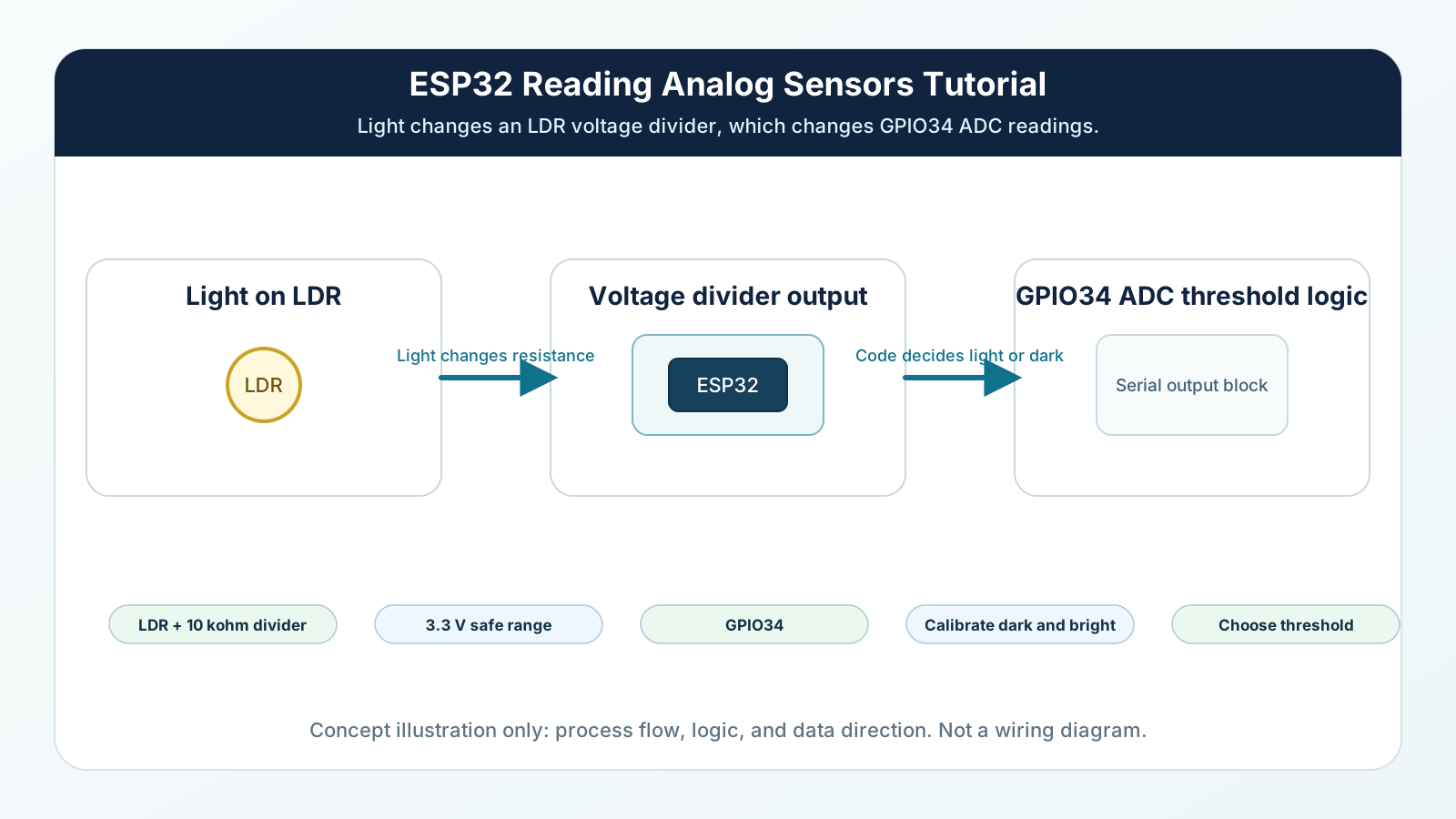
The ESP32 cannot see light directly. It can only read electrical signals.
An LDR changes resistance when light changes. A resistor divider converts that changing resistance into a changing voltage. The ADC converts that voltage into a number.
That chain is the core idea of analog sensing: real world change, electrical change, digital number, software decision.
Engineering Explanation
An LDR is a light-dependent resistor. In many common LDRs, resistance becomes lower in bright light and higher in darkness. The ESP32 ADC cannot measure resistance directly, so the LDR is paired with a fixed resistor to create a voltage divider.
The voltage at the divider midpoint depends on the balance between the LDR and the fixed resistor. When light changes the LDR resistance, the midpoint voltage changes. GPIO34 reads that voltage and analogRead() returns a raw number.
The exact raw range depends on your LDR, resistor value, wiring direction, room light, and shadows. That is why calibration matters. Instead of assuming 'dark is 3000' or 'bright is 500,' you first print values in your own environment. Cover the LDR, shine light on it, and record the numbers.
A threshold turns a continuous value into a decision. For example, if your bright reading is around 700 and your dark reading is around 3200, a threshold near 2000 might separate bright from dark. If your wiring direction is reversed, the comparison may also reverse. Good engineering starts by measuring the real range before writing final logic.
Analog sensors are useful but noisy. A few counts of movement are normal. Avoid thresholds too close to the boundary, and later you can average several readings to make decisions more stable.
Real-World Analogy
Think of a weather thermometer. The outside world changes gradually, but you still need a number before you can make a decision such as 'wear a jacket.'
An analog sensor does the same kind of translation. The LDR does not tell the ESP32 'sunny' or 'dark.' It changes an electrical value. Your code decides what that value means.
Calibration is like learning a new person's handwriting. You do not guess from one mark. You look at examples, learn the range, and then read it with confidence.
Wiring Diagram
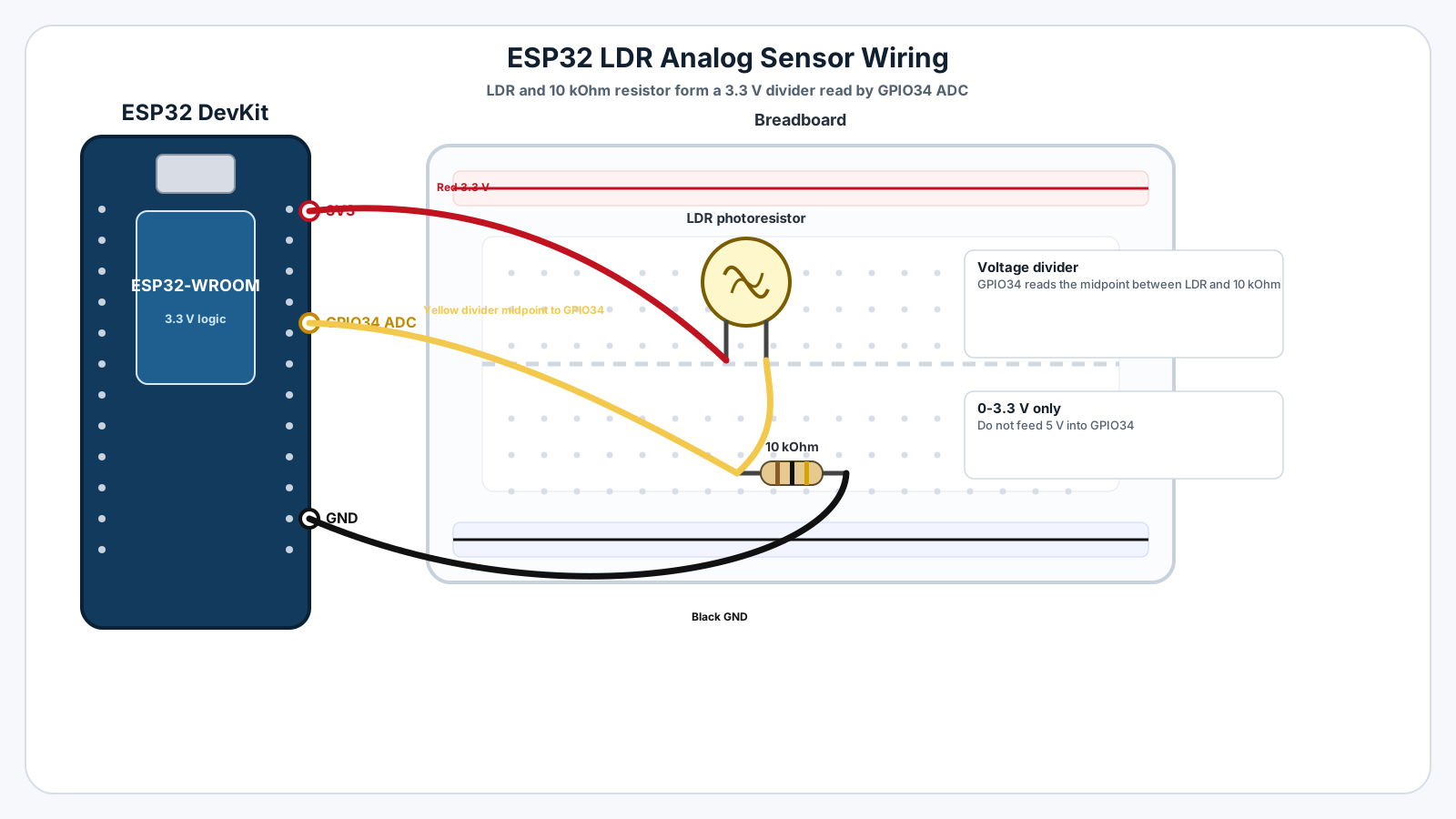
Follow these steps in order. Unplug USB before you change any wires.
-
1
Unplug the ESP32 USB cable before wiring.
-
2
Place the LDR on the breadboard.
-
3
Connect one LDR leg to ESP32 3.3 V.
-
4
Connect the other LDR leg to GPIO34.
-
5
Connect one side of the 10 kOhm resistor to the same GPIO34 row.
-
6
Connect the other side of the resistor to ESP32 GND.
-
7
Check that GPIO34 is connected to the point between the LDR and the resistor.
-
8
Plug USB back in, upload the sketch, and open Serial Monitor at 115200 baud.
GPIO Table
| Signal | ESP32 Pin | Mode | Notes |
|---|---|---|---|
| LDR divider midpoint | GPIO34 | Analog input | Reads the voltage created by the LDR and resistor divider. |
| LDR high side | 3V3 | Power | Supplies safe voltage to the divider. |
| Fixed resistor low side | GND | Ground | Completes the voltage divider. |
| Serial debug | USB | Serial | Shows raw ADC values and light/dark decisions. |
Arduino Code
Copy this into Arduino IDE, then click Upload.
const int LDR_PIN = 34;

const int LIGHT_THRESHOLD = 2000;

void setup() {
  Serial.begin(115200);
  delay(500);

  Serial.println("Mission 09: Analog light sensor ready");
  Serial.println("Cover the LDR, then shine light on it, and watch the raw values.");
}

void loop() {
  int rawLight = analogRead(LDR_PIN);

  Serial.print("Light ADC: ");
  Serial.print(rawLight);

  if (rawLight > LIGHT_THRESHOLD) {
    Serial.println("  |  DARK");
  } else {
    Serial.println("  |  BRIGHT");
  }

  delay(250);
}- GPIO34 reads the LDR voltage divider.
- The raw ADC number depends on your real circuit and room lighting.
- Start by observing raw values, then adjust LIGHT_THRESHOLD for your environment.
- This wiring usually gives lower values in brighter light and higher values in darkness.
Line-by-line Explanation
- LDR_PIN is GPIO34, the ADC input connected to the midpoint of the LDR voltage divider.
- LIGHT_THRESHOLD is the cutoff value that separates bright from dark for this example.
- Serial.begin(115200) starts Serial Monitor communication so you can inspect live sensor values.
- analogRead(LDR_PIN) reads the voltage at GPIO34 and returns a raw ADC number.
- Serial.print(rawLight) shows the raw reading first because raw data is the most important debugging tool.
- The if statement compares the raw reading with LIGHT_THRESHOLD.
- With this wiring, higher readings usually mean darker conditions. If your circuit behaves the opposite way, swap the comparison or swap the divider direction.
- delay(250) slows the Serial Monitor output so you can read changes while covering and uncovering the sensor.
Expected Behaviour
Serial Monitor should show values changing when light changes:
Mission 09: Analog light sensor ready Cover the LDR, then shine light on it, and watch the raw values. Light ADC: 650 | BRIGHT Light ADC: 720 | BRIGHT Light ADC: 2380 | DARK Light ADC: 3180 | DARK
Your values may be very different. The goal is to observe your actual bright and dark numbers, then move LIGHT_THRESHOLD to a sensible point between them.
Common Mistakes
Choosing a threshold before measuring
The example value may not match your LDR, resistor, or room lighting.
Expecting all LDR modules to behave the same
Different modules can have different resistor values and output direction.
Connecting the LDR without a fixed resistor
The ESP32 ADC needs a voltage, and the LDR alone does not create a useful divider.
Using 5 V on the divider
Some tutorials for other boards use 5 V.
Treating one reading as the final truth
Analog readings can wiggle because real signals contain noise.
Troubleshooting
Most ESP32 problems are wiring, power, library, or timing issues. Check these first.
The value never changes
Likely cause: GPIO34 may not be connected to the divider midpoint, or the LDR and resistor may be in separate breadboard rows.
Fix: Trace the exact midpoint where the LDR, resistor, and GPIO34 wire meet.
The value is always near 0
Likely cause: GPIO34 may be tied to GND, or the divider may be shorted.
Fix: Check that the LDR goes to 3.3 V and the resistor goes to GND with GPIO34 between them.
The value is always near 4095
Likely cause: GPIO34 may be tied to 3.3 V or the resistor may not reach GND.
Fix: Confirm the fixed resistor connects from the GPIO34 row to GND.
BRIGHT and DARK seem reversed
Likely cause: The divider direction changes whether light makes the reading rise or fall.
Fix: Either reverse the comparison in code or swap the LDR and fixed resistor positions.
The decision flickers near the threshold
Likely cause: The reading is noisy and sits too close to the cutoff.
Fix: Move the threshold farther from the boundary or average several readings.
Engineer Tip
Never trust an analog threshold until you have measured the sensor in the real conditions where the project will run. Calibrate first, decide second.
Remember This Forever
A sensor value is not automatically meaning.
Meaning comes from calibration: measure the range, choose the threshold, then let code decide.
Mini Challenge
No wrong answers — experiment and have fun!
- Write down your bright value, covered value, and normal-room value.
- Change LIGHT_THRESHOLD so your room light is BRIGHT but a covered LDR is DARK.
- Average five analogRead() values and compare whether the decision flickers less.
- Print BRIGHT, DIM, or DARK using two thresholds instead of one.
FAQs
What is an analog sensor?
An analog sensor is a component or circuit that changes its output voltage as the real-world condition changes.
What is an LDR?
An LDR is a light-dependent resistor. Its resistance changes when the amount of light hitting it changes.
Can the ESP32 read an LDR directly?
The ESP32 reads voltage, not resistance directly. The LDR needs a resistor divider so light changes become voltage changes.
Why do I need a 10 kOhm resistor with the LDR?
The fixed resistor and LDR form a voltage divider. Without the fixed resistor, the ADC pin will not get a meaningful changing voltage.
Why are my bright and dark values different from yours?
Room lighting, LDR type, resistor value, wiring direction, and USB power can all change the exact raw ADC numbers.
What is calibration?
Calibration means measuring the real values your sensor produces in known conditions before deciding what those values mean.
What is a threshold?
A threshold is a chosen cutoff value. If the sensor reading crosses that value, your code changes its decision.
Why does the sensor value jump around?
Analog sensor readings often contain noise from wiring, power, nearby light changes, and ADC variation.
Is sensor noise bad?
Small noise is normal. Engineers handle it with averaging, filtering, stable wiring, and carefully chosen thresholds.
Can I use ADC2 pins for analog sensors with WiFi?
Avoid ADC2 pins when using WiFi on ESP32. Use ADC1 pins such as GPIO34 for beginner analog sensor projects.
Why does covering the LDR make the number go up in some circuits?
The direction depends on whether the LDR is connected to 3.3 V or GND in the voltage divider. The trend matters more than the direction.
How do soil moisture sensors relate to this mission?
Many soil moisture modules output a changing analog voltage. You calibrate dry and wet values just like dark and bright values.
Should I convert every sensor value to percent?
Percent can help humans understand the value, but always inspect the raw ADC number first.
Can analog sensors be used in real products?
Yes. Products use analog sensing for light, moisture, pressure, position, battery voltage, sound level, and many other measurements.
What should I learn after analog sensors?
Learn I2C communication. Many modern sensors are smart digital devices that communicate measured values over data wires.