
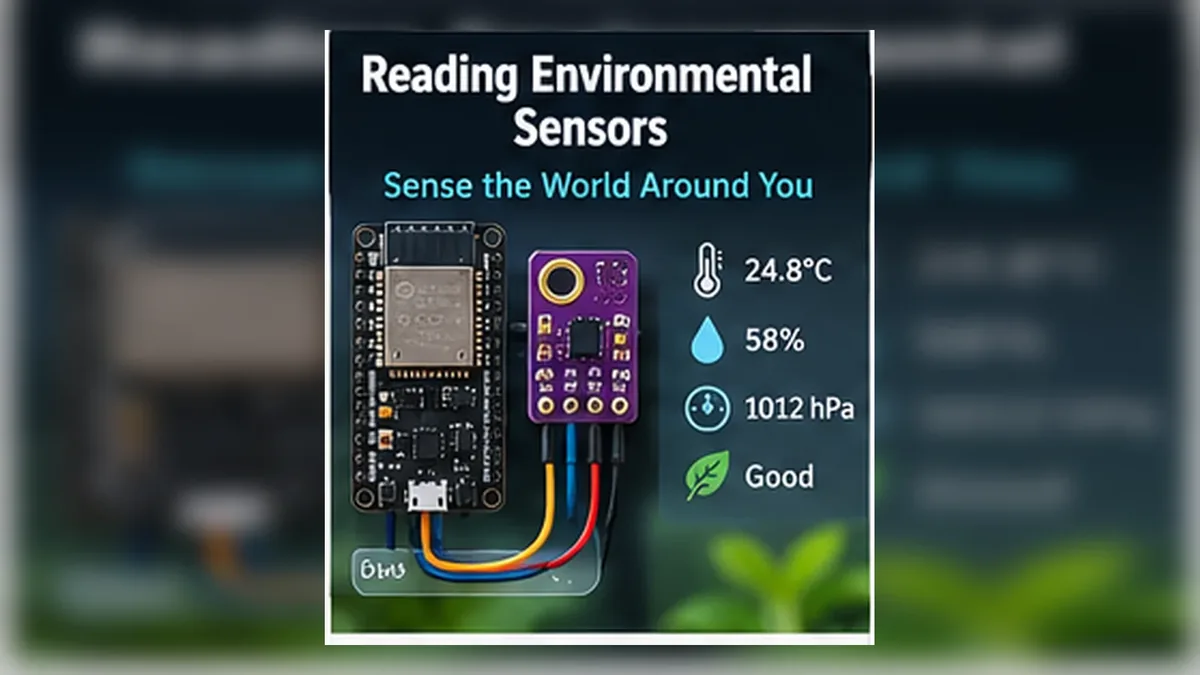
Read the Air Around Your ESP32
The Story
Blinking an LED proves your ESP32 can control an output. Reading a sensor proves it can observe the world.
In this mission, the ESP32 measures temperature, humidity, and pressure with a BME280. Then it shows those values on both Serial Monitor and an OLED display. This is the foundation of weather stations, indoor comfort monitors, greenhouse controllers, and smart home climate systems.
Explain Like I'm 12
A sensor is like a sense organ for your ESP32. A button lets it feel a press. A potentiometer lets it measure a dial. A BME280 lets it sense the air.
The BME280 does not just say hot or cold. It gives numbers. Your job as an engineer is to read those numbers, format them clearly, and decide what they mean.
Mission Goal
Read temperature, humidity, and pressure from a BME280 sensor, then display the data on an SSD1306 OLED and Serial Monitor.
Estimated Time
50-60 min
Difficulty
Beginner
Prerequisites
Skills You'll Learn
- Read environmental data from a BME280 sensor
- Explain temperature, humidity, and atmospheric pressure
- Display sensor values on an SSD1306 OLED and Serial Monitor
- Understand accuracy, precision, calibration, sampling, and refresh rate
- Recognize why real sensor readings constantly change
Components Required
- ESP32 DevKit V1Reads the sensor and controls the display
- BME280 environmental sensorMeasures temperature, humidity, and pressure
- SSD1306 OLED displayShows the live readings
- Breadboard and jumper wiresConnect shared 3.3 V, GND, SDA, and SCL
Environmental Sensors Turn Air Into Data
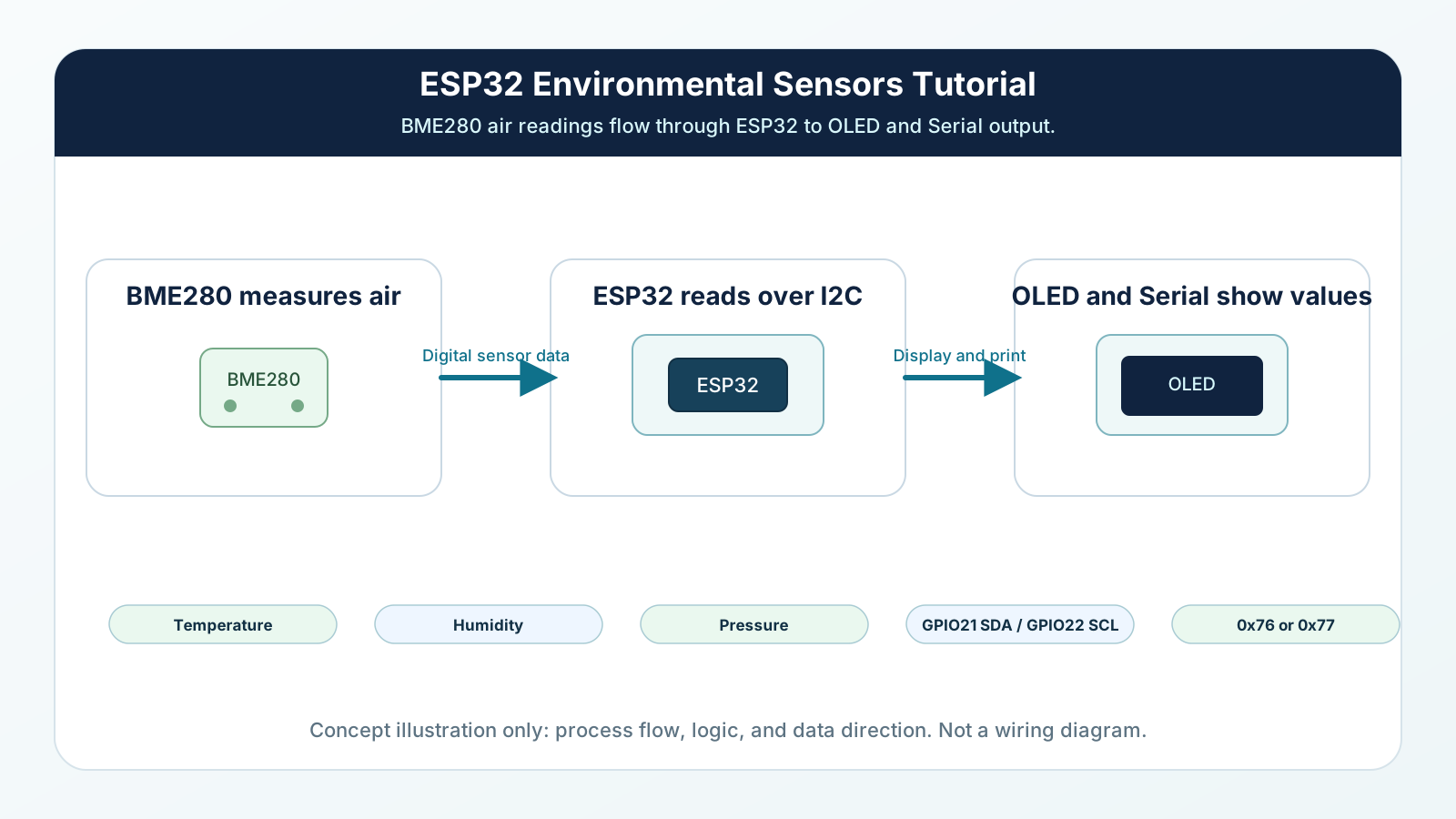
An environmental sensor measures conditions around your project. The BME280 measures three useful values: temperature, humidity, and atmospheric pressure.
Temperature tells you how warm the air is. Humidity tells you how much water vapor is in the air compared with what the air can hold. Pressure tells you how strongly the air above you is pushing down.
These values are not perfectly still. Air moves. People breathe. USB power warms the board. Weather changes. A good engineer expects small changes and designs the software to read them calmly.
Engineering Explanation
The BME280 contains tiny sensing elements and internal electronics. It measures physical effects, converts them into digital values, and makes those values available over I2C. Because Mission 10 introduced SDA, SCL, and addresses, you can now treat the BME280 as another smart I2C device on the same bus as the OLED.
Temperature readings are affected by real air temperature and heat near the sensor. If the sensor sits close to the ESP32 voltage regulator, USB chip, your hand, or direct sunlight, it may read warmer than the room.
Humidity is relative humidity. It depends on both water vapor and temperature. That is why humidity can change when a room warms or cools, even if no water was added.
Pressure changes because the atmosphere is not fixed. Weather systems move, air masses rise and sink, and local conditions shift through the day. Indoors, pressure usually follows outdoor pressure, but temperature and humidity may be very different because walls, windows, people, and air conditioning shape the room.
Accuracy means how close the reading is to the true value. Precision means how repeatable the readings are. Calibration means comparing readings with a trusted reference and correcting your interpretation. Cheap sensors are still useful because many projects care about trends: warmer than before, humidity rising, pressure falling, or the room becoming uncomfortable.
Common misconceptions are worth clearing up now. A sensor is not broken because values wiggle. Two sensors rarely match perfectly. A weather app is not measuring your desk. More decimal places do not always mean more truth. Faster sampling does not automatically mean better information. Engineers often average readings because one sample can wiggle, but several samples reveal the trend.
Real-World Analogy
A thermometer on a wall is one environmental sensor. It does not control the room by itself; it gives information so a person or thermostat can decide what to do.
A kitchen scale explains accuracy and precision. If it always reads 5 grams high, it is precise but not accurate. If it jumps around randomly, it is not precise. Sensors have the same two ideas.
A weather report is like a city-wide measurement, while your BME280 is like a measurement at your desk. Both can be useful, but they answer different questions.
Pressure is like the weight of a tall invisible stack of air above you. When weather systems move, that stack changes slightly, so the pressure number moves too.
Averaging sensor readings is like asking several people to estimate the same temperature and using the general agreement instead of trusting the loudest single answer.
Wiring Diagram
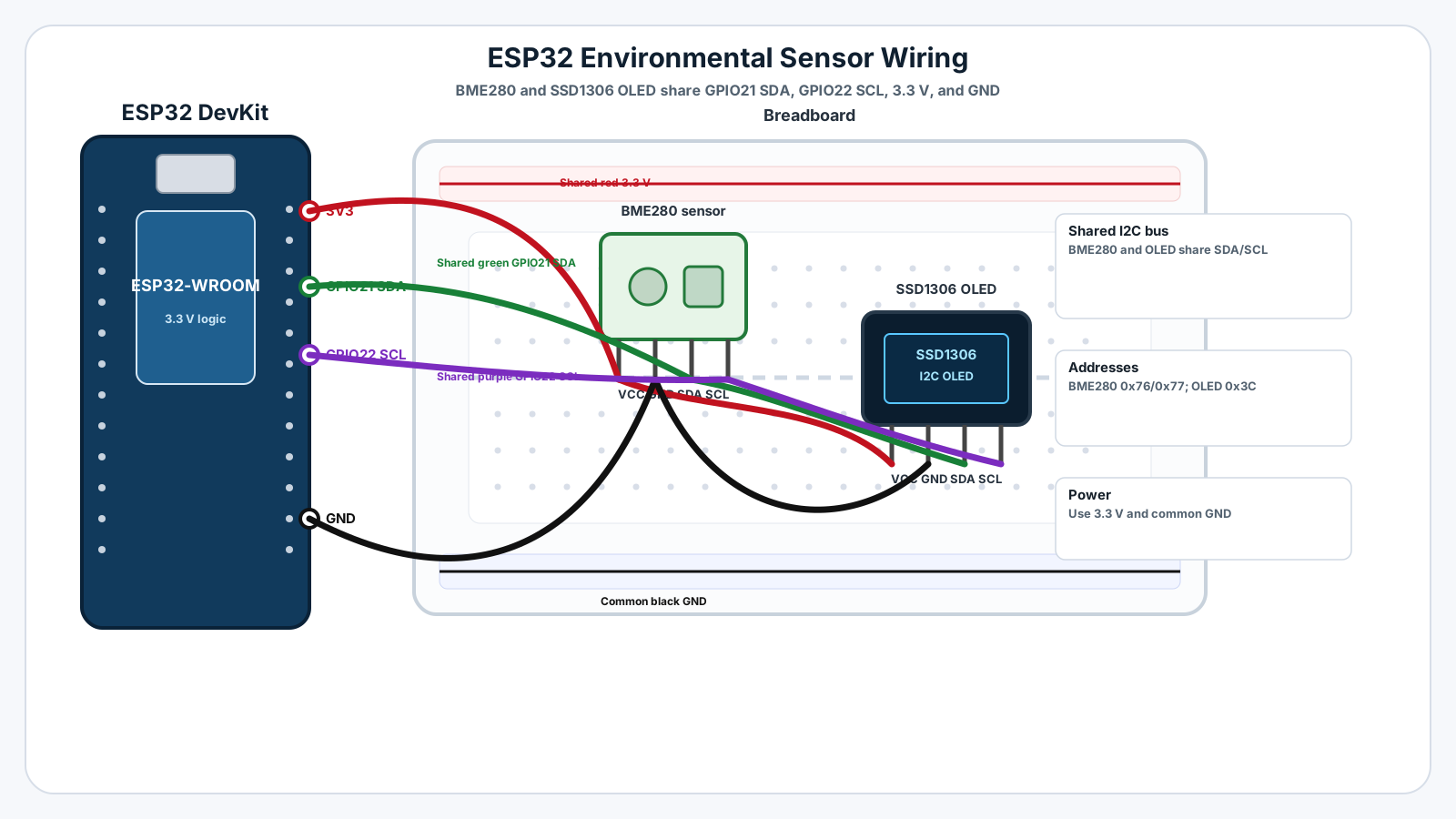
Follow these steps in order. Unplug USB before you change any wires.
-
1
Unplug the ESP32 USB cable before wiring.
-
2
Connect BME280 VIN or VCC to ESP32 3.3 V.
-
3
Connect BME280 GND to ESP32 GND.
-
4
Connect BME280 SDA to ESP32 GPIO21.
-
5
Connect BME280 SCL to ESP32 GPIO22.
-
6
Connect OLED VCC to ESP32 3.3 V.
-
7
Connect OLED GND to ESP32 GND.
-
8
Connect OLED SDA to the same GPIO21 SDA row.
-
9
Connect OLED SCL to the same GPIO22 SCL row.
-
10
Install Adafruit BME280, Adafruit Unified Sensor, Adafruit SSD1306, and Adafruit GFX from Arduino Library Manager.
GPIO Table
| Signal | ESP32 Pin | Mode | Notes |
|---|---|---|---|
| I2C SDA | GPIO21 | I2C data | Shared by BME280 SDA and OLED SDA. |
| I2C SCL | GPIO22 | I2C clock | Shared by BME280 SCL and OLED SCL. |
| BME280 power | 3V3 and GND | Power | Use 3.3 V wiring for this beginner build. |
| OLED power | 3V3 and GND | Power | The display shares power and ground with the sensor. |
Arduino Code
Copy this into Arduino IDE, then click Upload.
#include <Wire.h>
#include <Adafruit_GFX.h>
#include <Adafruit_SSD1306.h>
#include <Adafruit_BME280.h>

const int I2C_SDA = 21;
const int I2C_SCL = 22;

const int SCREEN_WIDTH = 128;
const int SCREEN_HEIGHT = 64;
const int OLED_RESET = -1;
const int OLED_ADDRESS = 0x3C;

const unsigned long SAMPLE_INTERVAL_MS = 2000;

Adafruit_SSD1306 display(SCREEN_WIDTH, SCREEN_HEIGHT, &Wire, OLED_RESET);
Adafruit_BME280 bme;

unsigned long lastSampleTime = 0;

void setup() {
  Serial.begin(115200);
  delay(1000);

  Wire.begin(I2C_SDA, I2C_SCL);

  if (!display.begin(SSD1306_SWITCHCAPVCC, OLED_ADDRESS)) {
    Serial.println("OLED not found. Check address, SDA, and SCL.");
    while (true) {
      delay(1000);
    }
  }

  bool bmeReady = bme.begin(0x76);

  if (!bmeReady) {
    bmeReady = bme.begin(0x77);
  }

  if (!bmeReady) {
    Serial.println("BME280 not found at 0x76 or 0x77.");
    showMessage("BME280 not found", "Check wiring");
    while (true) {
      delay(1000);
    }
  }

  Serial.println("Mission 11: Environmental sensor ready");
  showMessage("ESP32 Engine", "BME280 ready");
  delay(1500);
}

void loop() {
  unsigned long now = millis();

  if (now - lastSampleTime >= SAMPLE_INTERVAL_MS) {
    lastSampleTime = now;

    float temperatureC = bme.readTemperature();
    float humidity = bme.readHumidity();
    float pressureHpa = bme.readPressure() / 100.0;

    printToSerial(temperatureC, humidity, pressureHpa);
    showOnDisplay(temperatureC, humidity, pressureHpa);
  }
}

void printToSerial(float temperatureC, float humidity, float pressureHpa) {
  Serial.print("Temperature: ");
  Serial.print(temperatureC, 1);
  Serial.print(" C | Humidity: ");
  Serial.print(humidity, 1);
  Serial.print(" % | Pressure: ");
  Serial.print(pressureHpa, 1);
  Serial.println(" hPa");
}

void showOnDisplay(float temperatureC, float humidity, float pressureHpa) {
  display.clearDisplay();
  display.setTextColor(SSD1306_WHITE);
  display.setTextSize(1);

  display.setCursor(0, 0);
  display.println("Environment");

  display.setCursor(0, 16);
  display.print("Temp: ");
  display.print(temperatureC, 1);
  display.println(" C");

  display.setCursor(0, 32);
  display.print("Hum:  ");
  display.print(humidity, 1);
  display.println(" %");

  display.setCursor(0, 48);
  display.print("Pres: ");
  display.print(pressureHpa, 1);
  display.println(" hPa");

  display.display();
}

void showMessage(const char* line1, const char* line2) {
  display.clearDisplay();
  display.setTextColor(SSD1306_WHITE);
  display.setTextSize(1);
  display.setCursor(0, 12);
  display.println(line1);
  display.setCursor(0, 32);
  display.println(line2);
  display.display();
}- Required libraries: Adafruit BME280, Adafruit Unified Sensor, Adafruit SSD1306, and Adafruit GFX.
- Install them from Arduino IDE Library Manager before compiling.
- The sketch tries BME280 address 0x76 first, then 0x77.
- OLED address is set to 0x3C, the most common SSD1306 address.
- Sensor readings update every 2 seconds to keep the display readable.
Line-by-line Explanation
- Wire.h starts the I2C bus used by both the BME280 and OLED.
- Adafruit_GFX and Adafruit_SSD1306 control the OLED display.
- Adafruit_BME280 reads temperature, humidity, and pressure from the sensor.
- I2C_SDA and I2C_SCL keep the ESP32 on GPIO21 and GPIO22, matching Mission 10.
- SAMPLE_INTERVAL_MS sets how often the ESP32 reads the sensor. Two seconds is readable and calm.
- display.begin() checks that the OLED responds at address 0x3C.
- bme.begin(0x76) tries the common BME280 address first.
- If 0x76 fails, the sketch tries 0x77 because many BME280 modules use that address.
- millis() is used to sample every 2 seconds without needing a long blocking delay in the main loop.
- readTemperature() returns temperature in degrees Celsius.
- readHumidity() returns relative humidity as a percent.
- readPressure() returns pressure in pascals, so the code divides by 100 to display hPa.
- printToSerial() formats the values for debugging on your computer.
- showOnDisplay() formats the same values for the OLED so the project can stand alone.
Expected Behaviour
The OLED should show a compact live dashboard:
Environment Temp: 24.6 C Hum: 48.3 % Pres: 1012.7 hPa
Serial Monitor should print matching lines about every two seconds:
Mission 11: Environmental sensor ready Temperature: 24.6 C | Humidity: 48.3 % | Pressure: 1012.7 hPa Temperature: 24.7 C | Humidity: 48.1 % | Pressure: 1012.6 hPa
Do not expect every line to be identical. Real air moves, the sensor has noise, and pressure changes through the day.
Common Mistakes
Misconception: a stable room should give identical readings
Real measurements include air movement, sensor noise, and tiny electrical changes.
Misconception: more decimals mean more truth
Extra digits can suggest more certainty than the sensor really provides.
Confusing accuracy with precision
A stable reading can still be offset from the true value.
Touching the sensor during testing
Your finger warms the board and changes humidity around the sensor.
Putting the sensor beside the ESP32 regulator
Board heat can make temperature read too high.
Using the wrong BME280 address
Some modules use 0x76 and others use 0x77.
Reading too fast
Fast updates can make normal noise look like a problem.
Comparing indoor values directly with weather apps
Weather apps report outdoor station data, not the air next to your desk.
Ignoring humidity temperature relationship
Relative humidity can change when temperature changes.
Expecting two sensors to match exactly
Every sensor has tolerance, placement differences, and calibration differences.
Troubleshooting
Most ESP32 problems are wiring, power, library, or timing issues. Check these first.
OLED works but BME280 is not found
Likely cause: The display is on the bus, but the sensor wiring or address is wrong.
Fix: Check BME280 3.3 V, GND, SDA, SCL, then run the I2C scanner.
BME280 works but OLED is blank
Likely cause: The sensor is responding, but the OLED address or display wiring is wrong.
Fix: Check OLED VCC, GND, GPIO21, GPIO22, and address 0x3C or 0x3D.
Compilation fails for Adafruit_BME280.h
Likely cause: The BME280 library is not installed.
Fix: Install Adafruit BME280 and Adafruit Unified Sensor from Library Manager.
Compilation fails for Adafruit_SSD1306.h
Likely cause: The OLED display library is not installed.
Fix: Install Adafruit SSD1306 and Adafruit GFX from Library Manager.
Temperature seems too high
Likely cause: The sensor may be warmed by the ESP32, USB power, your hand, or sunlight.
Fix: Move the sensor away from heat and wait a few minutes.
Pressure looks unfamiliar
Likely cause: Pressure is shown in hPa, which is common for weather-style readings.
Fix: Normal sea-level pressure is often near 1013 hPa, but your local value changes with weather and altitude.
Engineer Tip
- Place the sensor where it measures the environment, not heat from the ESP32.
- Use a sampling interval that matches the real system. Room climate does not need millisecond updates.
- Average readings when one noisy value should not trigger a decision.
- Label units clearly: C, %, and hPa are part of the data.
- Debug with Serial Monitor even when the OLED is working.
Remember This Forever
A sensor reading is not a perfect fact.
It is the sensor's best measurement of a changing world.
Mini Challenge
No wrong answers — experiment and have fun!
- Take five temperature readings and calculate a simple average before printing.
- Change SAMPLE_INTERVAL_MS to 1000, 5000, and 10000. Decide which feels best for a room display.
- Move the sensor near your hand for 20 seconds, then move it away and watch it recover.
- Make the OLED show only one large value, then rotate between temperature, humidity, and pressure.
- Compare the BME280 temperature with a DHT22 or room thermometer and explain why they may differ.
FAQs
What is an environmental sensor?
An environmental sensor measures conditions around the device, such as temperature, humidity, air pressure, light, air quality, or moisture.
Why use the BME280 in this mission?
The BME280 is a compact I2C sensor that can measure temperature, humidity, and atmospheric pressure with one module.
How is the BME280 different from the DHT22?
The DHT22 measures temperature and humidity. The BME280 also measures pressure and uses I2C, which makes it fit naturally after the I2C mission.
Why do sensor readings keep changing?
Real air is always moving, electronics have small noise, and sensors have limited precision. Small changes are normal, not a sign that the sensor is broken.
What is sensor accuracy?
Accuracy describes how close a reading is to the true value. A sensor can be stable but still slightly wrong.
What is sensor precision?
Precision describes how repeatable the readings are. A sensor can show very consistent numbers even if they are offset from the true value.
What is calibration?
Calibration means comparing sensor readings with a trusted reference and adjusting your interpretation or code so the result is more useful.
Why does pressure change during the day?
Atmospheric pressure changes as weather systems move, air temperature changes, and air masses rise or sink. Indoor pressure usually follows outdoor pressure slowly.
Why does my sensor not match a weather app?
Weather apps usually use outdoor station data or forecasts. Your BME280 measures the air at your desk, inside your room, near your electronics.
Are cheap sensors useful?
Yes. Cheap sensors are excellent for trends, learning, automation triggers, and relative changes, even when they are not laboratory instruments.
Why do engineers average sensor readings?
Averaging reduces small random changes so decisions are based on the general trend instead of one noisy sample.
How often should I read a BME280?
For a beginner environment monitor, every 1 to 5 seconds is usually enough. Reading too quickly often creates noise without adding useful information.