
Read a Dial with the ESP32 ADC
The Story
So far, most of your inputs have been digital. A button is pressed or released. A GPIO is HIGH or LOW. That kind of thinking is powerful, but the real world is rarely only two choices.
Room light changes gradually. A volume knob turns smoothly. Soil becomes wetter or drier by degrees. A battery voltage falls slowly. Mission 08 teaches the ESP32 to measure those in-between values.
Explain Like I'm 12
A digital input is like asking, 'Is the door open?' The answer is yes or no.
An analog input is like asking, 'How open is the door?' It might be closed, halfway open, almost open, or anywhere between.
The ESP32 cannot directly think in smooth voltages, so it uses an ADC. The ADC looks at the voltage and turns it into a number. Low voltage becomes a small number. Higher voltage becomes a bigger number.
Mission Goal
Read a potentiometer with the ESP32 ADC and understand how a changing voltage becomes a number from 0 to 4095.
Estimated Time
35-40 min
Difficulty
Beginner
Prerequisites
Skills You'll Learn
- Explain the difference between digital and analog signals
- Describe what the ESP32 ADC does
- Read a potentiometer with analogRead()
- Understand why ESP32 ADC values range from 0 to 4095
- Recognize simple analog noise and why readings may wiggle
Components Required
- ESP32 DevKit boardReads the analog voltage with its ADC
- 10 kOhm potentiometerActs like a turnable voltage divider
- BreadboardHolds the potentiometer and jumper wires
- Jumper wiresConnect 3.3 V, GND, and GPIO34
- USB data cableUpload code and watch Serial Monitor
Analog Values Are In-Between Values
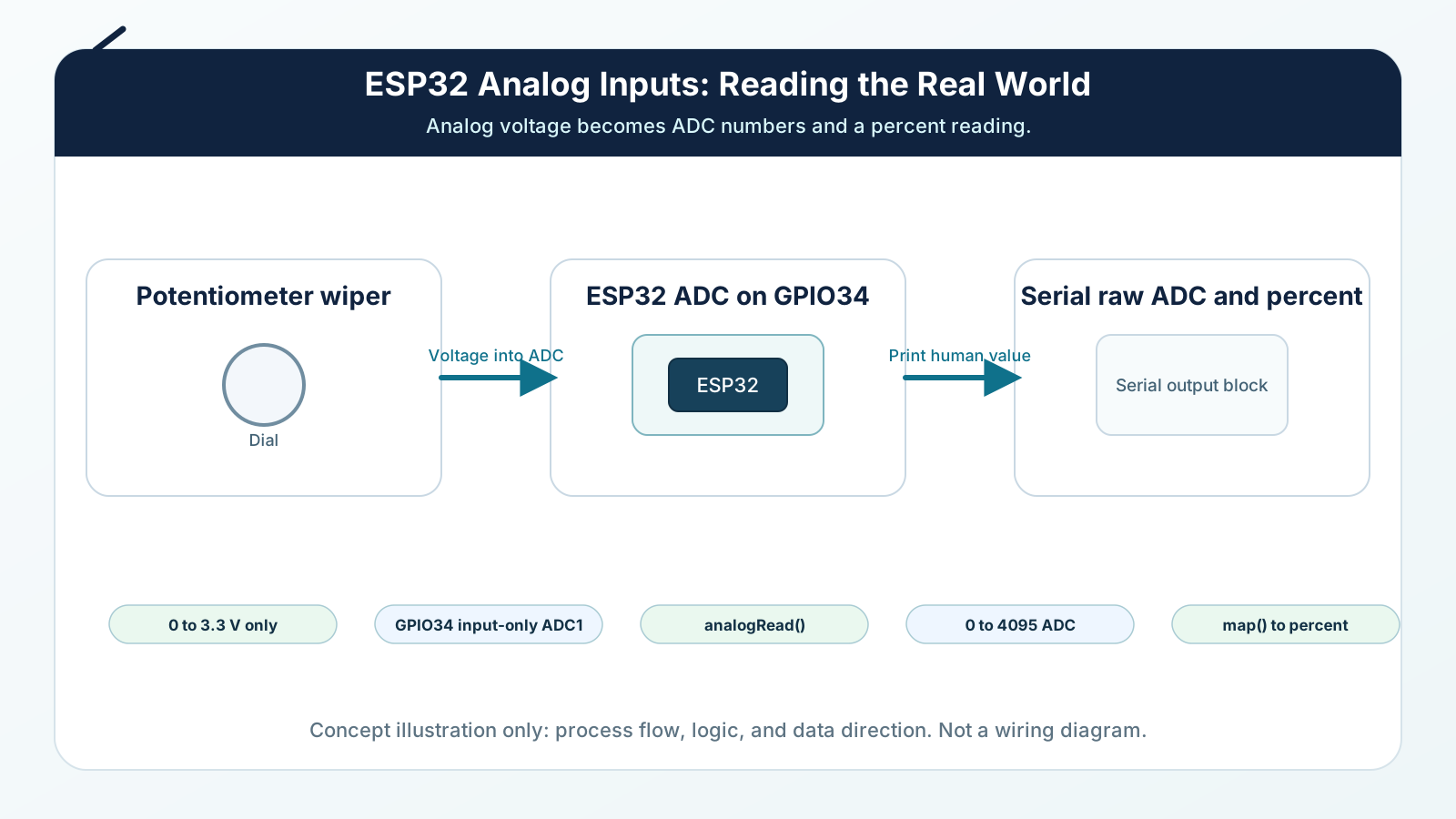
A digital input answers with two values. An analog input answers with many possible values.
The ESP32 ADC measures the voltage on an analog-capable pin. Near GND, the reading is near 0. Near 3.3 V, the reading is near 4095. Voltages between those two points become numbers between those two ends.
That number is not magic. It is the ESP32's best digital description of a real voltage.
Engineering Explanation
ADC stands for Analog-to-Digital Converter. Analog means the voltage can vary continuously. Digital means the ESP32 stores the result as a number.
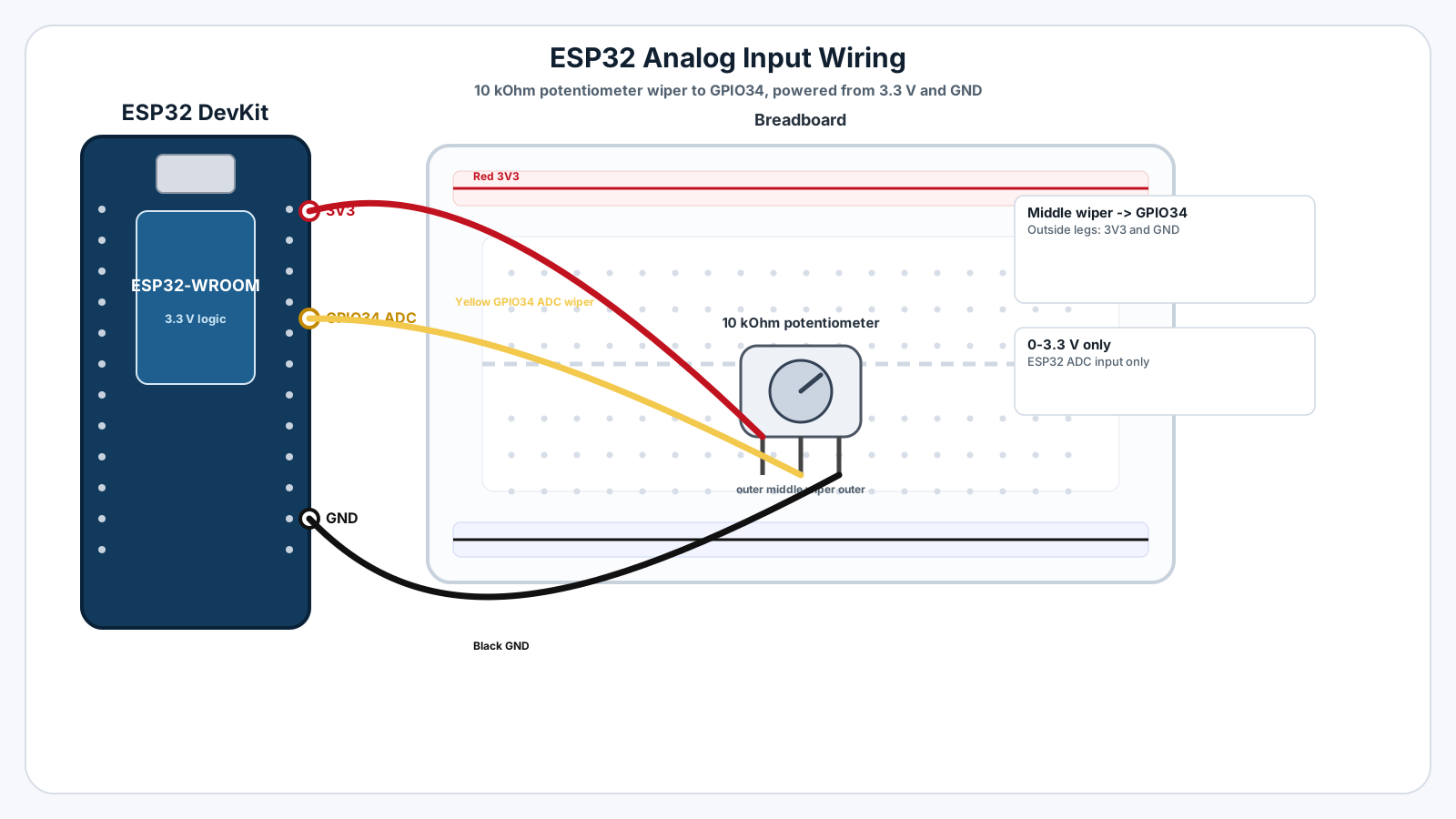
In this mission, the potentiometer is wired as a voltage divider. One outside leg connects to 3.3 V. The other outside leg connects to GND. The middle pin, called the wiper, slides between those two ends as you turn the knob. When the wiper is near GND, GPIO34 sees a low voltage. When it is near 3.3 V, GPIO34 sees a high voltage.
The ESP32 ADC samples that voltage and returns a raw number. With 12-bit readings, the possible values are 0 through 4095. A reading near 0 means the input is near GND. A reading near 4095 means the input is near the top of the safe range. A reading near 2048 means the input is roughly around the middle.
Real ADC readings are not perfectly still. You may see small changes even when the knob is not moving. That is normal. Wires pick up noise, USB power is not perfectly clean, and ADC hardware has small variation. Engineers handle this by averaging readings, filtering, calibrating, and designing stable circuits.
The most important beginner habit is to print the raw value first. Before guessing what a sensor means, look at the number the ESP32 is actually reading.
Real-World Analogy
A light switch is digital: it is either off or on. A volume knob is analog: it can be quiet, medium, loud, or anywhere between.
A thermometer is another example. Temperature does not jump only between cold and hot. It moves gradually. Analog inputs let a microcontroller notice those gradual changes.
Think of the ADC like a ruler for voltage. The voltage is the real-world length. The ADC number is the ruler marking closest to where the voltage lands.
Wiring Diagram
Follow these steps in order. Unplug USB before you change any wires.
-
1
Unplug the ESP32 USB cable before wiring.
-
2
Place the potentiometer on the breadboard.
-
3
Connect one outside potentiometer leg to ESP32 3.3 V.
-
4
Connect the other outside potentiometer leg to ESP32 GND.
-
5
Connect the middle potentiometer pin to ESP32 GPIO34.
-
6
Check that the middle pin goes to GPIO34, not directly to 3.3 V or GND.
-
7
Plug USB back in, upload the sketch, and open Serial Monitor at 115200 baud.
-
8
Turn the knob slowly and watch the values change.
GPIO Table
| Signal | ESP32 Pin | Mode | Notes |
|---|---|---|---|
| Potentiometer wiper | GPIO34 | Analog input | Reads the changing voltage from the middle pin. |
| Potentiometer high side | 3V3 | Power | Provides the safe top voltage for the dial. |
| Potentiometer low side | GND | Ground | Provides the low end of the dial. |
| Serial debug | USB | Serial | Shows raw ADC and percent values. |
Arduino Code
Copy this into Arduino IDE, then click Upload.
const int POT_PIN = 34;

void setup() {
  Serial.begin(115200);
  delay(500);

  Serial.println("Mission 08: Analog input ready");
  Serial.println("Turn the potentiometer and watch the ADC value change.");
}

void loop() {
  int rawValue = analogRead(POT_PIN);
  int percent = map(rawValue, 0, 4095, 0, 100);

  Serial.print("Raw ADC: ");
  Serial.print(rawValue);
  Serial.print("  |  Dial: ");
  Serial.print(percent);
  Serial.println("%");

  delay(200);
}- GPIO34 is an ADC input pin.
- analogRead() returns a raw value from about 0 to 4095.
- map() converts the raw reading into a 0 to 100 percent estimate.
- A short delay makes Serial Monitor easier to read.
Line-by-line Explanation
- POT_PIN is GPIO34, the ADC-capable pin connected to the potentiometer middle pin.
- Serial.begin(115200) starts communication with Serial Monitor.
- analogRead(POT_PIN) asks the ESP32 ADC to measure the voltage on GPIO34.
- rawValue stores the ADC result, usually somewhere between 0 and 4095.
- map(rawValue, 0, 4095, 0, 100) converts the raw ADC range into a beginner-friendly percentage.
- Serial.print() lines show both the raw number and the percent value so you can compare engineering data with human-friendly data.
- delay(200) slows the output so the Serial Monitor does not scroll too fast while you turn the knob.
Expected Behaviour
Serial Monitor should print changing values as you rotate the potentiometer:
Mission 08: Analog input ready Turn the potentiometer and watch the ADC value change. Raw ADC: 18 | Dial: 0% Raw ADC: 1024 | Dial: 25% Raw ADC: 2050 | Dial: 50% Raw ADC: 3075 | Dial: 75% Raw ADC: 4090 | Dial: 99%
Your exact values may not reach perfect 0 or perfect 4095. That is normal. The important behavior is that the number changes gradually when the knob turns gradually.
Common Mistakes
Connecting the potentiometer to 5 V
Many Arduino examples use 5 V boards, but ESP32 GPIO pins are 3.3 V logic.
Using a non-ADC pin
Not every GPIO can read analog voltage.
Reading the wrong potentiometer leg
The outside legs are fixed ends; the middle leg is the changing wiper.
Expecting perfectly stable numbers
ADC readings naturally include small noise and variation.
Thinking 4095 means 4095 volts
The ADC value is a count, not a voltage unit.
Troubleshooting
Most ESP32 problems are wiring, power, library, or timing issues. Check these first.
The value stays at 0
Likely cause: GPIO34 may be connected to GND, or the middle pin may not be wired correctly.
Fix: Trace the potentiometer middle pin to GPIO34 and confirm one outer leg goes to 3.3 V.
The value stays near 4095
Likely cause: GPIO34 may be connected directly to 3.3 V, or the wiper wire may be on the wrong leg.
Fix: Move the GPIO34 wire to the middle pin of the potentiometer.
Values change backwards
Likely cause: The 3.3 V and GND outer legs are swapped.
Fix: This is safe if both are still 3.3 V and GND. Swap the outer wires if you want clockwise to increase.
Values jump around a lot
Likely cause: Loose breadboard wires, a damaged potentiometer, or noisy power can cause unstable readings.
Fix: Press wires firmly, try a different potentiometer, and keep jumper wires short.
Serial Monitor prints nothing
Likely cause: The board may not be connected, upload may have failed, or the baud rate may be wrong.
Fix: Upload again, choose the correct port, and set Serial Monitor to 115200 baud.
Engineer Tip
Always print the raw ADC value before turning it into a decision. If the raw number does not make sense, the project logic built on top of it will not make sense either.
Remember This Forever
Digital asks: is it ON?
Analog asks: how much?
The ADC is how the ESP32 turns a changing voltage into a number it can reason about.
Mini Challenge
No wrong answers — experiment and have fun!
- Print only the 0-100 percent value and explain why it is easier for humans than 0-4095.
- Take five readings, average them, and compare whether the number wiggles less.
- Swap the two outside potentiometer wires and observe how the direction changes.
- Explain how this analog dial could later control the PWM LED brightness from Mission 07.
FAQs
What is an analog signal?
An analog signal can change smoothly through many values instead of being only ON or OFF.
What is the difference between digital and analog input?
A digital input gives two answers, HIGH or LOW. An analog input gives a number that represents a voltage level.
What does ADC mean?
ADC means Analog-to-Digital Converter. It turns a voltage into a number the ESP32 can use.
Why does ESP32 analogRead() return 0 to 4095?
The ESP32 ADC commonly uses 12-bit readings. Twelve bits can represent 4096 possible values, numbered 0 through 4095.
What voltage should I use with ESP32 analog inputs?
Keep analog inputs within the ESP32's safe 3.3 V range. Do not feed 5 V into an ESP32 GPIO.
What is a potentiometer?
A potentiometer is a variable resistor with a rotating shaft. It can act like a dial that outputs a changing voltage.
Why does turning the potentiometer change the number smoothly?
The middle pin of the potentiometer slides between 0 V and 3.3 V, so the ADC sees many voltage levels between the two ends.
Why does my analog value wiggle when I am not touching the dial?
Small electrical noise, loose wiring, USB power noise, and ADC variation can make readings move by a few counts.
Is ADC noise a broken sensor?
Usually no. Small changes are normal. Real products often average or filter analog readings.
Can I use any ESP32 GPIO for analog input?
No. Only ADC-capable pins can read analog values. For beginner lessons, use a known ADC1 pin such as GPIO34.
Why use GPIO34 in this mission?
GPIO34 is an input-only ADC1 pin, which makes it a good safe choice for reading a potentiometer.
Can GPIO34 control an LED?
No. GPIO34 is input-only. Use it for reading, not output.
What happens if I connect the potentiometer backwards?
The numbers will move in the opposite direction. Low becomes high and high becomes low, but the ESP32 should still read safely if the ends are 3.3 V and GND.
Can analog input read negative voltage?
No. ESP32 GPIO pins should not receive negative voltage. Keep the signal between GND and 3.3 V.
Why do real products use analog inputs?
Many real-world conditions change gradually, such as light, pressure, position, moisture, battery voltage, and sound level.