
Control Brightness with Fast Switching
The Story
So far your ESP32 outputs have mostly been simple: ON or OFF. That is useful for blinking an LED, reading button states, and making clear digital decisions.
But many real projects need more than ON and OFF. A lamp may need to be half bright. A small fan may need to run slowly. A robot motor may need gentle speed control. PWM is the beginner-friendly bridge between digital switching and smooth-looking control.
Explain Like I'm 12
PWM is like tapping a light switch very, very fast.
If the switch is ON almost all the time, the light looks bright. If it is ON only a little bit of the time, the light looks dim. The ESP32 is not sending a magic half-voltage to the LED. It is switching so quickly that your eyes see the average effect.
Mission Goal
Fade an LED with PWM and understand duty cycle well enough to explain how fast ON/OFF pulses can create brightness and speed control.
Estimated Time
30-35 min
Difficulty
Beginner
Prerequisites
Skills You'll Learn
- Explain PWM in plain English
- Describe the difference between digital ON/OFF and PWM output
- Understand duty cycle as the percentage of time an output is ON
- Use PWM to control LED brightness
- Explain why PWM can control motor speed conceptually
Components Required
- ESP32 DevKit boardGenerates the PWM signal
- LEDShows brightness changes visually
- 220 ohm or 330 ohm resistorLimits LED current
- BreadboardHolds the LED and resistor
- Jumper wiresConnect GPIO18, resistor, LED, and GND
- USB data cableUpload code and watch Serial Monitor
Digital Output vs PWM
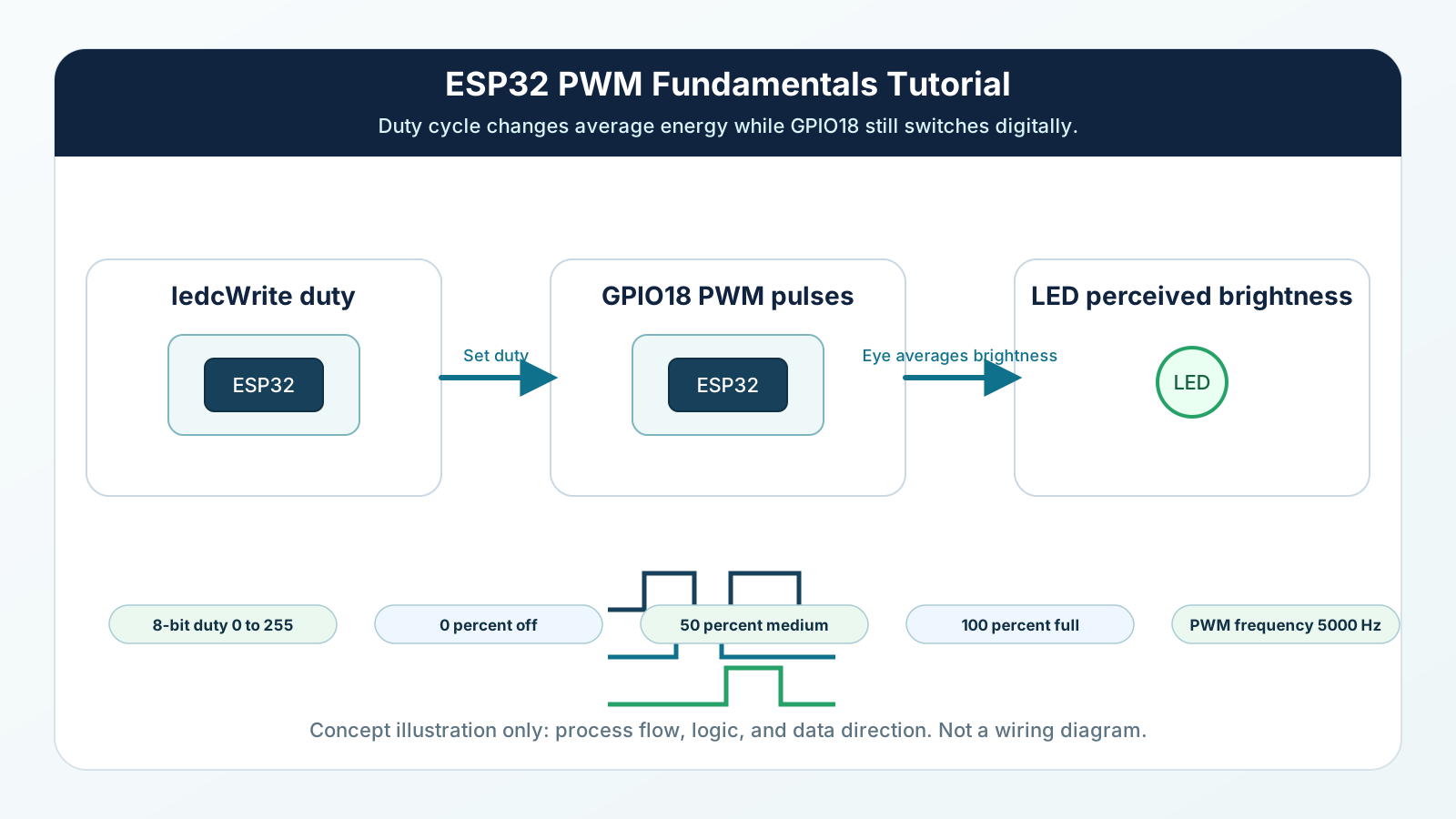
A normal digital output has two steady choices: LOW or HIGH. LOW is off. HIGH is on.
PWM repeats a fast pattern instead. During each cycle, the output is ON for part of the time and OFF for the rest. The duty cycle tells you how much of that cycle is ON.
25% duty cycle looks dim. 50% duty cycle looks medium. 90% duty cycle looks bright. The pin is still digital, but the effect feels adjustable.
Engineering Explanation
PWM stands for Pulse Width Modulation. A pulse is a short ON signal. Width means how long that ON part lasts. Modulation means changing it.
The ESP32 creates a repeating waveform. At the start of each cycle the output turns ON. After the duty-cycle time passes, the output turns OFF until the next cycle begins. If the ON time is short, the average energy sent to the LED is low. If the ON time is long, the average energy is high.
Frequency is how often the cycle repeats each second. In this mission, the exact frequency is not the main lesson. You only need the beginner idea: the switching is fast enough that the LED does not look like it is blinking slowly.
For a motor, PWM is similar in concept, but you must use a motor driver. The ESP32 PWM pin tells the driver how much power to deliver on average. More duty cycle means more average power and usually more speed. Less duty cycle means less average power and usually slower speed.
PWM is everywhere because microcontrollers are excellent at digital switching. Instead of creating a true adjustable voltage, they switch quickly and let the load, your eyes, the motor, or a filter respond to the average.
Real-World Analogy
Imagine watering a plant with a hose that can only be fully open or fully closed. If you open it for 1 second and close it for 9 seconds, the plant gets a little water. If you open it for 8 seconds and close it for 2 seconds, the plant gets much more. The hose is never halfway open, but the average water amount changes.
PWM works the same way with electricity. The ESP32 pin is fully ON or fully OFF, but the average ON time changes.
Another analogy is a ceiling fan controlled by quick bursts of power. Short bursts feel like low speed. Longer bursts feel like higher speed. The beginner lesson is not the motor physics; it is the idea of controlling average power with fast switching.
Wiring Diagram
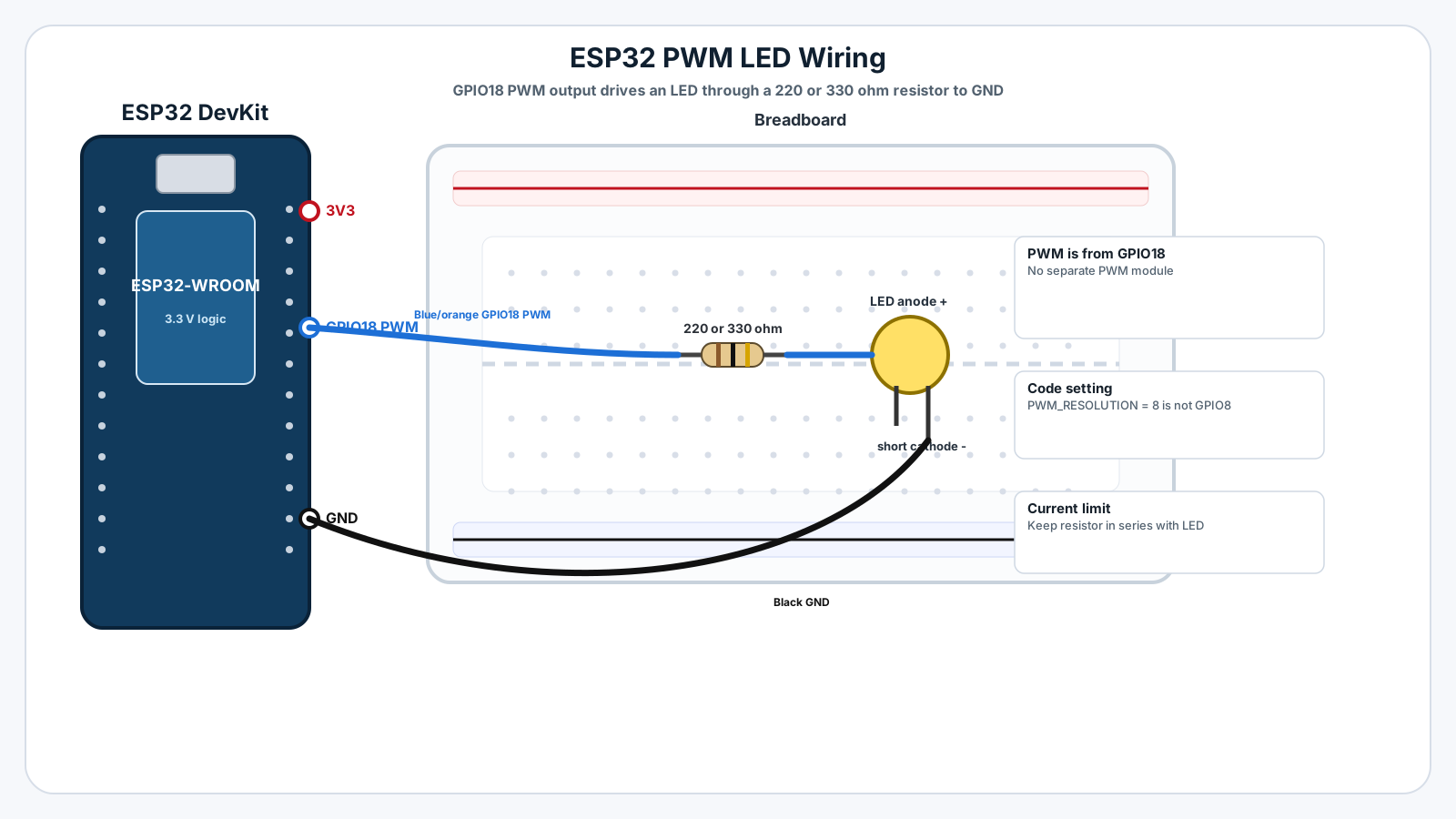
Follow these steps in order. Unplug USB before you change any wires.
-
1
Unplug the ESP32 USB cable before wiring.
-
2
Place the LED on the breadboard.
-
3
Connect ESP32 GPIO18 to one side of a 220 ohm or 330 ohm resistor.
-
4
Connect the other side of the resistor to the LED anode, the longer LED leg.
-
5
Connect the LED cathode, the shorter leg, to ESP32 GND.
-
6
Check that the resistor is in series with the LED, not beside it doing nothing.
-
7
Plug USB back in, upload the sketch, and open Serial Monitor at 115200 baud.
GPIO Table
| Signal | ESP32 Pin | Mode | Notes |
|---|---|---|---|
| PWM LED output | GPIO18 | PWM output | Drives LED brightness through a current-limiting resistor. |
| LED ground | GND | Ground | Completes the LED circuit. |
| Serial debug | USB | Serial | Shows duty values while brightness changes. |
Arduino Code
Copy this into Arduino IDE, then click Upload.
const int LED_PIN = 18;

const int PWM_CHANNEL = 0;
const int PWM_FREQUENCY = 5000;
const int PWM_RESOLUTION = 8;

void setup() {
  Serial.begin(115200);

  ledcSetup(PWM_CHANNEL, PWM_FREQUENCY, PWM_RESOLUTION);
  ledcAttachPin(LED_PIN, PWM_CHANNEL);

  Serial.println("Mission 07: PWM LED fade ready");
}

void loop() {
  for (int duty = 0; duty <= 255; duty += 5) {
    ledcWrite(PWM_CHANNEL, duty);
    Serial.print("Duty value: ");
    Serial.println(duty);
    delay(25);
  }

  for (int duty = 255; duty >= 0; duty -= 5) {
    ledcWrite(PWM_CHANNEL, duty);
    Serial.print("Duty value: ");
    Serial.println(duty);
    delay(25);
  }
}- GPIO18 drives the LED through a resistor.
- PWM resolution is 8 bits, so duty ranges from 0 to 255.
- 0 means always OFF and 255 means almost/full ON.
- The fade changes duty cycle gradually so you can see brightness change.
Line-by-line Explanation
- LED_PIN is GPIO18, the pin connected to the LED through the resistor.
- PWM_CHANNEL chooses one ESP32 PWM channel. The channel is like a small hardware helper that creates the repeated pulses.
- PWM_FREQUENCY is 5000 Hz, which means the PWM cycle repeats 5000 times per second.
- PWM_RESOLUTION is 8 bits, so the duty value can range from 0 to 255.
- ledcSetup() configures the PWM channel with the chosen frequency and resolution.
- ledcAttachPin() connects GPIO18 to that PWM channel.
- The first for loop increases duty from 0 to 255, making the LED fade brighter.
- ledcWrite() changes the duty cycle. It does not stop the program to blink manually.
- The second for loop decreases duty from 255 to 0, making the LED fade dimmer.
Expected Behaviour
The LED should fade smoothly from off to bright, then bright back to off. Serial Monitor should print changing duty values:
Mission 07: PWM LED fade ready Duty value: 0 Duty value: 5 Duty value: 10 ... Duty value: 255 Duty value: 250 ... Duty value: 0
The LED is not receiving a true half-voltage. It is receiving fast ON/OFF pulses that your eyes average into brightness.
Common Mistakes
Forgetting the LED resistor
PWM can make the LED look dimmer, but the pin still drives full current during each ON pulse.
Thinking PWM is analog voltage
The brightness looks smooth, so it feels like the voltage must be smoothly changing.
Using a motor directly on the GPIO pin
PWM motor speed examples can make beginners think the PWM pin powers the motor.
Choosing a poor GPIO pin
Some ESP32 pins are input-only or affect boot behavior.
Confusing frequency with brightness
Both are PWM settings, but they do different jobs.
Troubleshooting
Most ESP32 problems are wiring, power, library, or timing issues. Check these first.
LED does not turn on
Likely cause: The LED may be backwards, the resistor may be in the wrong row, or the wire may not be on GPIO18.
Fix: Check LED polarity, place the resistor in series, and trace GPIO18 to the resistor and LED anode.
LED is always full bright
Likely cause: The LED may be connected to 3.3 V instead of the PWM pin, or ledcWrite() may always receive 255.
Fix: Confirm the LED circuit starts at GPIO18 and watch Serial Monitor for changing duty values.
LED flickers visibly
Likely cause: The frequency may be too low if you changed it, or delay values may make the fade look jumpy.
Fix: Return PWM_FREQUENCY to 5000 and use small duty steps such as 5.
Code does not compile
Likely cause: Some ESP32 Arduino core versions changed PWM helper support.
Fix: Confirm you selected an ESP32 board in Arduino IDE. If needed, update the ESP32 board package.
Serial Monitor shows text but LED does nothing
Likely cause: The sketch is running, so the issue is likely wiring or pin choice.
Fix: Move the LED circuit back to GPIO18 and GND, then test the LED orientation.
Engineer Tip
PWM does not create real analog voltage. It creates a controlled illusion by switching fast. Once you understand the illusion, LED dimming, motor speed control, fan control, buzzers, and RGB color mixing all become easier to reason about.
Remember This Forever
PWM is not halfway ON.
It is fully ON, then fully OFF, so fast that the average feels like control.
Mini Challenge
No wrong answers — experiment and have fun!
- Change the fade delay from 25 ms to 5 ms and describe how the fade feels different.
- Change duty steps from 5 to 25 and notice whether the fade becomes smoother or more jumpy.
- Replace the fade with five fixed brightness levels: 0, 64, 128, 192, and 255.
- Plan how Mission 06 button events could increase or decrease PWM brightness later.
FAQs
What does PWM mean?
PWM means Pulse Width Modulation. It controls how long a digital output stays ON during a repeating cycle.
Is PWM real analog voltage?
No. PWM is still digital switching. It creates an analog-like effect by switching ON and OFF very quickly.
Why does PWM make an LED look dimmer?
Your eyes average the fast blinking. If the LED is ON for less of each cycle, it looks dimmer.
What is duty cycle?
Duty cycle is the percentage of each PWM cycle that the signal is ON. 25% duty means ON for one quarter of the cycle.
What does 0% duty cycle do?
0% duty cycle means the output is always OFF, so the LED is off.
What does 100% duty cycle do?
100% duty cycle means the output is always ON, so the LED is at full brightness.
What is PWM frequency?
Frequency is how many PWM cycles happen each second. For beginners, think of it as how fast the ON/OFF switching repeats.
Does higher frequency always mean brighter LED?
No. Brightness mostly follows duty cycle. Frequency controls how fast the switching happens.
Can PWM control motor speed?
Yes, conceptually. A motor driver can receive PWM so the motor gets power in fast pulses, making the average speed lower or higher.
Can I connect a motor directly to an ESP32 PWM pin?
No. Motors need more current than a GPIO pin can safely provide. Use a motor driver or transistor circuit.
Do I still need a resistor for a PWM LED?
Yes. PWM changes average brightness, but the LED still needs a current-limiting resistor when it is ON.
Why not just use delay() to blink fast?
Manual delay blinking blocks your program and is not smooth. Hardware PWM keeps the timing steady while your code does other work.
Does ESP32 use analogWrite() like Arduino Uno?
Newer ESP32 Arduino cores may support analogWrite(), but learning ledcWrite() teaches the ESP32's native PWM system more clearly.
Which ESP32 pins can use PWM?
Many output-capable ESP32 GPIOs can generate PWM. Avoid input-only pins and boot-sensitive pins when you are just starting.
Why does my LED flicker?
The PWM frequency may be too low, the wiring may be loose, or the code may be repeatedly changing duty cycle too slowly.