
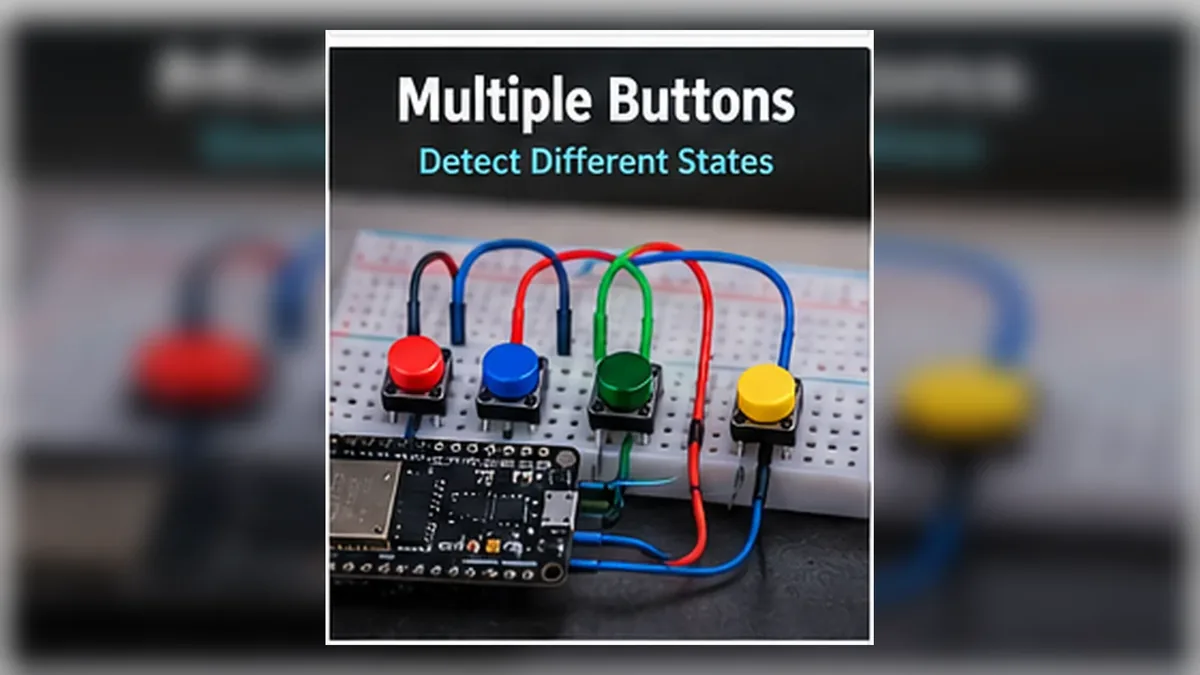
Read Several Buttons Reliably
The Story
Mission 05 taught your ESP32 to trust one button only after it settles. That is the foundation for real control panels.
Now the project grows up. Instead of one button, you will read three buttons. Button 1 connects to GPIO25, Button 2 connects to GPIO26, and Button 3 connects to GPIO27. The other side of every button connects to GND, and the sketch enables INPUT_PULLUP for all three inputs.
Each button has its own pin, its own state, its own debounce timer, and its own meaning. The goal is not just to add more wires. The goal is to keep several inputs clean, separate, and predictable.
Explain Like I'm 12
Imagine a piano. Pressing one key does not move the other keys. Each key has its own job.
ESP32 buttons should work the same way. Button A, Button B, and Button C are separate little worlds. The ESP32 checks each one quickly, remembers what each one was doing before, and notices when one of them changes.
That change is the important part. A button being held down is a state. A button that just became pressed is an event.
Mission Goal
Build a three-button input panel that detects clean press and release events for each button without repeated triggers while the button is held.
Estimated Time
25-30 min
Difficulty
Beginner
Prerequisites
Skills You'll Learn
- Read more than one button without mixing up the inputs
- Give every button its own pin, name, state, and debounce timer
- Detect the difference between held state and new press event
- Handle press and release actions separately
- Use arrays and small helper functions to keep button code organized
Components Required
- ESP32 DevKit boardReads three independent button inputs
- Three push buttonsUse the same type if possible
- BreadboardKeeps each button in its own rows
- Jumper wiresFor GPIO25, GPIO26, GPIO27, and GND
- USB data cableUpload code and watch Serial Monitor
State vs Event
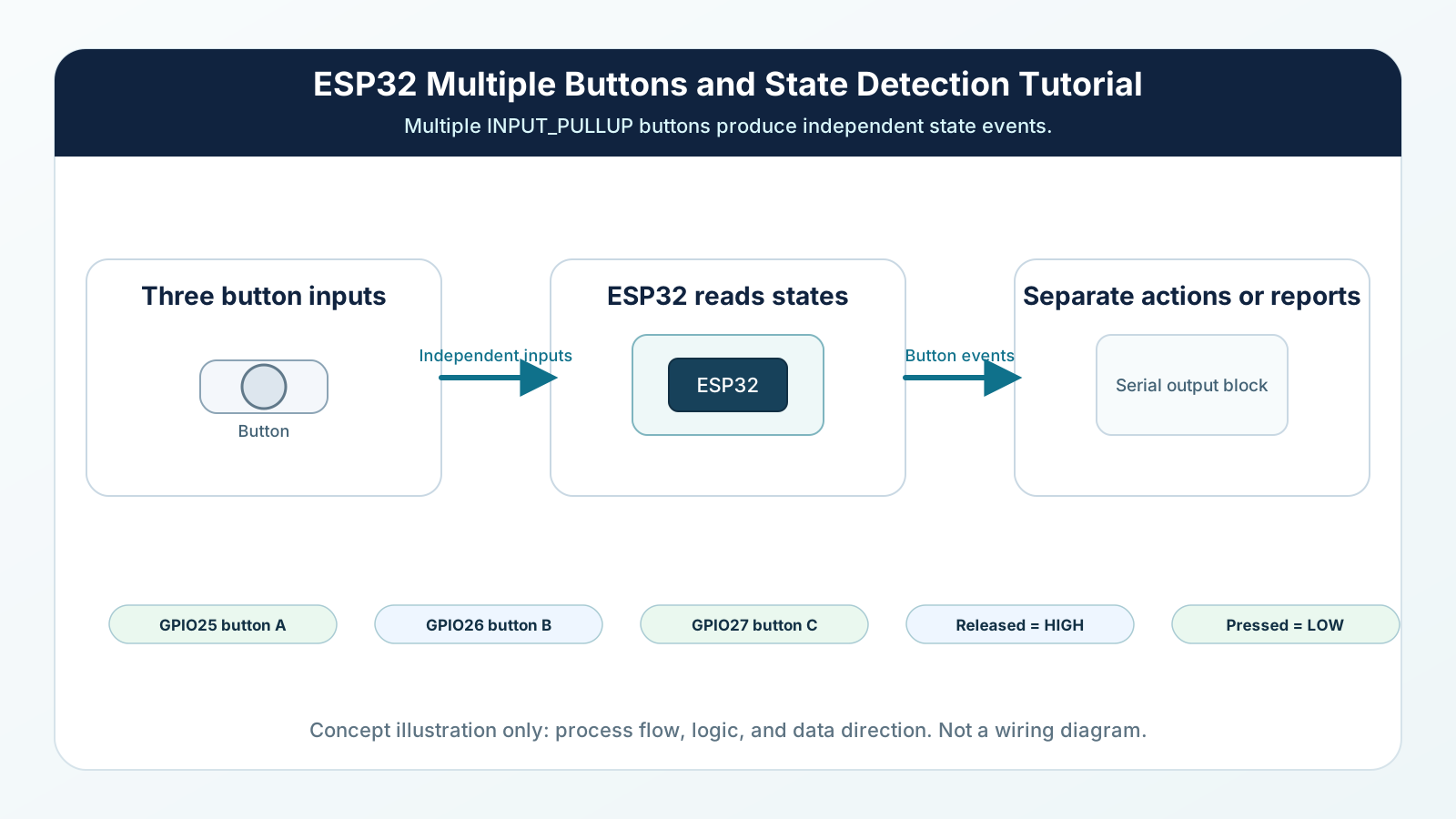
A state answers: what is true right now? Button A is pressed. Button B is released. Button C is released.
An event answers: what just changed? Button A was just pressed. Button B was just released.
This difference matters because loop() runs again and again. If you run an action whenever a button is currently pressed, the action may repeat hundreds of times while your finger is still down. If you run the action only when the button changes from released to pressed, the action happens once.
Engineering Explanation
With one button, you tracked one raw reading, one stable state, and one last-change time. With three buttons, you need the same information three times.
The beginner mistake is to reuse one variable for everything. That mixes the buttons together. If Button A changes, it can overwrite the timing or state that Button B needed. Reliable multi-input code keeps each button independent.
This mission uses arrays. An array is a numbered list. buttonPins[0] stores GPIO25, buttonPins[1] stores GPIO26, and buttonPins[2] stores GPIO27. Matching arrays store the raw readings, stable states, and debounce times for the same button number.
The loop checks each button one by one. For each button, the code reads the GPIO, restarts that button's debounce timer if the raw value changed, and accepts a new stable state only after the reading has stayed still long enough. Because all three inputs use INPUT_PULLUP, released means HIGH and pressed means LOW. When the accepted state changes to LOW, that is a press event. When it changes to HIGH, that is a release event.
This pattern scales. Three buttons, five buttons, and ten buttons use the same idea: separate identity, separate state, repeated clean logic. For ordinary beginner buttons, each independently identified button should have its own GPIO; shared-pin button networks need different circuit techniques and are outside this mission.
Real-World Analogy
A teacher taking attendance does not ask, 'Is anyone here?' and stop. She checks each student by name: Ali, Sara, Mina, Omar. The ESP32 must do the same thing with buttons. It checks GPIO25, then GPIO26, then GPIO27, and remembers each result separately.
A piano is another good picture. Pressing C does not press D. Each key is independent, even though the musician can press several keys together. Your buttons should be wired and tracked the same way.
A traffic-light control panel also works like this. Each switch has a label and a job. If two switches share the wrong wire, one action can accidentally trigger another. Clean button systems keep the wiring and code labels matched.
Wiring Diagram
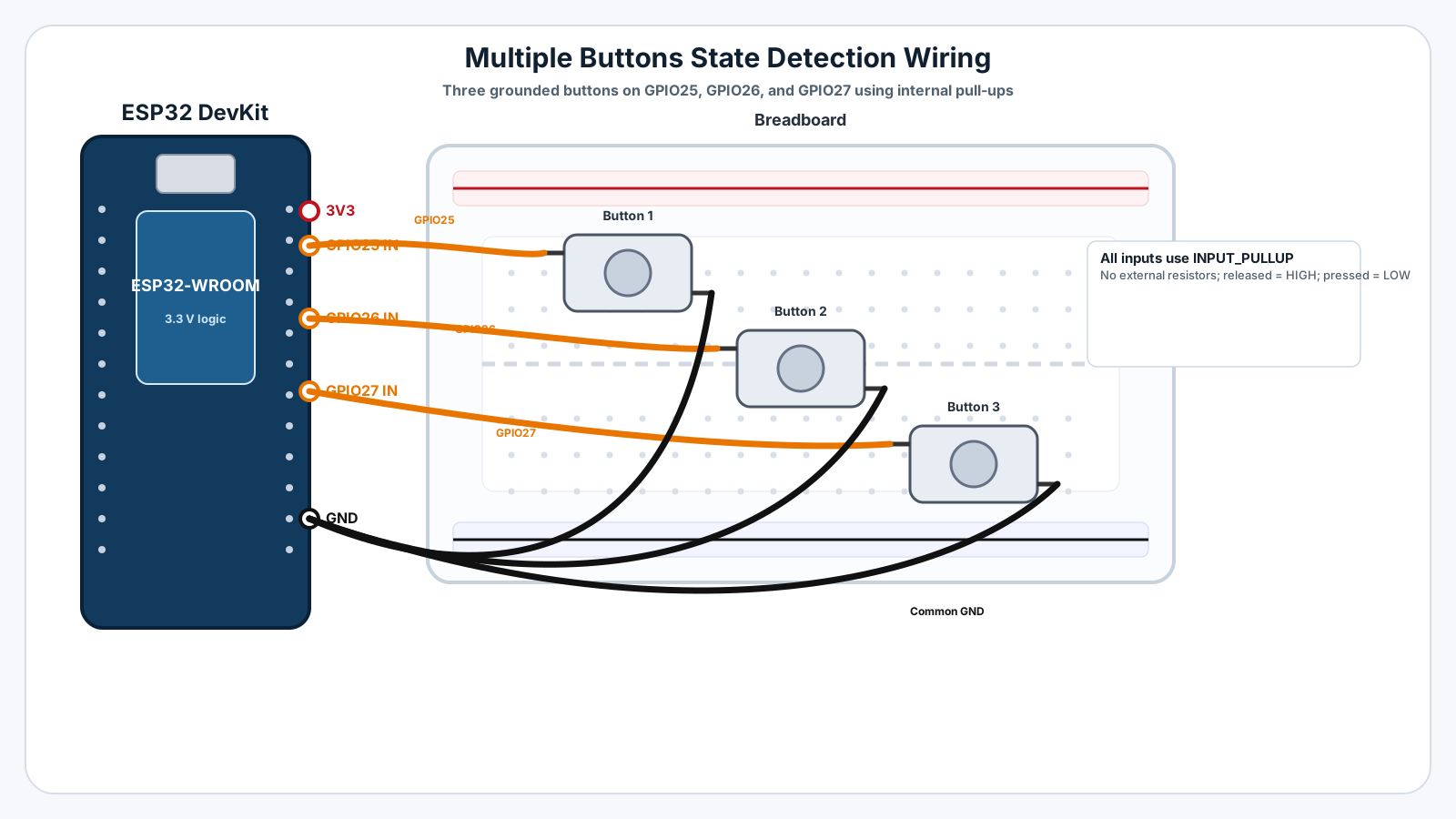
Follow these steps in order. Unplug USB before you change any wires.
-
1
Unplug the ESP32 USB cable before wiring.
-
2
Place three push buttons across the breadboard center gap.
-
3
Connect one side of Button 1 to ESP32 GPIO25.
-
4
Connect one side of Button 2 to ESP32 GPIO26.
-
5
Connect one side of Button 3 to ESP32 GPIO27.
-
6
Connect the opposite side of each button to GND.
-
7
Do not add external resistors; the sketch uses INPUT_PULLUP for all three buttons.
-
8
Plug USB back in, upload the sketch, and open Serial Monitor at 115200 baud.
GPIO Table
| Signal | ESP32 Pin | Mode | Notes |
|---|---|---|---|
| Button 1 | GPIO25 | INPUT_PULLUP | Released reads HIGH. Pressed reads LOW. |
| Button 2 | GPIO26 | INPUT_PULLUP | Tracked separately from Button 1. |
| Button 3 | GPIO27 | INPUT_PULLUP | Uses its own debounce timer. |
| Common ground | GND | Ground | The other side of every button connects to GND. |
Arduino Code
Copy this into Arduino IDE, then click Upload.
const byte BUTTON_COUNT = 3;

const byte buttonPins[BUTTON_COUNT] = {25, 26, 27};
const char* buttonNames[BUTTON_COUNT] = {"START", "STOP", "MODE"};

const unsigned long DEBOUNCE_DELAY = 50;

int lastRawReading[BUTTON_COUNT] = {HIGH, HIGH, HIGH};
int stableState[BUTTON_COUNT] = {HIGH, HIGH, HIGH};
unsigned long lastChangeTime[BUTTON_COUNT] = {0, 0, 0};

void setup() {
  Serial.begin(115200);

  for (byte i = 0; i < BUTTON_COUNT; i++) {
    pinMode(buttonPins[i], INPUT_PULLUP);
  }

  Serial.println("Mission 06: Multiple buttons ready");
  Serial.println("Press START, STOP, or MODE.");
}

void loop() {
  for (byte i = 0; i < BUTTON_COUNT; i++) {
    checkButton(i);
  }
}

void checkButton(byte index) {
  int rawReading = digitalRead(buttonPins[index]);

  if (rawReading != lastRawReading[index]) {
    lastChangeTime[index] = millis();
    lastRawReading[index] = rawReading;
  }

  bool readingHasSettled = (millis() - lastChangeTime[index]) > DEBOUNCE_DELAY;

  if (readingHasSettled && rawReading != stableState[index]) {
    stableState[index] = rawReading;

    if (stableState[index] == LOW) {
      Serial.print(buttonNames[index]);
      Serial.println(" pressed");
    } else {
      Serial.print(buttonNames[index]);
      Serial.println(" released");
    }
  }
}- Each button has its own pin, name, raw reading, stable state, and debounce timer.
- INPUT_PULLUP means released is HIGH and pressed is LOW.
- A press event is detected only when the debounced state changes from HIGH to LOW.
- A release event is detected when the debounced state changes from LOW to HIGH.
Line-by-line Explanation
- BUTTON_COUNT tells the program how many buttons are in the panel.
- buttonPins stores the GPIO number for each button. Button 0 uses GPIO25, button 1 uses GPIO26, and button 2 uses GPIO27.
- buttonNames stores human-friendly labels so Serial Monitor prints START, STOP, and MODE instead of only numbers.
- lastRawReading keeps the latest immediate digitalRead() value for each button.
- stableState keeps the trusted debounced state for each button.
- lastChangeTime keeps a separate debounce timer for each button so one button's bounce does not affect another button.
- setup() uses a for loop to set every button pin to INPUT_PULLUP.
- loop() checks every button every time it runs. The ESP32 is fast enough that this feels instant for a small button panel.
- checkButton(index) runs the same debounce logic for whichever button number is passed in.
- When the debounced state becomes LOW, the code prints a press event. When it becomes HIGH, the code prints a release event.
Expected Behaviour
Press each button once. Serial Monitor should show one press event and one release event for the correct button name:
START pressed START released STOP pressed STOP released MODE pressed MODE released
If you hold START down, it should not print START pressed again and again. It prints once when the press begins, then once when the release happens.
Common Mistakes
Using one state variable for all buttons
The code cannot remember three independent states in one variable.
Giving two buttons the same GPIO pin
Copy-paste or wiring notes were not updated.
Forgetting a separate debounce timer
One shared timer makes one button's bounce affect the others.
Triggering actions while the button is held
The program reacts to current state every loop instead of reacting to the change event.
Mixing pull-up and pull-down wiring styles
Some buttons are wired to GND and others to 3.3 V.
Testing all buttons at once first
Multiple mistakes can hide each other.
Troubleshooting
Most ESP32 problems are wiring, power, library, or timing issues. Check these first.
Wrong button name appears
Likely cause: The physical wire order does not match the buttonPins and buttonNames arrays.
Fix: Trace each wire from the GPIO pin to the button and update either the wiring or the array order.
One button never prints
Likely cause: That GPIO wire may be in the wrong breadboard row or the button may not cross the center gap.
Fix: Move the button across the breadboard gap and test the pin with a single-button sketch if needed.
A button prints many presses
Likely cause: Its debounce timer may not be separate, or the delay may be too short for that physical button.
Fix: Confirm lastChangeTime is indexed and try DEBOUNCE_DELAY = 80.
Two buttons trigger together
Likely cause: Their GPIO wires or ground rows may be accidentally connected.
Fix: Separate the wires, check breadboard rows, and test each input one at a time.
Serial Monitor prints nothing
Likely cause: The baud rate may be wrong, upload may have failed, or all buttons may be wired to the wrong side.
Fix: Use 115200 baud, upload again, and confirm every button connects its GPIO pin to GND when pressed.
Engineer Tip
Give every physical input its own identity: pin number, name, purpose, state, and debounce timer. Professional firmware stays reliable because it never lets one input overwrite another input's memory.
Remember This Forever
A button state says what is true now.
A button event says what just changed.
Reliable projects act on events, remember states, and keep every input separate.
Mini Challenge
No wrong answers — experiment and have fun!
- Add a fourth button on GPIO33 and name it RESET.
- Press two buttons at the same time and describe what Serial Monitor reports.
- Create a lastButtonPressed variable and print which button was pressed most recently.
- Build a tiny password game where START, MODE, STOP must be pressed in that order.
FAQs
Can two buttons share one GPIO pin?
Not if you want to know which button was pressed. Each normal button should use its own GPIO pin so the ESP32 can read it independently.
Do I need separate debounce timing for each button?
Yes. Each mechanical button bounces on its own schedule, so each button needs its own last reading, stable state, and change time.
Will pressing two buttons at once damage the ESP32?
No. With the INPUT_PULLUP wiring in this mission, pressing two buttons at once is safe. Your code simply needs to decide how to respond.
Is reading multiple buttons much slower than reading one?
No. Reading a few GPIO pins takes a tiny amount of time. The bigger challenge is keeping the code organized and the states separate.
What is the difference between button state and button event?
State means what the button is doing right now, such as pressed or released. Event means something just changed, such as a new press or a new release.
Why does my code trigger again while I hold the button?
That usually happens when the code reacts to the current pressed state every loop instead of reacting only to the moment the state changes.
Can I copy the same debounce code three times?
You can, but it becomes easy to make mistakes. Arrays and a small helper function keep the same logic consistent for every button.
Should all buttons use INPUT_PULLUP?
For beginner projects, yes. Keeping all buttons wired the same way reduces confusion because released means HIGH and pressed means LOW for every button.
What happens if I mix up the wire order?
The wrong button name will appear in Serial Monitor or the wrong action will run. Label your pins and test one button at a time.
Can I detect both press and release?
Yes. A press event happens when the debounced state changes to LOW. A release event happens when it changes back to HIGH.
Why use arrays for buttons?
Arrays let one piece of code handle several buttons. Instead of writing the same logic over and over, the loop can check each button by index.
Do I need interrupts for multiple buttons?
No. For beginner button panels, checking the buttons in loop() is simpler, reliable, and easier to debug.
What if two buttons are pressed at exactly the same time?
The ESP32 can detect both. Your program should define what that means, such as allowing both actions or giving one action priority.
Why not use the same variable for every button?
One variable can only remember one thing at a time. If several buttons share the same state variable, one button can overwrite another button's information.
How should I name buttons in code?
Use names that describe purpose, such as START, STOP, and MODE, instead of vague names like btn1 and btn2.