ESP32 ECG Monitor

HealthcareBeginnerIntermediateAdvanced

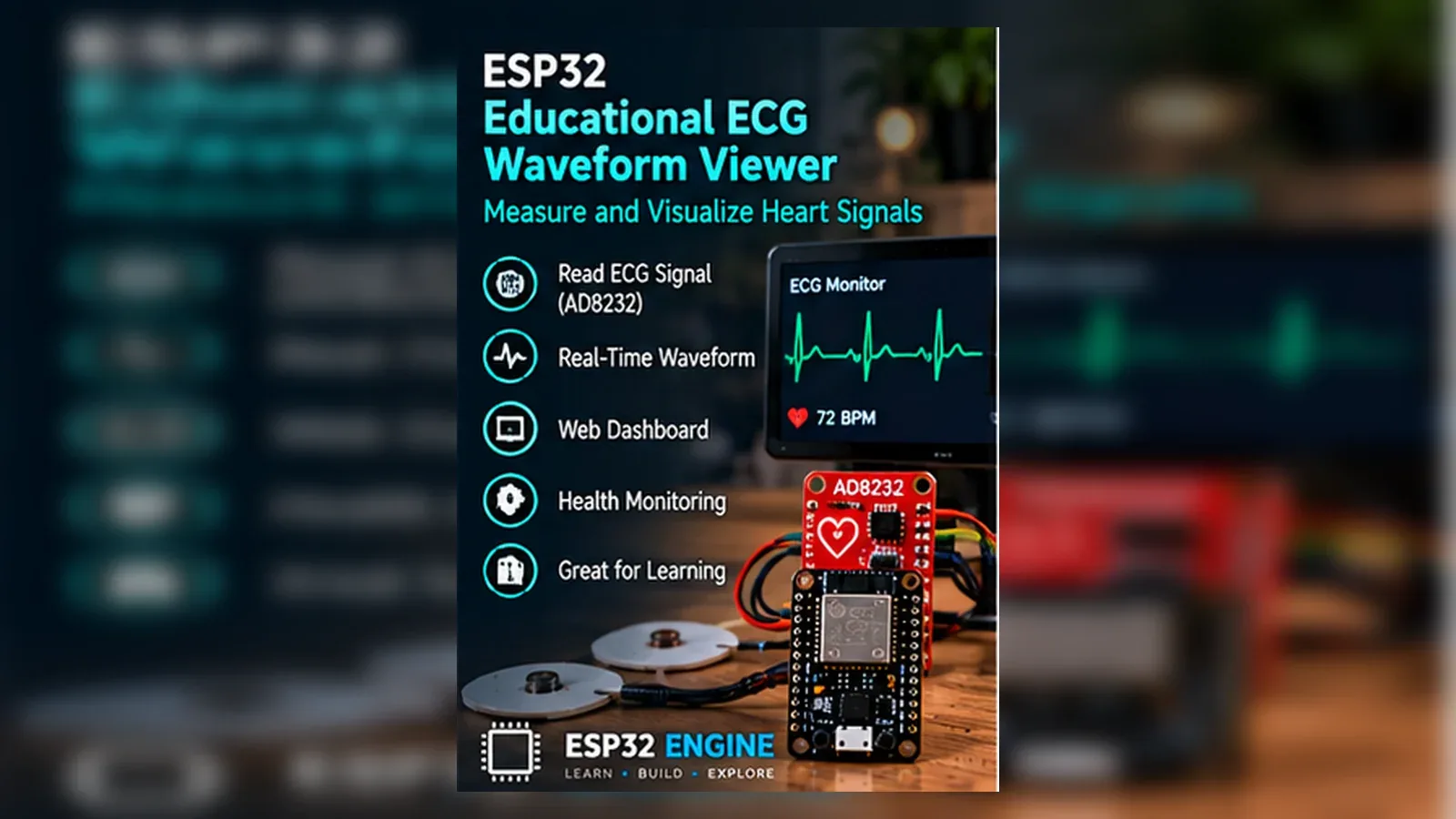
Connect the AD8232 ECG front-end to the ESP32 to capture heart electrical signals, visualise waveforms in real time, calculate beats per minute, and stream live ECG data to a web dashboard for health monitoring.

Overview

In this beginner project you will connect the AD8232 single-lead heart rate monitor to the ESP32 and stream the raw ECG waveform to the Arduino Serial Plotter. Electrode pads attach to the chest in a Lead I configuration. The ESP32 reads the analog ECG signal at 250 Hz and prints the value to Serial. A leads-off detection circuit stops output when electrodes are disconnected. This project teaches analog signal reading, serial data streaming, and basic biopotential sensor setup.

Components
  • 1× AD8232 ECG module — SparkFun or compatible; includes 3.5 mm electrode connector
  • 1× Disposable ECG electrode pads (3 pack) — Ag-AgCl snap electrodes
  • 1× ECG lead cable with snaps — 3.5 mm to snap connectors
  • 1× ESP32 DevKit V1
  • 1× USB cable — Serial Plotter connection
Wiring
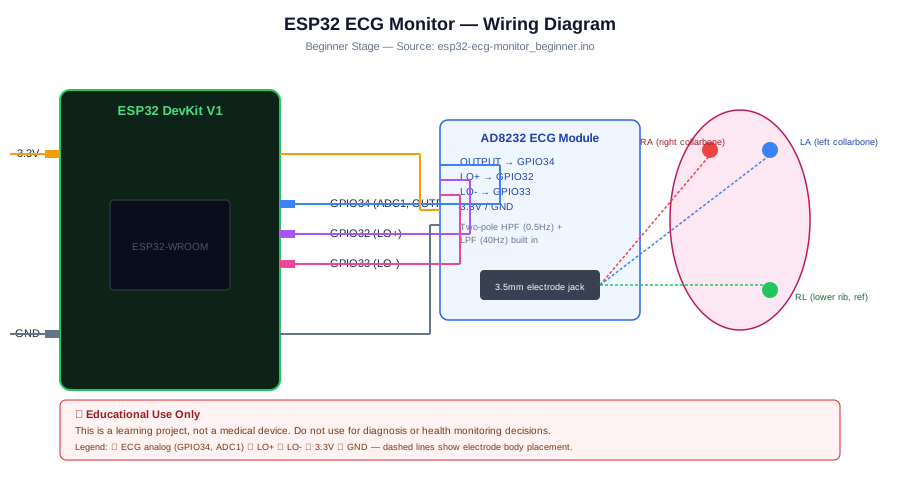
Component PinESP32 PinNotes
AD8232 OUTPUTGPIO 34 (ADC1_CH6)Analog ECG signal output
AD8232 LO+GPIO 32Leads-off detection positive
AD8232 LO-GPIO 33Leads-off detection negative
AD8232 3.3 V3V3
AD8232 GNDGND
Electrode RA (right arm)AD8232 RA leadRight collarbone
Electrode LA (left arm)AD8232 LA leadLeft collarbone
Electrode RL (right leg)AD8232 RL leadLower left rib; driven right leg reference
Arduino Code
esp32-ecg-monitor_beginner.ino
// ESP32 ECG Monitor - Beginner
// AD8232 ECG signal to Serial Plotter at 250 Hz
const int ECG_PIN = 34; // Analog input
const int LO_P    = 32; // Leads-off positive
const int LO_N    = 33; // Leads-off negative

void setup() {
  Serial.begin(115200);
  pinMode(LO_P, INPUT);
  pinMode(LO_N, INPUT);
  analogReadResolution(12); // 12-bit ADC: 0-4095
  analogSetAttenuation(ADC_11db); // Full 0-3.3 V range
}

void loop() {
  if (digitalRead(LO_P) == HIGH || digitalRead(LO_N) == HIGH) {
    // Electrodes not connected or leads off
    Serial.println(2048); // Print midscale so plotter stays stable
    delayMicroseconds(4000); // 250 Hz
    return;
  }

  int ecg = analogRead(ECG_PIN);
  Serial.println(ecg);
  delayMicroseconds(4000); // 4 ms = 250 Hz sample rate
}
How It Works
01

AD8232 Signal Chain: The AD8232 is an instrumentation amplifier with a two-pole high-pass filter (0.5 Hz cutoff) to remove DC offset from electrode potentials, and a low-pass filter (40 Hz cutoff) to reject EMI. The output is a centred, amplified ECG signal in the 0-3.3 V range.

02

Leads-Off Detection: LO+ and LO- pins go HIGH when an electrode is not making skin contact. Detecting HIGH on either pin before reading the ADC prevents displaying noise as ECG. A midscale value is printed instead to keep the Serial Plotter baseline stable.

03

250 Hz Sampling Rate: Clinical ECG standards require at least 150-250 Hz sampling to faithfully capture the QRS complex spikes. delayMicroseconds(4000) creates a 4 ms period (250 Hz). The ESP32 ADC sample time is approximately 2 us at 12-bit resolution.

04

Serial Plotter Visualisation: Opening Tools > Serial Plotter in the Arduino IDE at 115200 baud plots each printed integer value as a live scrolling waveform. The P wave, QRS complex, and T wave of a healthy heart rhythm are clearly visible.

Applications
  • Personal heart rhythm monitoring during exercise
  • STEM biology project demonstrating cardiac bioelectrical signals
  • Research prototype for wearable ECG patch development
  • Educational demonstration of analog signal conditioning
Troubleshooting

ECG shows flat line with no waveform

Check that both LO+ and LO- read LOW (electrodes connected). Verify electrode placement on bare skin, not over clothing. Press electrodes firmly for 10 seconds for good skin adhesion.

Waveform is very noisy with no clear P-QRS-T pattern

Movement artefact is the most common cause. Remain completely still during recording. Also verify the RL electrode is attached to the lower left rib, not the arm.

ADC reads maximum 4095 continuously

The AD8232 output may be clipping. Check the 3.3 V supply is stable. Some electrode gel types increase DC offset; switch to standard Ag-AgCl disposable pads.

Serial Plotter shows erratic spikes on mains power

Mains-frequency (50/60 Hz) interference is coupling through the power supply. Use a battery-powered laptop for the ESP32 and avoid being near mains appliances during recording.

Upgrades
  • Calculate heart rate (BPM) by detecting QRS peaks above a threshold
  • Add an OLED display to show BPM without a computer
  • Add an SD card to log ECG data for later analysis in Python
  • Add an alert LED and buzzer if BPM stays above 120 or below 40 for 10 seconds
FAQ

You need an ESP32 DevKit, AD8232 OUTPUT, AD8232 LO+, a breadboard, jumper wires, and a USB cable for power and programming.

Only the Advanced stage uses Wi-Fi. Beginner and Intermediate builds run offline on the ESP32 with USB power.

Start with Beginner if you are new to Healthcare. Use Intermediate for OLED feedback and Advanced for dashboards or connected monitoring.

Overview

The intermediate build adds a real-time heart rate calculation by detecting QRS R-peaks in the ECG signal and computing beats per minute from the inter-peak interval. The BPM value and a heart symbol are displayed on an OLED. A configurable alert threshold triggers a buzzer if the heart rate exceeds 100 BPM or falls below 50 BPM for more than five consecutive beats. All values are logged to Serial in CSV format for offline analysis.

Components
  • 1× ESP32 DevKit V1
  • 1× AD8232 ECG module
  • 1× SSD1306 OLED 128x64 I2C — BPM display
  • 1× Active buzzer — High/low BPM alert
  • 1× Disposable ECG electrodes (3)
Wiring
Component PinESP32 PinNotes
AD8232 OUTPUT/LO+/LO-/3V3/GNDSame as beginner
OLED SDAGPIO 21
OLED SCLGPIO 22
Buzzer +GPIO 15
Arduino Code
esp32-ecg-monitor_intermediate.ino
// ESP32 ECG Monitor - Intermediate (R-peak BPM + OLED + alert)
#include <Wire.h>
#include <Adafruit_SSD1306.h>

Adafruit_SSD1306 oled(128,64,&Wire,-1);

const int ECG=34, LO_P=32, LO_N=33, BUZ=15;
const int HIGH_BPM=100, LOW_BPM=50;

// Simple R-peak detection
int prevSample=2048, currSample=0;
bool rising=false;
unsigned long lastPeak=0;
float bpm=0;
int alertCount=0;

void setup(){
  Serial.begin(115200);
  Wire.begin(21,22);
  oled.begin(SSD1306_SWITCHCAPVCC,0x3C);
  oled.setTextColor(WHITE);
  pinMode(LO_P,INPUT); pinMode(LO_N,INPUT);
  pinMode(BUZ,OUTPUT);
  analogReadResolution(12);
  Serial.println("time_ms,ecg,bpm");
}

void loop(){
  if(digitalRead(LO_P)||digitalRead(LO_N)){
    delay(4); return;
  }
  currSample=analogRead(ECG);
  unsigned long now=millis();
  Serial.printf("%lu,%d,%.1fn",now,currSample,bpm);

  // Rising edge threshold: sample crosses 2600 upward (tune per electrode quality)
  if(currSample>2600 && prevSample<=2600 && !rising){
    rising=true;
    if(lastPeak>0){
      unsigned long rr=now-lastPeak;
      if(rr>300 && rr<2000){ // 30-200 BPM range
        bpm=60000.0f/rr;
        alertCount=(bpm>HIGH_BPM||bpm<LOW_BPM)?alertCount+1:0;
        if(alertCount>=5){ digitalWrite(BUZ,HIGH); delay(300); digitalWrite(BUZ,LOW); }
      }
    }
    lastPeak=now;
  }
  if(currSample<2500) rising=false;
  prevSample=currSample;

  // OLED update every 500 ms
  static unsigned long lastOLED=0;
  if(now-lastOLED>500){
    lastOLED=now;
    oled.clearDisplay();
    oled.setTextSize(1); oled.setCursor(0,0); oled.println("Heart Rate");
    oled.setTextSize(3); oled.setCursor(10,20);
    oled.printf("%.0f",bpm);
    oled.setTextSize(1); oled.setCursor(80,30); oled.println("BPM");
    if(bpm>HIGH_BPM) oled.drawRect(0,55,128,8,WHITE);
    oled.display();
  }
  delayMicroseconds(4000);
}
How It Works
01

Threshold R-Peak Detection: The R-peak (tallest spike in the QRS complex) crosses a fixed threshold (2600 out of 4095 ADC counts). A rising-edge flag prevents counting the same peak multiple times while the signal stays above threshold.

02

RR Interval to BPM: BPM = 60000 / RR_ms where RR_ms is the millisecond interval between consecutive R-peaks. An RR window of 300-2000 ms (30-200 BPM) filters out noise spikes and motion artefacts that produce implausibly short intervals.

03

Consecutive Alert Counter: alertCount increments each beat when BPM is outside the 50-100 range and resets to zero when BPM returns to normal. The buzzer activates only after five consecutive out-of-range beats, suppressing single-beat artefacts.

04

CSV Serial Logging: Every sample prints a CSV row with timestamp, raw ADC value, and current BPM. Import the Serial Monitor output into Python pandas or Excel for offline waveform analysis and QRS morphology study.

Applications
  • Exercise heart rate monitoring with high-rate alert
  • Sleep study tracking overnight heart rate trends
  • Stress monitoring biofeedback device for meditation sessions
  • Remote patient monitoring prototype for telemedicine research
Troubleshooting

BPM shows 0 or very high values

The threshold of 2600 may not match your electrode setup. Print the raw ADC values in the Serial Plotter and adjust the threshold to sit midway between the ECG baseline and the R-peak apex.

Double-counting: BPM shows double the actual rate

The rising-edge guard (rising flag) should prevent double-counting. If double-counting still occurs the R-peak is wide enough to re-cross the threshold on the descending edge; increase the hysteresis by making the reset threshold (2500) lower than the trigger (2600).

OLED BPM display freezes

delayMicroseconds(4000) in the main loop may interfere with I2C timing if the display update is too frequent. The 500 ms OLED refresh gate prevents this; verify the lastOLED check is working correctly.

Upgrades
  • Calculate HRV (heart rate variability) as the standard deviation of consecutive RR intervals
  • Add an SD card to log the full ECG CSV for cardiologist review
  • Add a Wi-Fi mode to stream BPM to a ThingSpeak dashboard for remote monitoring
  • Add a configurable alarm threshold set via a web page instead of hard-coded constants
FAQ

You need an ESP32 DevKit, AD8232 OUTPUT, AD8232 LO+, a breadboard, jumper wires, and a USB cable for power and programming.

Only the Advanced stage uses Wi-Fi. Beginner and Intermediate builds run offline on the ESP32 with USB power.

Start with Beginner if you are new to Healthcare. Use Intermediate for OLED feedback and Advanced for dashboards or connected monitoring.

Overview

The advanced build streams the live ECG waveform and calculated BPM to a browser-based dashboard using Server-Sent Events (SSE) for low-latency, no-plugin real-time display. The dashboard shows a scrolling 10-second ECG trace and a BPM trend chart. All data is simultaneously published to MQTT in JSON format for integration with a remote patient monitoring platform or data storage pipeline.

Components
  • 1× ESP32 DevKit V1
  • 1× AD8232 ECG module
  • 1× SSD1306 OLED 128x64 — Local BPM display
  • 1× Wi-Fi router — Web dashboard and MQTT access
  • 1× MQTT broker — For data pipeline integration
  • 1× Disposable ECG electrodes
Wiring
Component PinESP32 PinNotes
AD8232 + OLEDSame as intermediate
Arduino Code
esp32-ecg-monitor_advanced.ino
// ESP32 ECG Monitor - Advanced (SSE web dashboard + MQTT)
#include <Wire.h>
#include <WiFi.h>
#include <WebServer.h>
#include <PubSubClient.h>
#include <ArduinoJson.h>

const char* SSID="YourSSID", *PASS="YourPass";
const char* MQTT_HOST="192.168.1.100";
const char* TOPIC_ECG="health/ecg";

const int ECG=34, LO_P=32, LO_N=33;
WebServer server(80);
WiFiClient wifiClient;
PubSubClient mqtt(wifiClient);

float currentBPM=0;
int currentECG=2048;
bool sseActive=false;
WiFiClient sseClient;

// SSE handler — keeps connection open and streams data
void handleSSE(){
  sseClient=server.client();
  sseClient.println("HTTP/1.1 200 OK");
  sseClient.println("Content-Type: text/event-stream");
  sseClient.println("Cache-Control: no-cache");
  sseClient.println("Connection: keep-alive");
  sseClient.println();
  sseActive=true;
}

void sendSSE(){
  if(!sseActive||!sseClient.connected()){ sseActive=false; return; }
  sseClient.printf("data: {"ecg":%d,"bpm":%.1f}nn",currentECG,currentBPM);
}

const char* DASHBOARD=
  "<!DOCTYPE html><html><body>"
  "<h2>ESP32 ECG Monitor</h2>"
  "<canvas id=ecg width=800 height=200 style="border:1px solid #ccc"></canvas>"
  "<p>BPM: <span id=bpm>--</span></p>"
  "<script>"
  "var ctx=document.getElementById("ecg").getContext("2d");"
  "var data=[],x=0;"
  "var es=new EventSource("/sse");"
  "es.onmessage=function(e){"
    "var d=JSON.parse(e.data);"
    "document.getElementById("bpm").textContent=d.bpm.toFixed(1);"
    "data.push(d.ecg);"
    "if(data.length>800)data.shift();"
    "ctx.clearRect(0,0,800,200);"
    "ctx.beginPath();"
    "for(var i=0;i<data.length;i++){"
      "var y=200-(data[i]/4095)*200;"
      "i==0?ctx.moveTo(i,y):ctx.lineTo(i,y);"
    "}"
    "ctx.stroke();"
  "};"
  "</script></body></html>";

void setup(){
  Serial.begin(115200);
  Wire.begin(21,22);
  pinMode(LO_P,INPUT); pinMode(LO_N,INPUT);
  analogReadResolution(12);
  WiFi.begin(SSID,PASS);
  while(WiFi.status()!=WL_CONNECTED) delay(500);
  server.on("/",[](){server.send(200,"text/html",DASHBOARD);});
  server.on("/sse",handleSSE);
  server.begin();
  mqtt.setServer(MQTT_HOST,1883);
  Serial.printf("Dashboard: http://%s/n",WiFi.localIP().toString().c_str());
}

void loop(){
  server.handleClient();
  if(!mqtt.connected()) mqtt.connect("ESP32ECG");
  mqtt.loop();

  if(digitalRead(LO_P)||digitalRead(LO_N)){ delay(4); return; }
  currentECG=analogRead(ECG);

  // BPM detection (same threshold logic as intermediate)
  // ...

  // Send SSE every 4 ms
  static unsigned long lastSSE=0;
  if(millis()-lastSSE>=4){ sendSSE(); lastSSE=millis(); }

  // Publish MQTT every second
  static unsigned long lastMQTT=0;
  if(millis()-lastMQTT>=1000){
    lastMQTT=millis();
    StaticJsonDocument<64> doc;
    doc["bpm"]=currentBPM; doc["ecg"]=currentECG;
    char buf[64]; serializeJson(doc,buf);
    mqtt.publish(TOPIC_ECG,buf);
  }
  delayMicroseconds(3000);
}
How It Works
01

Server-Sent Events (SSE): SSE is a browser standard for server-push real-time data. The /sse endpoint sends a chunked HTTP response with Content-Type: text/event-stream. Each data message is formatted as "data: JSON\\n\\n". The browser EventSource API reconnects automatically if the connection drops.

02

Canvas ECG Renderer: The JavaScript EventSource listener appends each ECG value to a rolling 800-element array (one per pixel width). On every message the canvas is cleared and redrawn as a line chart, creating a smooth scrolling ECG trace at 250 Hz update rate.

03

Parallel MQTT Publishing: MQTT publishes occur every second with the latest BPM and most recent ECG sample. This lower rate is suitable for trend monitoring and storage without flooding the broker. Real-time waveform delivery uses SSE instead.

04

No-Plugin Browser Dashboard: The dashboard uses only native browser APIs (EventSource, Canvas 2D). No WebSocket library, React, or plugin is needed. Any modern browser on the local network displays the live ECG without installing additional software.

Applications
  • Telemedicine research prototype for remote ECG review
  • Sports science lab monitoring athlete cardiac response
  • Hospital ward prototype for wireless bedside monitoring
  • IoT health platform integration via MQTT data pipeline
Troubleshooting

SSE stream stops after a few seconds

Send a keep-alive comment line every 15 seconds: sseClient.println(": keep-alive"); to prevent proxy or browser timeout from closing the connection.

Dashboard ECG trace lags behind real time

WebServer.handleClient() in the main loop has latency during ADC sampling. Move the ADC and SSE send to a FreeRTOS timer task at 250 Hz and keep web serving on the main loop to eliminate timing conflicts.

MQTT publishes and SSE conflict causing resets

MQTT and SSE both use the Wi-Fi stack. Add mqtt.setKeepAlive(60) and increase the SSE send interval to every 8 ms (125 Hz) to reduce Wi-Fi bandwidth and prevent TX buffer overflow.

Upgrades
  • Add InfluxDB direct write to store every ECG sample for long-term analysis
  • Implement QRS detection in JavaScript on the dashboard for BPM display without ESP32 processing
  • Add a PDF report generator that exports a 30-second ECG strip from the browser
  • Add AES encryption for the MQTT payload to protect sensitive health data
FAQ

You need an ESP32 DevKit, AD8232 OUTPUT, AD8232 LO+, a breadboard, jumper wires, and a USB cable for power and programming.

Only the Advanced stage uses Wi-Fi. Beginner and Intermediate builds run offline on the ESP32 with USB power.

Start with Beginner if you are new to Healthcare. Use Intermediate for OLED feedback and Advanced for dashboards or connected monitoring.