
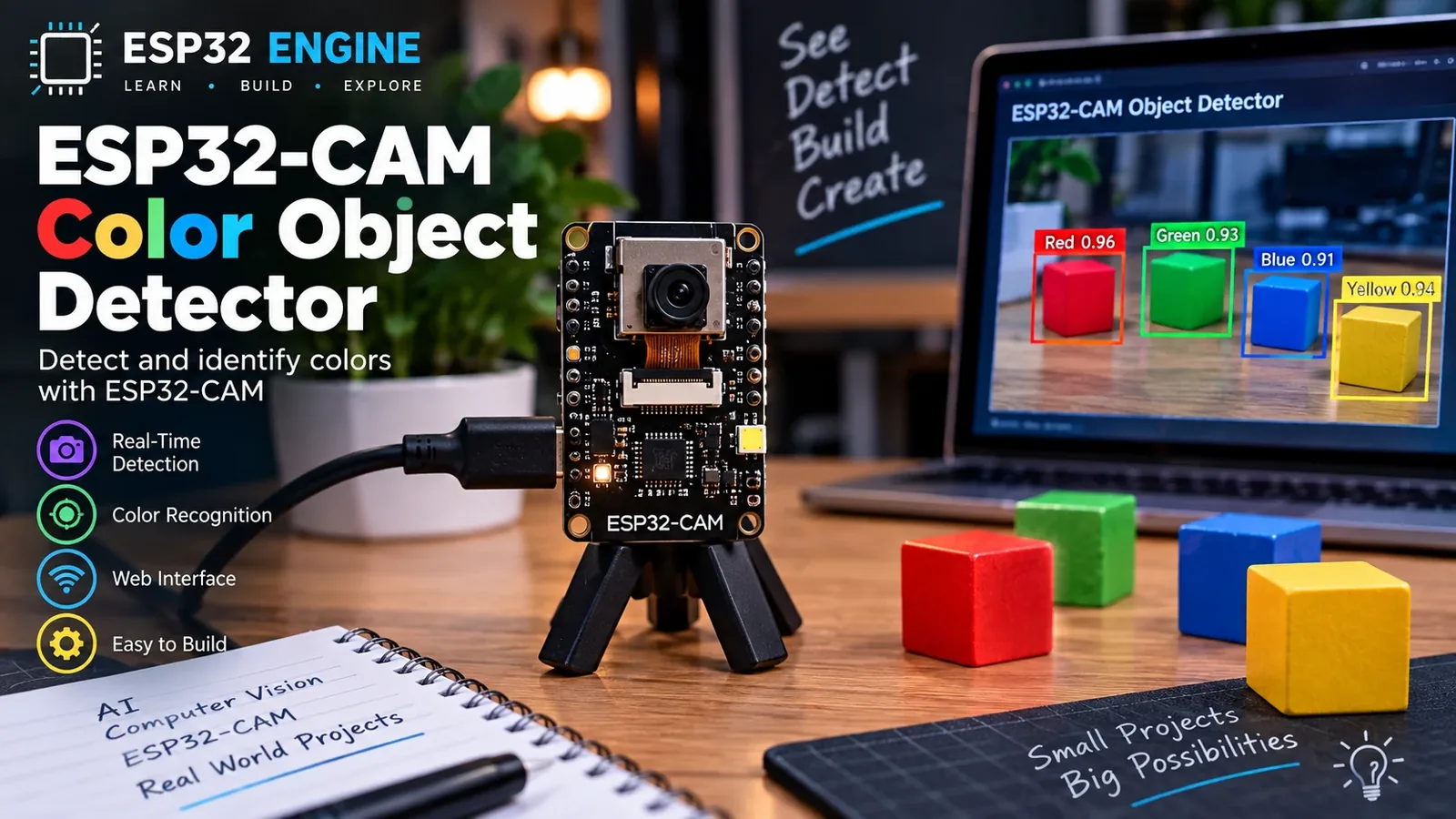
Build a Color Object Presence Demo
The Story
The slug says AI object detector, but this repository evidence supports a color-image-processing starter. The page names the boundary honestly. The Golden version keeps the implementation narrow and testable: code constants, wiring, GPIO notes, expected output, limitations, and troubleshooting all describe the same educational prototype.
Explain Like I'm 12
The camera picture is made of tiny color dots. The ESP32 counts dots that look orange and decides whether enough of them are present. The ESP32 reads a signal, checks it against a simple rule, and prints or changes an output so you can see what happened.
Learning Support
- Recommended ageAges 13+
- Adult supervisionAdult help recommended for ESP32-CAM flashing and privacy setup.
- Classroom useUse colored cards under controlled lighting to compare image processing with real machine learning.
- Parent promptAsk whether the sketch finds an object location or only estimates color presence.
- Screen-free activityDraw a camera frame and shade the pixels that should count as orange.
- Next challengeMove to an ESP32-S3 plus a documented model before claiming on-device AI object detection.
- Skills practiced
- ESP32-CAM setup
- RGB565 pixels
- Threshold tuning
- AI claim limits
- Learning outcomes
- Initialize the AI-Thinker OV2640 camera.
- Scan RGB565 pixels for a color target.
- Explain why this is not full AI object detection.
- Discuss lighting and privacy limitations.
- Mini experiments
- Change DETECT_THRESHOLD and observe false triggers.
- Test the same object under two lighting conditions.
- Change the RGB thresholds to look for another color.
Safety Standards
- Unplug USB before changing jumper wires. Recheck 3.3 V, 5 V, and GND before reconnecting power.
- Do not power motors, pumps, LED strips, or servos from the ESP32 3.3 V pin. Use a suitable external supply and common ground.
- Breadboards are for low-current prototypes. Move high-current or unattended builds to proper terminals, enclosure, strain relief, and fusing.
What You Will Build
A local AI-Thinker ESP32-CAM demo that captures OV2640 RGB565 frames, counts orange-like pixels on the ESP32, and lights the onboard LED when the color target fills enough of the frame. There is no neural network, Edge Impulse model, cloud API, browser inference, or object-class list in this starter build.
Learning Objectives
- Initialize the AI-Thinker OV2640 camera.
- Scan RGB565 pixels for a color target.
- Explain why this is not full AI object detection.
- Discuss lighting and privacy limitations.
Components List
- ESP32-CAM AI-Thinker board with OV2640ESP32-family camera board; use the fixed AI-Thinker camera pin map and stable 5 V power.
- FTDI USB-to-serial adapter3.3 V logic for programming; use stable 5 V power for the camera board.
- Jumper wiresProgramming and IO0 upload jumper.
Bill of Materials
| Part | Qty | Estimated Cost | Notes |
|---|---|---|---|
| ESP32-CAM AI-Thinker board with OV2640 | 1 | Varies | ESP32-family camera board; use the fixed AI-Thinker camera pin map and stable 5 V power. |
| FTDI USB-to-serial adapter | 1 | Varies | 3.3 V logic for programming; use stable 5 V power for the camera board. |
| Jumper wires | 1 | Varies | Programming and IO0 upload jumper. |
Wiring
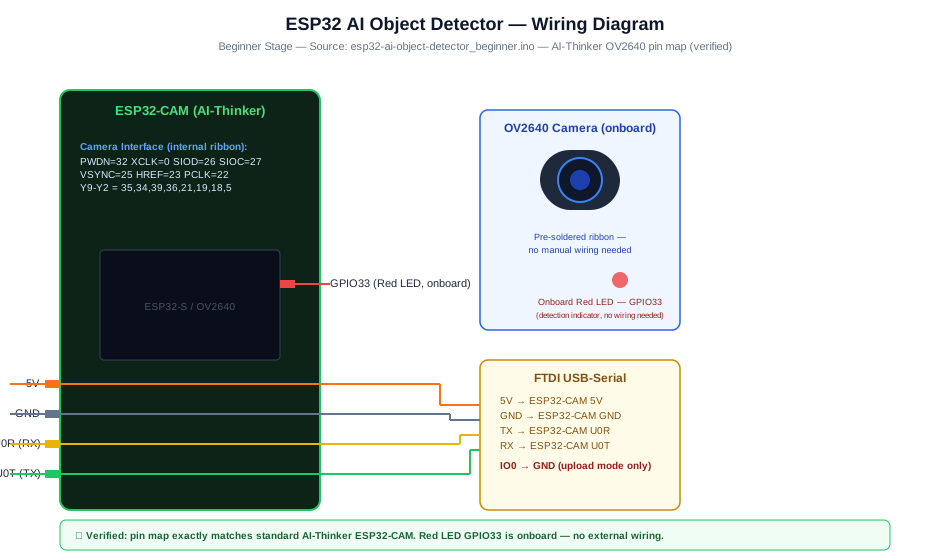
FTDI TX/RX connect to U0R/U0T for upload. IO0 goes to GND only during upload. Camera pins are fixed on the AI-Thinker board.
-
1
Unplug USB before changing ESP32-CAM programming wires.
-
2
Connect FTDI TX to U0R / GPIO3 and FTDI RX to U0T / GPIO1.
-
3
Connect FTDI GND to ESP32-CAM GND.
-
4
Power ESP32-CAM from stable 5 V and common ground.
-
5
Connect IO0 to GND only for upload, then remove it and reset.
-
6
Aim at a colored test card, not people, for first tests.
GPIO Mapping
| Signal | ESP32 Pin | Direction | Notes |
|---|---|---|---|
| OV2640 camera bus | AI-Thinker fixed camera pins | I/O | Do not remap unless using another board profile. |
| FTDI UART | GPIO3 / GPIO1 | I/O | Programming serial only. |
| Onboard LED | GPIO33 | Output | Detection indicator; active level varies by board. |
Circuit Explanation
The OV2640 is already wired to fixed ESP32-CAM pins. The sketch captures RGB565 frames and counts pixels in a color range.
Engineering Explanation
Processing happens on the ESP32 as simple RGB565 color thresholding. This is not bounding-box object detection and not trained ML inference. It is sensitive to lighting, camera angle, background colors, exposure, and the chosen threshold constants.
Libraries
- Arduino ESP32 coreIncludes esp_camera support for ESP32-CAM boards.
Code
Copy into Arduino IDE. Install any libraries noted in the component guides first.
// ESP32-CAM color object presence demo
// This is image processing, not machine-learning object detection.
#include "esp_camera.h"

#define PWDN_GPIO 32
#define RESET_GPIO -1
#define XCLK_GPIO 0
#define SIOD_GPIO 26
#define SIOC_GPIO 27
#define Y9_GPIO 35
#define Y8_GPIO 34
#define Y7_GPIO 39
#define Y6_GPIO 36
#define Y5_GPIO 21
#define Y4_GPIO 19
#define Y3_GPIO 18
#define Y2_GPIO 5
#define VSYNC_GPIO 25
#define HREF_GPIO 23
#define PCLK_GPIO 22

const int LED_PIN = 33;
const float DETECT_THRESHOLD = 0.05;

bool setupCamera() {
  camera_config_t config;
  config.ledc_channel = LEDC_CHANNEL_0;
  config.ledc_timer = LEDC_TIMER_0;
  config.pin_d0 = Y2_GPIO; config.pin_d1 = Y3_GPIO; config.pin_d2 = Y4_GPIO; config.pin_d3 = Y5_GPIO;
  config.pin_d4 = Y6_GPIO; config.pin_d5 = Y7_GPIO; config.pin_d6 = Y8_GPIO; config.pin_d7 = Y9_GPIO;
  config.pin_xclk = XCLK_GPIO; config.pin_pclk = PCLK_GPIO; config.pin_vsync = VSYNC_GPIO; config.pin_href = HREF_GPIO;
  config.pin_sscb_sda = SIOD_GPIO; config.pin_sscb_scl = SIOC_GPIO;
  config.pin_pwdn = PWDN_GPIO; config.pin_reset = RESET_GPIO;
  config.xclk_freq_hz = 20000000;
  config.pixel_format = PIXFORMAT_RGB565;
  config.frame_size = FRAMESIZE_QQVGA;
  config.jpeg_quality = 12;
  config.fb_count = 1;
  return esp_camera_init(&config) == ESP_OK;
}

float orangeFraction(camera_fb_t *fb) {
  uint16_t *pixels = (uint16_t *)fb->buf;
  size_t total = fb->width * fb->height;
  size_t matches = 0;
  for (size_t i = 0; i < total; i++) {
    uint16_t px = pixels[i];
    int r = (px >> 11) & 0x1F;
    int g = (px >> 5) & 0x3F;
    int b = px & 0x1F;
    if (r > 18 && g > 18 && g < 50 && b < 14) matches++;
  }
  return (float)matches / (float)total;
}

void setup() {
  Serial.begin(115200);
  pinMode(LED_PIN, OUTPUT);
  if (!setupCamera()) {
    Serial.println("Camera init failed");
    while (true) delay(1000);
  }
  Serial.println("Color object presence demo ready.");
}

void loop() {
  camera_fb_t *fb = esp_camera_fb_get();
  if (!fb) {
    Serial.println("Capture failed");
    delay(1000);
    return;
  }
  float fraction = orangeFraction(fb);
  esp_camera_fb_return(fb);
  bool detected = fraction > DETECT_THRESHOLD;
  digitalWrite(LED_PIN, detected ? LOW : HIGH); // AI-Thinker flash LED is often active LOW
  Serial.printf("orange_fraction=%.3f detected=%s\n", fraction, detected ? "YES" : "no");
  delay(1000);
}
Code Explanation
The sketch initializes the AI-Thinker OV2640 pin map, captures QQVGA RGB565 frames, counts pixels that fit a fixed orange threshold, compares the matching fraction with 0.05, and drives the onboard LED. It does not load a model or return object labels.
Expected Output
Serial Monitor prints orange_fraction and detected state once per second. The indicator changes when the colored target fills enough of the frame.
Troubleshooting
- Camera init failed Check AI-Thinker board selection, stable 5 V power, common ground with the programmer, and the OV2640 ribbon cable.
- Always detected Raise DETECT_THRESHOLD, remove orange or warm-colored background objects, and retest under steady lighting.
- Never detected Improve lighting, move the colored target closer, and adjust RGB threshold values only after confirming camera capture works.
- Upload works but the sketch will not run Remove the IO0-to-GND upload jumper, reset the ESP32-CAM, and reopen Serial Monitor.
Common Mistakes
- Calling color thresholding a trained AI model.
- Leaving IO0 connected after upload.
- Using weak power for ESP32-CAM.
- Testing with private scenes or people without consent.
Testing Checklist
- Upload with IO0 grounded, then remove IO0 jumper.
- Point at a neutral background and record baseline fraction.
- Move an orange card into frame.
- Change threshold and repeat.
Engineering Tips
- Use controlled lighting.
- Use QQVGA for memory headroom.
- Do not claim detection classes without a model.
Upgrade Ideas
- Show fraction on a local web page.
- Add a bounding box only after implementing real localization.
- Port a real model to ESP32-S3 with documented assets.
Real-World Applications
- Image processing lesson
- Camera threshold experiment
- AI limitations discussion
FAQs
Is this true AI?
No. It is local color thresholding.
Does it return bounding boxes?
No. It reports color presence as a fraction.
Can it detect people?
No. Do not use it for people detection or surveillance.
Review, Testing, and References
Author: Abdul Mubeen and the ESP32 Engine editorial team. Last updated: 2026-08-23. Reviewed: wiring logic, Arduino code structure, beginner safety, and learning sequence.
Educational level: Intermediate. Estimated completion time: 90-120 min. This project is for learning and prototyping; production or unattended hardware needs additional engineering review.
Project Complete!
You completed Build an ESP32-CAM Color Object Detector Demo as a safe, bounded ESP32 learning build with matching wiring, code, tests, and limitations.
- ESP32-CAM setup
- RGB565 pixels
- Threshold tuning