
Before you start
- Board and software
- Classic ESP32-WROOM-32/32E DevKit with the listed GPIOs exposed and unused. Arduino IDE 2.x; esp32 by Espressif Systems 3.3.2 (review baseline, not a latest-release claim). Select the documented board or ESP32 Dev Module for a generic WROOM board. Other families need their own pin map. Serial Monitor: 115200 baud.
- Supported hardware
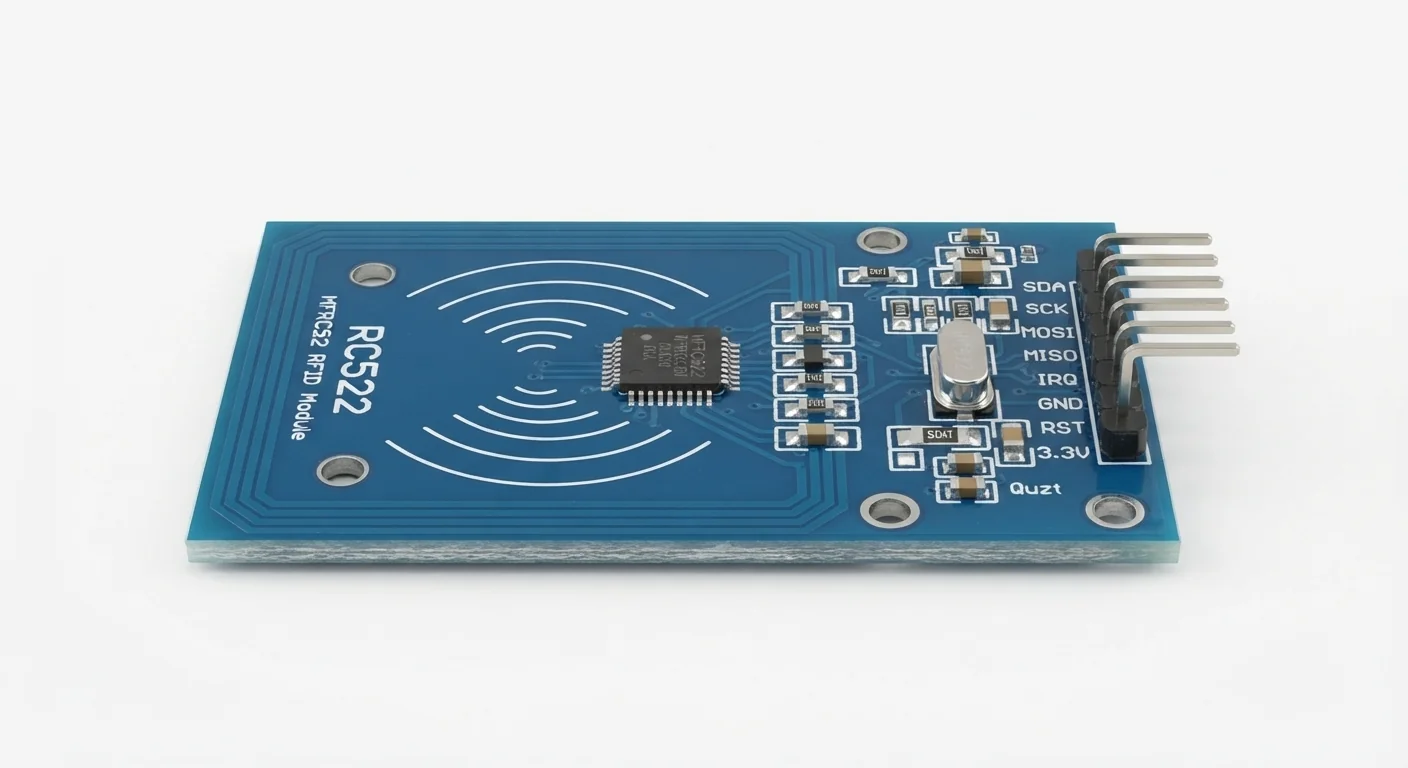
- A documented RC522/MFRC522 board configured for SPI with 3.3 V, GND, SCK, MOSI, MISO, SS (often SDA), RST and optional IRQ. Supply and host logic must both be 3.3 V. The illustration does not prove genuine NXP silicon or a board schematic.
- Prerequisites and parts
- Complete IDE setup and Blink. Reader, short wires and a known ISO/IEC 14443 Type A test tag, such as MIFARE Classic. A generic RFID card/fob or phone is not automatically compatible.
- Libraries
- Install MFRC522 by GithubCommunity 1.4.12 from Library Manager. SPI is bundled with Arduino-ESP32 3.3.2.
- Expected result
- A version byte appears, then UID bytes when a compatible card is presented. Remove and present it again for another read.
- Verification status
- Documentation and source review only. Not compiled or tested on hardware. The approved product-style illustration identifies a family, not a verified physical pin layout or manufacturer-authenticated board. Follow the logical diagram and documentation for your actual part.
Overview
The reader energizes a nearby passive 13.56 MHz tag and exchanges data. This example prints the UID without writing the card. It is useful for learning SPI or labelling classroom objects.
The RC522 pin labelled SDA is chip select in this SPI example, not ESP32 I2C SDA. Match labels, not the artwork’s pin order. UID-only access control is easy to spoof and is not a secure lock design.
Technical Specifications
Arduino library: MFRC522 1.4.12
| Specification | Value | Why it matters |
|---|---|---|
| RF interface | 13.56 MHz, ISO/IEC 14443 A | Frequency alone does not establish tag compatibility. |
| Host interface | SPI with explicit pins | Not I2C despite the SDA header label. |
| UID | Variable-length hexadecimal bytes | Not a secret or proof of authorized ownership. |
Pinout
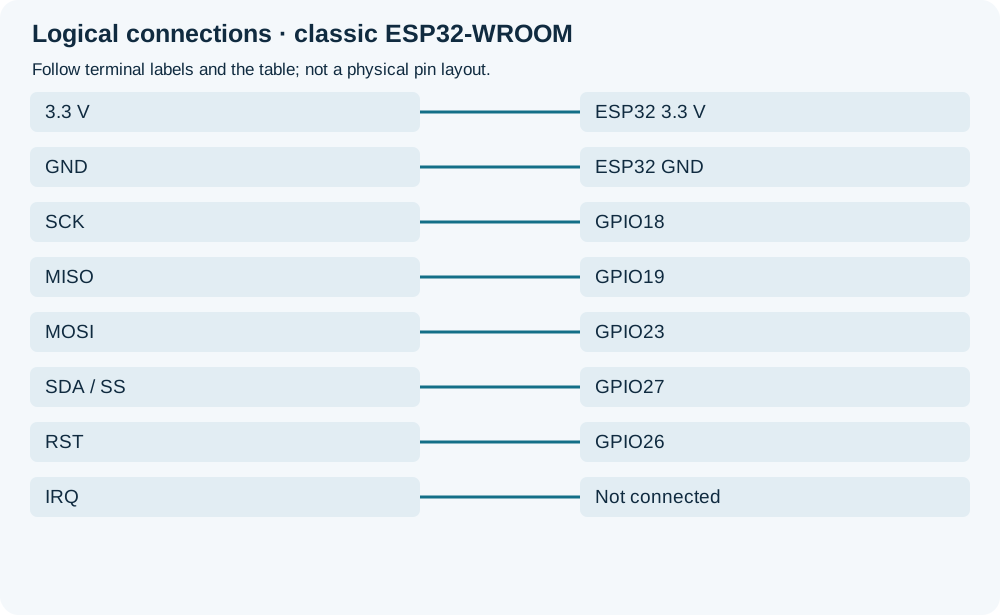
- 3.3 V Supply ESP32 3.3 V Only a documented 3.3 V board; no 5 V.
- GND Return ESP32 GND Common ground.
- SCK SPI clock GPIO18 Explicit in SPI.begin.
- MISO Reader to ESP32 GPIO19 3.3 V signal.
- MOSI ESP32 to reader GPIO23 3.3 V signal.
- SDA / SS SPI select GPIO27 Active LOW; not I2C SDA.
- RST Reset GPIO26 Library-controlled reset.
- IRQ Optional interrupt Not connected Polling example.
Wiring Diagram
Reader 3.3 V and common GND; SCK18, MISO19, MOSI23, SS27 and RST26. IRQ unused.
| Component terminal | ESP32 / circuit connection | Purpose and qualification |
|---|---|---|
| 3.3 V | ESP32 3.3 V | Only a documented 3.3 V board; no 5 V. |
| GND | ESP32 GND | Common ground. |
| SCK | GPIO18 | Explicit in SPI.begin. |
| MISO | GPIO19 | 3.3 V signal. |
| MOSI | GPIO23 | 3.3 V signal. |
| SDA / SS | GPIO27 | Active LOW; not I2C SDA. |
| RST | GPIO26 | Library-controlled reset. |
| IRQ | Not connected | Polling example. |
Open wiring diagram at full size (new tab)
-
1
Disconnect USB and verify SPI configuration and 3.3 V power requirements.
-
2
Connect named signals, install MFRC522 1.4.12 and upload.
-
3
Open Serial Monitor at 115200 and present a known compatible tag; remove it before another presentation.
Wiring and matching Arduino code
SPI reader check and tag UID
Reader 3.3 V and common GND; SCK18, MISO19, MOSI23, SS27 and RST26. IRQ unused.
mfrc522_rfid_reader.ino
#include <Arduino.h>
#include <SPI.h>
#include <MFRC522.h>
constexpr uint8_t SS_PIN = 27;
constexpr uint8_t RST_PIN = 26;
MFRC522 reader(SS_PIN, RST_PIN);
bool ready = false;
void setup() {
  Serial.begin(115200);
  if (!SPI.begin(18, 19, 23, SS_PIN)) {
    Serial.println("SPI initialization failed");
    return;
  }
  reader.PCD_Init();
  delay(4);
  byte version = reader.PCD_ReadRegister(MFRC522::VersionReg);
  Serial.print("Reader version byte: 0x");
  Serial.println(version, HEX);
  if (version == 0x00 || version == 0xFF) {
    Serial.println("No usable reader response; check power, SS and SPI wiring");
    return;
  }
  ready = true;
  Serial.println("Present a compatible Type A test card");
}
void loop() {
  if (!ready) { delay(100); return; }
  if (reader.PICC_IsNewCardPresent() && reader.PICC_ReadCardSerial()) {
    Serial.print("UID:");
    for (byte i = 0; i < reader.uid.size; ++i) {
      Serial.print(' ');
      if (reader.uid.uidByte[i] < 0x10) Serial.print('0');
      Serial.print(reader.uid.uidByte[i], HEX);
    }
    Serial.println();
    reader.PICC_HaltA();
    reader.PCD_StopCrypto1();
  }
  delay(10);
}
The version read detects a missing SPI response, not authenticity. A halted stationary card need not produce repeated lines. This reads UID only, with no authentication or protected data access.
Expected Output
Expect one version line and UID bytes for a successful presentation. Bytes and length depend on the tag; no fixed sample UID is promised. A silent tag can be an unsupported protocol rather than a wiring fault.
How it works
SPI commands control the reader; its antenna handles the RF exchange. The library requests a new card, selects it and exposes its UID. Card halt and crypto cleanup finish the transaction.
Troubleshooting
| Problem | Possible cause | Solution |
|---|---|---|
| Version 00 or FF | Missing power, wrong SPI pins or unsoldered header. | Disconnect power; trace 3.3 V, GND and every named signal. Check the actual module schematic. |
| Reader responds but no UID | Wrong tag protocol or poor antenna coupling. | Use a known Type A test card, short wires and avoid metal beside the antenna. No universal read distance is promised. |
| No repeat UID while held still | The example halts the selected card. | Remove and present it again; transaction handling is deliberate. |
Where you use it
- Classroom object identification
- SPI communication practice
- Non-security inventory prototype
Continue learning
Related projects
FAQ
Not in this SPI-configured example. SDA means SS/NSS here; another interface needs different hardware configuration and software.
UIDs can be copied or changed on some tags. This is a reading demonstration, not secure authentication.
Technical references
- NXP MFRC522 datasheet Rev. 3.9 — RF protocols, supply and host interfaces; not authenticity of the artwork.
- MFRC522 library 1.4.12 — SPI API, cleanup and security limitations.
- Arduino-ESP32 3.3.2 SPI implementation — Explicit pins and boolean begin result.