
The Story
Both sensors can give an ESP32 useful environmental readings, but they connect differently and answer different questions. Knowing what each one measures makes it easier to choose without paying for features your project will not use.
Background reading
Choose by the measurements your project needs: DHT22 is a simpler temperature-and-humidity sensor, while BME280 adds barometric pressure and supports I2C or SPI. Compare practical wiring, library setup, documented limits, and project fit before you build.
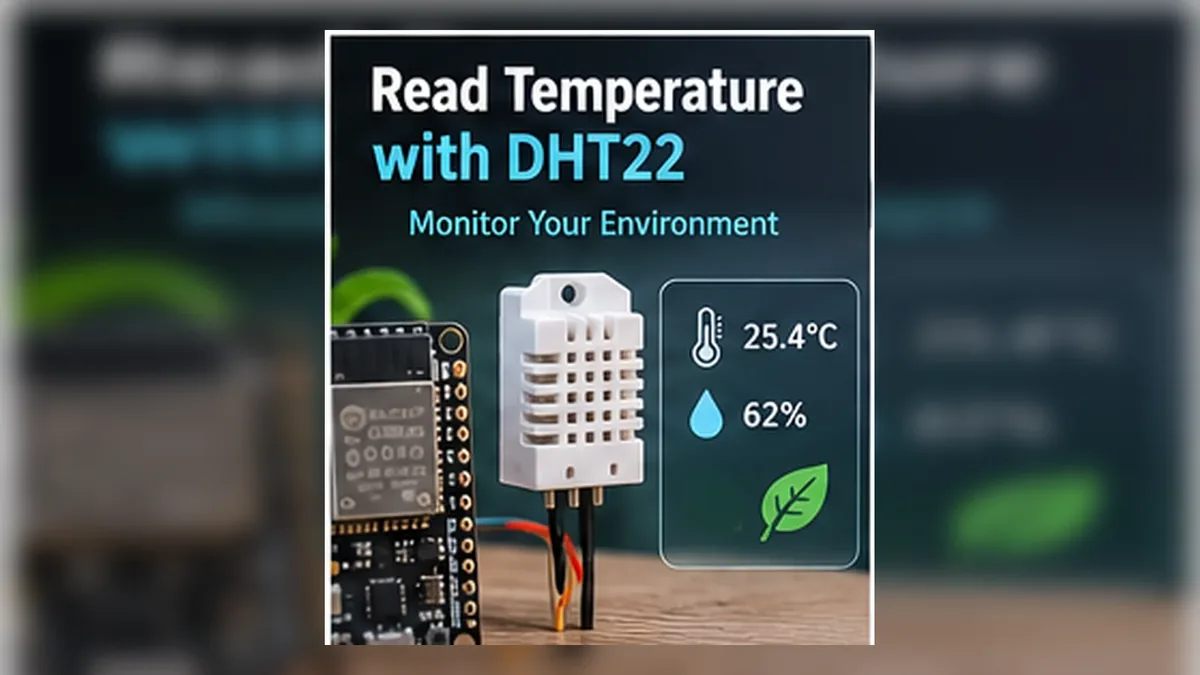
Both sensors can give an ESP32 useful environmental readings, but they connect differently and answer different questions. Knowing what each one measures makes it easier to choose without paying for features your project will not use.
DHT22 tells the ESP32 how warm and humid the air is. BME280 measures those too, and also measures air pressure, which can help estimate changes in altitude.
Author: Abdul Mubeen and the ESP32 Engine editorial team. Last updated: 2026-10-02. Reviewed: educational accuracy and beginner safety. Level: Beginner. Estimated time: 10 min read.
This guide is written for learning and bench prototyping. Check the testing notes before adapting the circuit to different boards, batteries, relays, motors, or outdoor hardware.
The DHT22 (also commonly called AM2302) measures air temperature and relative humidity over a timed single-wire digital connection. The BME280 measures temperature, relative humidity, and barometric pressure, and communicates using I2C or SPI. Choose based on the readings and interface your project needs; neither is the universal winner.
For a room monitor that only needs temperature and humidity, DHT22 may be enough. For a weather-station experiment, pressure trend, or pressure-based altitude estimate, the extra BME280 pressure measurement is useful. Both still need sensible placement and realistic expectations about sensor tolerance.
DHT22 reports temperature and relative humidity. It does not measure air pressure, altitude, air quality, or wind. Its comparatively slow measurement cycle makes it suitable for room and greenhouse monitoring, not rapid control loops.
BME280 reports temperature, relative humidity, and barometric pressure. Software can use pressure and a reference pressure to estimate altitude, but that is an estimate: weather changes and local pressure must be considered. Neither sensor measures wind, rainfall, or the full set of quantities needed for a calibrated outdoor weather station.
| Category | DHT22 / AM2302 | BME280 |
|---|---|---|
| Measurements | Temperature and relative humidity | Temperature, relative humidity, and pressure |
| Published sensor accuracy examples | Common AM2302 documentation lists about ±0.5 °C temperature and ±2% RH at 25 °C (maximum humidity deviation can be larger) | Bosch datasheet specifies about ±0.5 °C temperature, ±3% RH humidity, and pressure accuracy around ±1 hPa over stated conditions |
| ESP32 interface | One timed digital data wire plus power and ground; not I2C | I2C or SPI; I2C uses SDA and SCL, SPI uses clock, data, and chip-select signals |
| Update pace | Slow; allow about two seconds between readings | Configurable measurement and standby settings; faster sampling is possible, depending on settings and power mode |
| Pressure / altitude | No pressure measurement, so no pressure-based altitude estimate | Measures pressure; software can estimate altitude from pressure and a reference |
| Pull-up needs | DATA needs a pull-up; bare sensors generally need an external resistor, while many modules include one | I2C lines need pull-ups; many breakouts include them, but check the exact board. SPI does not use I2C pull-ups |
| Setup | Simple wiring, but timing and pull-up matter | More interface and configuration choices; confirm I2C address or SPI pin setup |
| Best fit | Basic, low-rate temperature and humidity projects | Projects that need pressure too, or prefer I2C/SPI bus integration |
These published figures are examples, not a simple head-to-head score. AM2302 documentation lists ±0.5 °C temperature accuracy and ±2% RH at 25 °C, with maximum humidity deviation that can reach ±5% RH. Bosch specifies BME280 temperature accuracy around ±0.5 °C, humidity accuracy around ±3% RH, and pressure accuracy around ±1 hPa under stated conditions. Conditions and test methods differ, so do not treat the numbers as a direct winner comparison. Exact revision, temperature and humidity range, pressure conditions, breakout design, mounting, airflow, and self-heating all matter; check the datasheet for your part.
The BME280 chip's datasheet gives temperature, humidity, and pressure error figures under particular test conditions. Pressure-based altitude can be sensitive to local weather and the reference pressure; it is useful for relative changes and learning, but is not automatically a surveyed elevation measurement. The sensor package and breakout board can also warm up from the ESP32 or nearby electronics.
DHT22 readings update slowly and should not be requested more often than the sensor supports; the manufacturer recommends a two-second measurement interval. Humidity response and readings are affected by placement, condensation, airflow, contamination, and exposure to conditions outside the documented range. Keep either sensor away from direct sunlight, warm regulators, and heat-producing components when measuring ambient air.
DHT22 uses one bidirectional data connection with a device-specific timing protocol. Arduino libraries handle the pulse timing and decoding. Despite some boards marking a signal pin SDA, it is not an I2C sensor and does not share the ESP32 I2C bus in the normal way.
I2C uses two shared signal lines, SDA and SCL, and typically only a few wires overall. A BME280 is commonly found at I2C address 0x76 or 0x77, depending on the SDO/address selection and breakout implementation. SPI uses separate clock, data-in, data-out, and chip-select signals, with some signal names varying by board. The ESP32 can map these peripherals to supported GPIOs, but use a pinout and library example for your specific board.
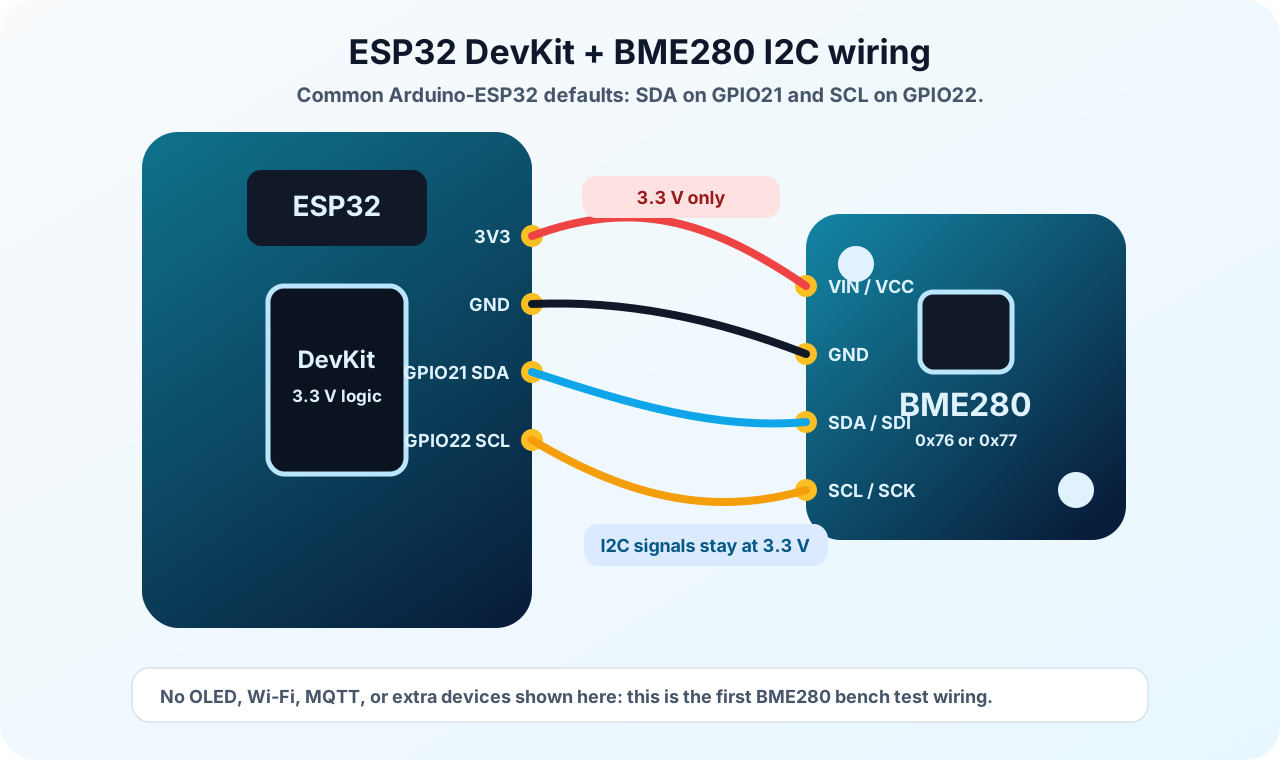
These existing diagrams are examples only. Module pin order, labeling, pull-ups, regulators, and level shifting differ, so read the silkscreen and documentation for your exact breakout.
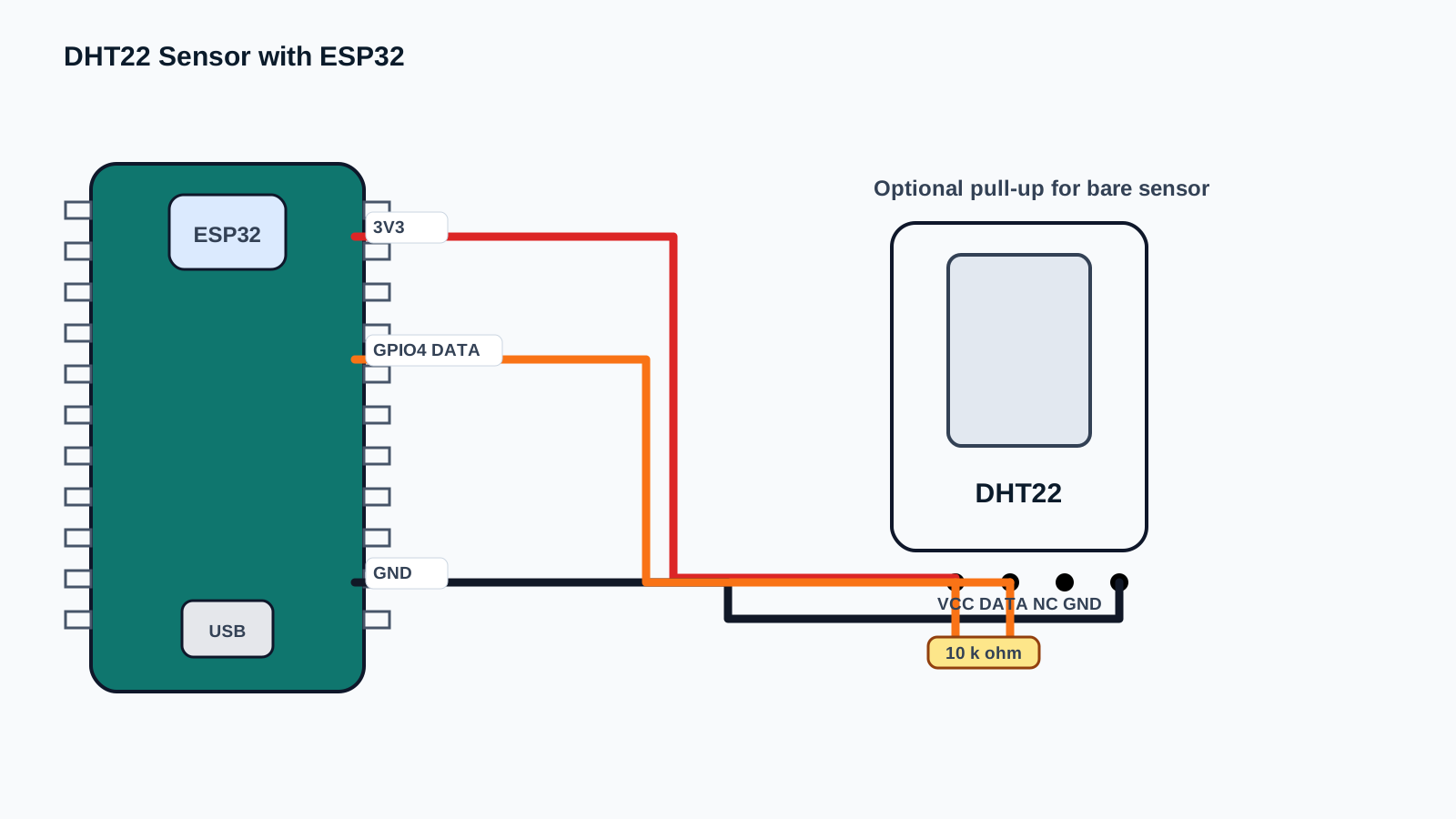
Connect VCC, DATA, and GND according to the sensor's pinout, with a common ground. A bare four-pin DHT22 normally needs a pull-up resistor between DATA and a suitable logic supply. For direct connection to an ESP32 GPIO, keep DATA pulled up to 3.3 V. Many three-pin modules include a pull-up, but board designs vary; inspect its schematic or documentation before adding another. A DHT22 module that accepts 5 V at VCC may still pull DATA up to 5 V, which is not safe to assume for an ESP32 input.
For I2C, wire the breakout's GND, SDA, and SCL to the matching ESP32 connections. For SPI, follow the module's labels and library example for SCK, MOSI/SDI, MISO/SDO, and CS. The BME280 chip itself is a low-voltage device; a breakout marked VIN may add a regulator or level shifting, while another board may expose chip-level connections directly. Never infer safe 5 V operation from the BME280 name alone. Check the exact board's permitted supply and signal voltage. Pull-up resistors may already be fitted to I2C breakouts; several modules on one bus can result in overly strong combined pull-ups, so check board documentation if the bus behaves unreliably.
Both sensors work with Arduino libraries, but the code and library are different. For DHT22, install the commonly used DHT sensor library and its stated dependency through Library Manager, then select the DHT22 sensor type in code. For BME280, choose a library that explicitly supports BME280 and install its required dependencies; the Adafruit BME280 library, for example, lists Adafruit Unified Sensor and Adafruit BusIO dependencies. Avoid similarly named libraries or BMP280-only drivers, which do not support every BME280 feature.
The ESP32 board package and upload setup are shared. Follow the ESP32 Arduino IDE setup guide if you have not yet selected a board and port. Then use the matching DHT22 complete guide or BME280 complete guide for verified end-to-end sketches. This comparison intentionally focuses on the differences instead of duplicating both tutorials.
A DHT22 sketch configures a data GPIO and the DHT22 type, initializes the DHT library, and reads temperature and humidity. It should wait long enough between measurements; the complete DHT22 guide uses a two-second interval and checks for invalid readings.
A BME280 sketch initializes the I2C or SPI bus, starts the sensor at its selected address or chip-select pin, and reads temperature, humidity, and pressure. An I2C sketch may try the address used by the module, commonly 0x76 or 0x77; SPI setup instead requires the correct wiring and chip-select pin. Use the complete BME280 guide for its working code and address troubleshooting. These are not interchangeable drop-in libraries or pin configurations.
For outdoor forecasts, calibrated records, or robust industrial monitoring, neither hobby breakout automatically provides a complete solution. Enclosure, radiation shielding, ventilation, calibration, logging, and sensor environmental rating can matter as much as the chip.
Check the concise DHT22 component reference and BME280 component reference for the specific module details. Then follow the complete ESP32 DHT22 guide or complete ESP32 BME280 guide to wire the sensor, install the library, and run working code. To combine pressure, temperature, and humidity readings into a build, continue to the ESP32 IoT Weather Station project.
Yes. BME280 measures temperature, relative humidity, and pressure. Check the exact chip: BMP280 is a similar part without humidity measurement.
No. DHT22 has no pressure measurement; a BME280 can support a pressure-based altitude estimate when supplied with a suitable reference pressure.
Accuracy depends on the measurement, specified operating conditions, exact part and breakout, and how it is installed. Compare the appropriate datasheet specifications rather than declaring an all-purpose winner.
No. DHT22 uses its timed data connection; BME280 uses I2C or SPI. Match the pins, voltage, and library to the exact sensor module.
Yes. Connect the BME280 to I2C or SPI and the DHT22 data line to a separate suitable GPIO, then avoid pin conflicts in code and wiring.
Yes. The BME280 measures temperature, relative humidity, and barometric pressure. Some similar-looking Bosch sensors, such as the BMP280, do not measure humidity, so check the exact chip marking or module documentation.
No. The DHT22 does not measure pressure. Pressure-based altitude estimates require a barometric sensor such as the BME280, and the result depends on the reference pressure and conditions.
There is no single answer across every measurement and condition. Published tolerances depend on the specific sensor, operating range, and test conditions; the breakout board, placement, airflow, and self-heating also affect real readings. Compare the datasheets for the exact parts and intended conditions.
No. A DHT22 uses a timed single-wire digital data line, while a BME280 normally uses I2C or SPI. Their power and pin labels also differ, so follow the wiring example and board documentation for the specific sensor.
Yes, if your wiring and libraries support both and you have suitable GPIO and bus connections. The BME280 uses I2C or SPI, while the DHT22 has its own data GPIO; make sure the chosen pins do not conflict with other hardware.
For temperature and humidity alone, a DHT22 can be a straightforward starting point. Choose a BME280 when your project needs pressure as well, or when I2C/SPI integration suits the rest of the build. Use the exact module documentation for pin and power details, then follow the matching ESP32 guide for a complete setup.