
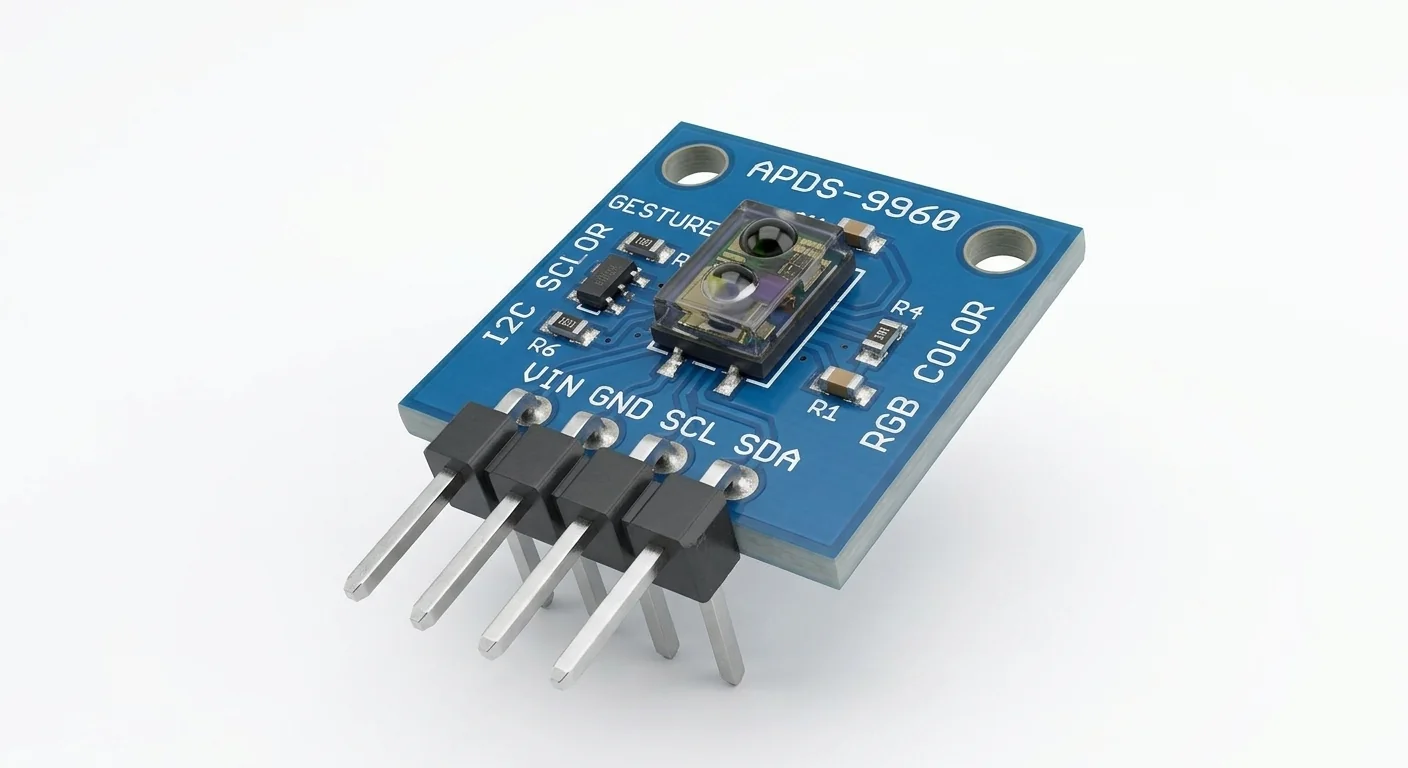
Before you start
- Board and software
- Classic ESP32-WROOM-32/32E DevKit with the listed GPIOs exposed and unused. Arduino IDE 2.x; esp32 by Espressif Systems 3.3.2 (review baseline, not a latest-release claim). Select the documented board or ESP32 Dev Module for a generic WROOM board. Other families need their own pin map. Serial Monitor: 115200 baud.
- Supported hardware
- Reference circuit: documented Adafruit APDS9960 breakout powered at VIN 3.3 V, with level-shifted SDA/SCL. The illustrated generic board is not identified as Adafruit. Generic regulators, pull-ups and level shifting must be checked separately.
- Prerequisites and parts
- Complete IDE setup and I2C scanner lesson. Documented breakout, short wires and colored objects under consistent lighting; leave the optical window uncovered.
- Libraries
- Install Adafruit APDS9960 1.3.1 and Adafruit BusIO. Wire is bundled with core 3.3.2. Use this Adafruit API, not SparkFun gesture examples.
- Expected result
- Raw R/G/B/C counts print when ready. Lighting and objects change them; they are not calibrated display RGB, lux or distance.
- Verification status
- Documentation and source review only. Not compiled or tested on hardware. The approved product-style illustration identifies a family, not a verified physical pin layout or manufacturer-authenticated board. Follow the logical diagram and documentation for your actual part.
Overview
APDS-9960 combines ambient/color channels with infrared proximity and directional gesture sensing. Clear is a broad light-intensity channel, not transparency or distance. Start with color to check the bus before enabling the gesture engine.
The example enables color only, leaving proximity and gestures off. It does not promise swipe recognition. The linked gesture project has its own mode, wiring and library assumptions.
Technical Specifications
Arduino library: Adafruit APDS9960 1.3.1
| Specification | Value | Why it matters |
|---|---|---|
| Address | 0x39 fixed | Address conflicts require separate buses or a suitable multiplexer. |
| Example mode | Color only | A color read is not gesture classification. |
| Output | 16-bit R/G/B/clear counts | Exposure and lighting matter; not calibrated lux or distance. |
Pinout
- VIN (reference breakout) Supply ESP32 3.3 V Adafruit reference; check generic board separately.
- GND Return ESP32 GND Common ground.
- SDA I2C data GPIO21 ESP32-side pulls at 3.3 V.
- SCL I2C clock GPIO22 100 kHz here.
- INT Optional interrupt Not connected Color data-ready is polled.
- 3Vo (reference breakout) Regulator output Not connected Do not tie output rails together or use as VIN.
Wiring Diagram
Reference Adafruit VIN to 3.3 V, common GND, SDA21/SCL22; INT and 3Vo unused. Generic board circuitry is not inferred.
| Component terminal | ESP32 / circuit connection | Purpose and qualification |
|---|---|---|
| VIN (reference breakout) | ESP32 3.3 V | Adafruit reference; check generic board separately. |
| GND | ESP32 GND | Common ground. |
| SDA | GPIO21 | ESP32-side pulls at 3.3 V. |
| SCL | GPIO22 | 100 kHz here. |
| INT | Not connected | Color data-ready is polled. |
| 3Vo (reference breakout) | Not connected | Do not tie output rails together or use as VIN. |
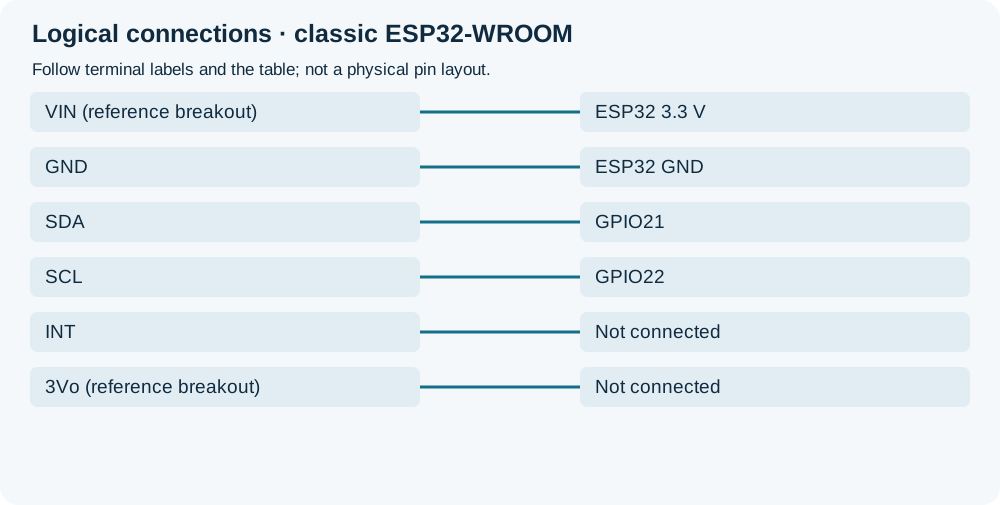
Open wiring diagram at full size (new tab)
-
1
Disconnect power and confirm actual board supply/pull-up rails.
-
2
Connect named reference terminals; leave the optical window clear.
-
3
Install the library, upload and open Serial Monitor at 115200. Compare covered and illuminated colored objects under consistent lighting.
Wiring and matching Arduino code
Raw RGB/clear counts and bounded data-ready diagnostic
Reference Adafruit VIN to 3.3 V, common GND, SDA21/SCL22; INT and 3Vo unused. Generic board circuitry is not inferred.
apds9960_sensor.ino
#include <Arduino.h>
#include <Wire.h>
#include <Adafruit_APDS9960.h>
Adafruit_APDS9960 apds;
bool ready = false;
uint32_t lastReady = 0;
uint32_t lastSample = 0;
void setup() {
  Serial.begin(115200);
  if (!Wire.begin(21, 22, 100000)) {
    Serial.println("I2C bus initialization failed");
    return;
  }
  if (!apds.begin(50, APDS9960_AGAIN_4X, 0x39, &Wire)) {
    Serial.println("APDS9960 initialization failed; check board, power and I2C");
    return;
  }
  apds.enableProximity(false);
  apds.enableGesture(false);
  apds.enableColor(true);
  ready = true;
  lastReady = millis();
}
void loop() {
  if (!ready) { delay(100); return; }
  uint32_t now = millis();
  if (now - lastSample >= 500) {
    lastSample = now;
    if (apds.colorDataReady()) {
      uint16_t r, g, b, c;
      apds.getColorData(&r, &g, &b, &c);
      Serial.printf("R=%u G=%u B=%u Clear=%u\n",
        unsigned(r), unsigned(g), unsigned(b), unsigned(c));
      lastReady = now;
    }
  }
  if (now - lastReady >= 3000) {
    Serial.println("No ready color data for 3 s; check bus and sensor mode");
    lastReady = now;
  }
  delay(1);
}
The diagnostic does not wait forever. The pinned begin implementation checks chip ID; ACK alone is insufficient. Data-ready and getColorData do not guarantee continuing bus health after unplugging the sensor.
Expected Output
Counts change with light, surface color, geometry and exposure/gain. No fixed numbers are promised. Saturated counts suggest excessive exposure; low counts can mean little light or an obstructed window. This sketch reports neither gestures nor centimetres.
How it works
Color sensing integrates light for the configured interval; data-ready gates reading the four channel registers. Gesture mode instead uses reflected infrared patterns and a separate engine/FIFO workflow. Keep those tasks distinct.
Troubleshooting
| Problem | Possible cause | Solution |
|---|---|---|
| Initialization fails despite 0x39 ACK | Wiring, chip variant or identification failure. | Check supply/pulls and markings; another device can ACK this address. Do not bypass the ID check. |
| No ready data diagnostic | Mode, power or bus failure. | Check connections, then restart. Do not block indefinitely waiting for data. |
| Saturation or unstable comparisons | High gain/exposure or changing lighting. | Use consistent geometry; reduce gain/integration using the documented API. Calibrate before claiming physical units. |
Where you use it
- Relative color/light experiments
- Brightness input after calibration
- Prerequisite for gesture-control experiments
Continue learning
Related projects
FAQ
No. It is a light channel; proximity is separate and not automatically calibrated distance.
Only color is enabled. Gesture recognition needs a different engine and setup; follow the separate project’s workflow.
Technical references
- Broadcom APDS-9960 datasheet — Chip modes, RGBC output and separate supplies.
- Adafruit APDS9960 pinouts — Reference power and level shifting.
- Adafruit APDS9960 1.3.1 — begin, color mode, data-ready and read API.