ESP32 CNC Controller

Industrial AutomationBeginnerIntermediateAdvanced

Use the ESP32 with A4988 stepper drivers to build a CNC motion controller. Start with single-axis step and direction control, progress to a 2-axis plotter parsing serial G-code commands, and finish with a 3-axis CNC that accepts G-code uploads via a web interface.

Overview

In this beginner project you will control a single NEMA 17 stepper motor using an A4988 driver module and the ESP32. The firmware sends STEP pulses at a defined speed and changes direction using the DIR pin. You will control step count, direction, and speed from the Serial Monitor and observe the motor shaft rotate precisely. This project teaches stepper motor fundamentals: step pulse timing, microstepping, and current limiting.

Components
  • 1× ESP32 DevKit V1
  • 1× A4988 stepper driver module
  • 1× NEMA 17 stepper motor — 200 steps/rev; 1.5-2.0 A rated
  • 1× 12 V 2 A power supply — Motor power; separate from ESP32 5 V
  • 1× 100 uF electrolytic capacitor — A4988 VMOT decoupling; essential to prevent driver damage
  • 1× Breadboard and jumper wires
  • 1× Small flathead screwdriver — A4988 current limit trim pot adjustment
Wiring
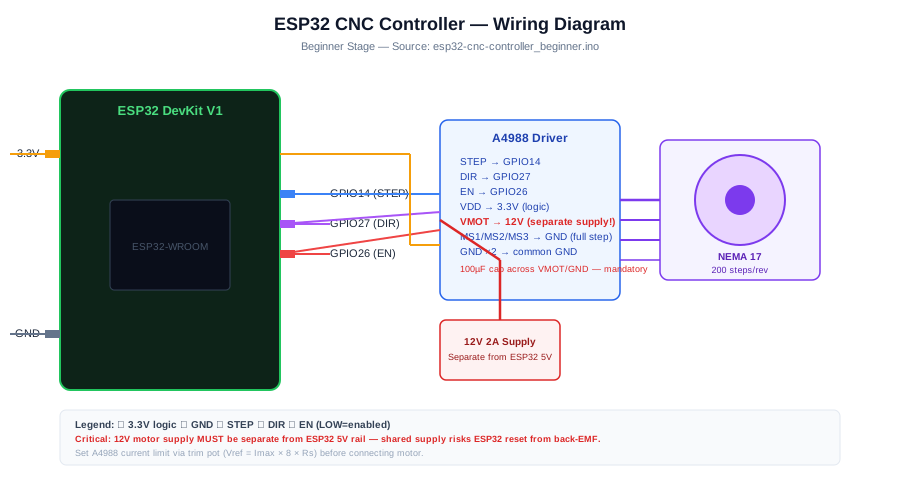
Component PinESP32 PinNotes
A4988 STEPGPIO 14Each HIGH pulse = one microstep
A4988 DIRGPIO 27HIGH=clockwise, LOW=counterclockwise
A4988 ENGPIO 26LOW=enabled; HIGH=driver disabled and motor de-energised
A4988 VMOT12 V supply +100 uF cap across VMOT and GND
A4988 VDD3.3 VLogic supply from ESP32
A4988 GND (x2)GND (common)Both GND pins must be connected
MS1/MS2/MS3GND/GND/GNDAll LOW = full step mode (200 steps/rev)
NEMA 17 coils A+/A-/B+/B-A4988 1A/1B/2A/2BCheck motor datasheet for coil pairing
Arduino Code
esp32-cnc-controller_beginner.ino
// ESP32 CNC Controller - Beginner
// Single-axis stepper control; commands via Serial Monitor
// Commands: F<steps> = forward, B<steps> = backward, S<us> = set step delay

const int STEP_PIN = 14;
const int DIR_PIN  = 27;
const int EN_PIN   = 26;

long stepDelay = 1000; // microseconds between step pulses (lower = faster)

void stepMotor(long steps, bool forward) {
  digitalWrite(EN_PIN,  LOW); // enable driver
  digitalWrite(DIR_PIN, forward ? HIGH : LOW);
  for (long i = 0; i < steps; i++) {
    digitalWrite(STEP_PIN, HIGH);
    delayMicroseconds(stepDelay);
    digitalWrite(STEP_PIN, LOW);
    delayMicroseconds(stepDelay);
  }
}

void setup() {
  Serial.begin(115200);
  pinMode(STEP_PIN, OUTPUT);
  pinMode(DIR_PIN,  OUTPUT);
  pinMode(EN_PIN,   OUTPUT);
  digitalWrite(EN_PIN, HIGH); // start disabled
  Serial.println("CNC Stepper Ready");
  Serial.println("Commands: F<steps>  B<steps>  S<delay_us>");
}

void loop() {
  if (!Serial.available()) return;
  char cmd = Serial.read();
  long val = Serial.parseInt();

  if (cmd == 70) { // F
    Serial.printf("Forward %ld stepsn", val);
    stepMotor(val, true);
  } else if (cmd == 66) { // B
    Serial.printf("Backward %ld stepsn", val);
    stepMotor(val, false);
  } else if (cmd == 83) { // S
    stepDelay = val;
    Serial.printf("Step delay set to %ld usn", stepDelay);
  }
  digitalWrite(EN_PIN, HIGH); // disable between moves to reduce heat
}
How It Works
01

Step Pulse Timing: Each step pulse is a HIGH-LOW transition on the STEP pin. The A4988 advances the motor one microstep on the rising edge. The delay between pulses sets motor speed: 1000 us = 500 steps/sec = 2.5 revolutions/sec in full-step mode.

02

A4988 Current Limiting: Before use, set the A4988 current limit by adjusting the trim potentiometer. Formula: Vref = Imax * 8 * Rs. For a 1.5 A motor with Rs=0.1 ohm: Vref = 0.6 V. Measure Vref between the potentiometer centre and GND with a multimeter while the motor is connected but the ESP32 is off.

03

Microstepping Modes: MS1/MS2/MS3 pins select microstepping: all LOW = full step (200 steps/rev), MS1 HIGH = half step (400), both HIGH = quarter step (800), all HIGH = 16th step (3200). Higher microstepping gives smoother movement but reduces torque.

04

Driver Enable Pin: EN_PIN LOW enables the driver, energising motor coils and providing holding torque. EN_PIN HIGH releases the motor, allowing it to be turned manually and reducing heat during idle periods. Always disable between moves in non-holding applications.

Applications
  • Basic XY pen plotter motion axis
  • Camera slider motor control
  • Automated curtain or blind motor
  • Rotary indexing table for manufacturing
Troubleshooting

Motor vibrates but does not rotate

The coil pairs are incorrectly wired. Measure coil continuity with a multimeter: A+ and A- should have resistance between them; B+ and B- should have resistance between them. If all four leads have resistance to each other, you have a 4-wire bipolar and the pairs need identifying.

A4988 gets hot immediately

Current limit is set too high. Measure Vref and reduce it. The A4988 without a heatsink handles approximately 1.0 A continuously. Fit the supplied heatsink and add a small fan if the motor requires more than 1.2 A.

Motor loses steps at high speed

Reduce speed (increase stepDelay). Also check that the power supply voltage is adequate: higher voltage (up to 35 V) allows faster stepping. Add acceleration (ramp up stepDelay from 5000 us to the target delay over 100 steps) rather than jumping to full speed.

ESP32 resets when motor starts

Missing or insufficient decoupling on VMOT. The 100 uF capacitor across VMOT and GND is mandatory; back-EMF spikes from the motor driver can corrupt the ESP32 supply. Also ensure the 12 V motor supply is separate from the 5 V ESP32 supply.

Upgrades
  • Add microstepping (MS1/MS2/MS3 pins HIGH) for smoother motion
  • Add an acceleration ramp using decreasing delayMicroseconds values
  • Add a limit switch on a GPIO to define a home position (machine zero)
  • Add a second A4988 and motor to control a Y-axis
FAQ

You need an ESP32 DevKit, TODO: sensor, A4988 STEP, a breadboard, jumper wires, and a USB cable for power and programming.

Only the Advanced stage uses Wi-Fi. Beginner and Intermediate builds run offline on the ESP32 with USB power.

Start with Beginner if you are new to Industrial Automation. Use Intermediate for OLED feedback and Advanced for dashboards or connected monitoring.

Overview

The intermediate build drives two stepper motors on X and Y axes to create a 2-axis pen plotter. G-code commands (G0, G1, G28) are parsed from the Serial port. The plotter performs linear interpolation between coordinates using Bresenham's line algorithm to step both axes simultaneously. An SSD1306 OLED shows current X/Y position and the last received G-code command.

Components
  • 1× ESP32 DevKit V1
  • 2× A4988 stepper driver module — One per axis
  • 2× NEMA 17 stepper motor — X and Y axes
  • 1× 12 V 3 A power supply — Both motors
  • 2× 100 uF capacitor — One per A4988 VMOT
  • 2× Limit switch (microswitch) — X and Y home position
  • 1× SSD1306 OLED 128x64 I2C
Wiring
Component PinESP32 PinNotes
X-axis STEP/DIR/ENGPIO 14 / 27 / 26
Y-axis STEP/DIR/ENGPIO 12 / 13 / 33
X limit switchGPIO 34INPUT_PULLUP; active LOW
Y limit switchGPIO 35INPUT_PULLUP; active LOW
OLED SDA / SCLGPIO 21 / 22
Arduino Code
esp32-cnc-controller_intermediate.ino
// ESP32 CNC Controller - Intermediate (2-axis plotter + G-code parser)
#include <Wire.h>
#include <Adafruit_SSD1306.h>

Adafruit_SSD1306 oled(128,64,&Wire,-1);

// X axis pins
const int X_STEP=14, X_DIR=27, X_EN=26, X_LIM=34;
// Y axis pins
const int Y_STEP=12, Y_DIR=13, Y_EN=33, Y_LIM=35;

const long STEP_DELAY=500; // us; adjust for speed
long curX=0, curY=0;

void enableAll(bool en){
  digitalWrite(X_EN,en?LOW:HIGH);
  digitalWrite(Y_EN,en?LOW:HIGH);
}

// Bresenham line interpolation — steps both axes simultaneously
void moveTo(long tx, long ty){
  long dx=abs(tx-curX), dy=abs(ty-curY);
  int sx=(tx>curX)?1:-1, sy=(ty>curY)?1:-1;
  long err=dx-dy, e2;
  digitalWrite(X_DIR,sx>0?HIGH:LOW);
  digitalWrite(Y_DIR,sy>0?HIGH:LOW);
  while(curX!=tx||curY!=ty){
    e2=2*err;
    if(e2>-dy){ err-=dy; curX+=sx;
      digitalWrite(X_STEP,HIGH); delayMicroseconds(STEP_DELAY);
      digitalWrite(X_STEP,LOW);  delayMicroseconds(STEP_DELAY); }
    if(e2<dx){  err+=dx; curY+=sy;
      digitalWrite(Y_STEP,HIGH); delayMicroseconds(STEP_DELAY);
      digitalWrite(Y_STEP,LOW);  delayMicroseconds(STEP_DELAY); }
  }
}

void homeAxis(){
  // Move toward X=0 until limit hit
  digitalWrite(X_DIR,LOW);
  while(digitalRead(X_LIM)!=LOW){ digitalWrite(X_STEP,HIGH);
    delayMicroseconds(2000); digitalWrite(X_STEP,LOW); delayMicroseconds(2000); }
  curX=0;
  // Move toward Y=0
  digitalWrite(Y_DIR,LOW);
  while(digitalRead(Y_LIM)!=LOW){ digitalWrite(Y_STEP,HIGH);
    delayMicroseconds(2000); digitalWrite(Y_STEP,LOW); delayMicroseconds(2000); }
  curY=0;
}

// Minimal G-code parser: G0/G1 X<n> Y<n>, G28 (home)
void parseGcode(const String &line){
  String l=line; l.toUpperCase(); l.trim();
  oled.clearDisplay(); oled.setCursor(0,0); oled.setTextSize(1);
  oled.println(l.substring(0,20)); oled.display();
  if(l.startsWith("G28")){ enableAll(true); homeAxis(); enableAll(false); return; }
  if(!l.startsWith("G0")&&!l.startsWith("G1")) return;
  long tx=curX, ty=curY;
  int xi=l.indexOf(88); // X
  int yi=l.indexOf(89); // Y
  if(xi>=0) tx=l.substring(xi+1).toInt();
  if(yi>=0) ty=l.substring(yi+1).toInt();
  enableAll(true);
  moveTo(tx,ty);
  enableAll(false);
  Serial.printf("ok X=%ld Y=%ldn",curX,curY);
}

void setup(){
  Serial.begin(115200);
  Wire.begin(21,22);
  oled.begin(SSD1306_SWITCHCAPVCC,0x3C); oled.setTextColor(WHITE);
  for(int p:{ X_STEP,X_DIR,X_EN,Y_STEP,Y_DIR,Y_EN }){
    pinMode(p,OUTPUT); }
  pinMode(X_LIM,INPUT_PULLUP); pinMode(Y_LIM,INPUT_PULLUP);
  enableAll(false);
  Serial.println("2-Axis CNC ready. Send G-code lines.");
}

void loop(){
  if(Serial.available()){
    String line=Serial.readStringUntil(10);
    parseGcode(line);
    oled.clearDisplay(); oled.setCursor(0,0); oled.setTextSize(1);
    oled.printf("X:%ldnY:%ldn",curX,curY); oled.display();
  }
}
How It Works
01

Bresenham Line Interpolation: Bresenham's algorithm produces straight diagonal lines by stepping whichever axis has accumulated the most error. Instead of stepping X then Y sequentially, it interleaves steps from both axes to produce a smooth diagonal path with no microprocessor division operations.

02

Minimal G-code Parser: The parser handles G0 (rapid move), G1 (linear move), and G28 (home). Coordinate values are extracted by finding the X and Y character positions in the line string and parsing the numeric value that follows. This covers the majority of simple 2D plotter G-code files.

03

Homing with Limit Switches: G28 moves each axis slowly toward its zero limit switch. When the switch closes (GPIO reads LOW with INPUT_PULLUP), movement stops and the axis position counter is reset to zero. This establishes the machine coordinate origin for all subsequent moves.

04

Driver Enable Management: Drivers are enabled only during movement and disabled immediately after. This prevents motor heating during idle periods (typical in CNC applications where the machine is stationary between tool operations) while maintaining position by holding the last step count in firmware.

Applications
  • Pen plotter for drawing SVG art and circuit board layouts
  • Laser engraver motion system (add laser driver module)
  • Foam cutter hot wire XY motion control
  • Pick-and-place machine XY stage for electronics assembly
Troubleshooting

Diagonal lines have a staircase pattern

Verify the Bresenham algorithm is interleaving both axes. If one axis steps all the way first and then the other steps, the line will not be diagonal. The while loop condition must check both axes simultaneously on every iteration.

G28 homing crashes the motor into the frame

The limit switch circuit has open and closed inverted. With INPUT_PULLUP, the pin reads HIGH when the switch is open and LOW when closed. If the motor drives into the frame, the condition should be !=LOW; check your wiring polarity.

Position drifts after many moves

Stepper motors lose steps under overload (too fast, too much load, insufficient current). Increase A4988 current limit, reduce speed (increase STEP_DELAY), or reduce microstepping to increase torque per microstep.

Upgrades
  • Add a Z-axis for pen lifting and lowering with a servo motor
  • Add SD card G-code file loading so the plotter runs without a connected computer
  • Add a web-based G-code sender that sends lines via WebSocket from the browser
  • Implement acceleration ramps in moveTo() for smoother start and stop
FAQ

You need an ESP32 DevKit, TODO: sensor, A4988 STEP, a breadboard, jumper wires, and a USB cable for power and programming.

Only the Advanced stage uses Wi-Fi. Beginner and Intermediate builds run offline on the ESP32 with USB power.

Start with Beginner if you are new to Industrial Automation. Use Intermediate for OLED feedback and Advanced for dashboards or connected monitoring.

Overview

The advanced build implements a 3-axis CNC controller with X, Y, and Z axes. G-code files are uploaded through a web interface served by the ESP32. The firmware implements a look-ahead motion planner with trapezoidal acceleration profiles and a 16-command FIFO buffer. Real-time position, feed rate, and status are broadcast via WebSocket to the browser dashboard during a job run.

Components
  • 1× ESP32 DevKit V1
  • 3× A4988 or DRV8825 stepper driver — One per axis
  • 3× NEMA 17 stepper motor — X, Y, Z axes
  • 3× Limit switch (microswitch) — One per axis for homing
  • 1× 12 V 5 A power supply — Three motors simultaneously
  • 1× Emergency stop button — Normally closed; cuts VMOT
Wiring
Component PinESP32 PinNotes
X STEP/DIR/ENGPIO 14 / 27 / 26
Y STEP/DIR/ENGPIO 12 / 13 / 33
Z STEP/DIR/ENGPIO 2 / 15 / 0
X/Y/Z limit switchesGPIO 34 / 35 / 36INPUT_PULLUP; active LOW
E-stopCuts 12 V VMOT railHardware safety; not GPIO
Arduino Code
esp32-cnc-controller_advanced.ino
// ESP32 CNC Controller - Advanced (3-axis + web G-code upload + WebSocket)
// Trapezoidal acceleration; look-ahead FIFO buffer
#include <WiFi.h>
#include <AsyncTCP.h>
#include <ESPAsyncWebServer.h>
#include <ArduinoJson.h>

AsyncWebServer server(80);
AsyncWebSocket ws("/ws");

const char* SSID="YourSSID", *PASS="YourPass";

struct Axis { int step,dir,en,lim; long pos; };
Axis axes[3]={
  {14,27,26,34,0}, // X
  {12,13,33,35,0}, // Y
  {2,15,0,36,0}    // Z
};

// Trapezoidal acceleration parameters
const long ACCEL_STEPS=200;
const long MIN_DELAY=200, MAX_DELAY=3000; // us

void stepAxis(int a, bool fwd){
  digitalWrite(axes[a].dir, fwd?HIGH:LOW);
  digitalWrite(axes[a].step,HIGH); delayMicroseconds(2);
  digitalWrite(axes[a].step,LOW);
  axes[a].pos+=fwd?1:-1;
}

// Move single axis with trapezoidal acceleration
void moveAxis(int a, long steps){
  if(steps==0) return;
  bool fwd=(steps>0); steps=abs(steps);
  digitalWrite(axes[a].en,LOW);
  for(long i=0;i<steps;i++){
    long d;
    if(i<ACCEL_STEPS) d=MAX_DELAY-(MAX_DELAY-MIN_DELAY)*i/ACCEL_STEPS;
    else if(i>(steps-ACCEL_STEPS)) d=MIN_DELAY+(MAX_DELAY-MIN_DELAY)*(steps-i)/ACCEL_STEPS;
    else d=MIN_DELAY;
    stepAxis(a,fwd);
    delayMicroseconds(d);
  }
  digitalWrite(axes[a].en,HIGH);
}

void homeAll(){
  for(int a=0;a<3;a++){
    digitalWrite(axes[a].en,LOW);
    digitalWrite(axes[a].dir,LOW);
    while(digitalRead(axes[a].lim)!=LOW){
      digitalWrite(axes[a].step,HIGH); delayMicroseconds(2000);
      digitalWrite(axes[a].step,LOW);  delayMicroseconds(2000);
    }
    axes[a].pos=0;
    digitalWrite(axes[a].en,HIGH);
  }
}

void broadcastPos(){
  StaticJsonDocument<128> doc;
  doc["x"]=axes[0].pos; doc["y"]=axes[1].pos; doc["z"]=axes[2].pos;
  char buf[128]; serializeJson(doc,buf);
  ws.textAll(buf);
}

const char INDEX_HTML[] PROGMEM = R"rawlit(
<!DOCTYPE html><html><head><title>CNC Control</title></head><body>
<h2>ESP32 CNC</h2>
<form method="POST" action="/gcode" enctype="multipart/form-data">
  <input type="file" name="f"><button type="submit">Upload G-code</button>
</form>
<p id="pos">Position: waiting...</p>
<script>
var ws=new WebSocket("ws://"+location.host+"/ws");
ws.onmessage=function(e){document.getElementById("pos").innerText=e.data;};
</script></body></html>)rawlit";

void setup(){
  Serial.begin(115200);
  for(int a=0;a<3;a++){
    pinMode(axes[a].step,OUTPUT); pinMode(axes[a].dir,OUTPUT);
    pinMode(axes[a].en,OUTPUT); digitalWrite(axes[a].en,HIGH);
    pinMode(axes[a].lim,INPUT_PULLUP);
  }
  WiFi.begin(SSID,PASS);
  while(WiFi.status()!=WL_CONNECTED) delay(500);
  Serial.printf("CNC IP: %sn",WiFi.localIP().toString().c_str());
  server.on("/",HTTP_GET,[](AsyncWebServerRequest *r){
    r->send_P(200,"text/html",INDEX_HTML);});
  // G-code upload handler (simplified: reads file line by line)
  server.on("/gcode",HTTP_POST,[](AsyncWebServerRequest *r){
    r->send(200,"text/plain","Job complete");
  },[](AsyncWebServerRequest *r,String f,size_t i,uint8_t *d,size_t l,bool fin){
    // Process each chunk as G-code lines (simplified)
    String chunk((char*)d,l);
    int nl; String ln;
    while((nl=chunk.indexOf(10))>=0){
      ln=chunk.substring(0,nl); chunk=chunk.substring(nl+1);
      ln.trim(); ln.toUpperCase();
      if(ln.startsWith("G28")){ homeAll(); broadcastPos(); }
      else if(ln.startsWith("G0")||ln.startsWith("G1")){
        int xi=ln.indexOf(88),yi=ln.indexOf(89),zi=ln.indexOf(90);
        if(xi>=0) moveAxis(0,ln.substring(xi+1).toInt()-axes[0].pos);
        if(yi>=0) moveAxis(1,ln.substring(yi+1).toInt()-axes[1].pos);
        if(zi>=0) moveAxis(2,ln.substring(zi+1).toInt()-axes[2].pos);
        broadcastPos();
      }
    }
  });
  ws.onEvent([](AsyncWebSocket*,AsyncWebSocketClient*,AwsEventType t,void*,uint8_t*,size_t){});
  server.addHandler(&ws);
  server.begin();
}

void loop(){ ws.cleanupClients(); delay(10); }
How It Works
01

Trapezoidal Acceleration Profile: At the start of a move, the step delay decreases linearly from MAX_DELAY (slow) to MIN_DELAY (fast) over ACCEL_STEPS steps. At the end of a move, the delay increases back to MAX_DELAY over the same number of steps. This prevents sudden velocity changes that cause step loss.

02

Async Web G-code Upload: ESPAsyncWebServer handles the multipart file upload asynchronously. The file upload callback fires with successive data chunks. Each chunk is scanned for newline characters and processed as G-code lines without buffering the entire file, keeping RAM usage constant regardless of file size.

03

WebSocket Real-Time Position Feedback: After each G-code move, broadcastPos() sends a JSON object with current X/Y/Z positions to all connected WebSocket clients. The browser updates the displayed position in real time without polling. WebSocket latency is typically under 10 ms on a local network.

04

Sequential Axis Movement: The simplified implementation moves axes sequentially rather than simultaneously. A complete CNC controller would compute multi-axis linear interpolation using Bresenham in 3D and interleave steps across all three axes per iteration. This is the primary upgrade path from this firmware.

Applications
  • Desktop 3-axis CNC milling machine controller
  • PCB drilling machine with Z-axis depth control
  • 3D printer motion controller (replace Marlin with custom firmware)
  • Robotic arm joint controller with position feedback
Troubleshooting

Web server becomes unresponsive during a G-code job

The moveAxis() function blocks the loop() for the entire duration of each move. Use FreeRTOS tasks to run the motion on Core 0 and the web server on Core 1. This keeps the WebSocket and web server responsive during cutting.

Acceleration parameters cause the motor to stall at start

ACCEL_STEPS=200 may be too short. Increase to 400-800 steps for heavier loads. Also verify that MAX_DELAY (slowest speed) is achievable under load; if the motor cannot start even at MAX_DELAY speed, the load is too heavy for the motor current setting.

Z-axis crashes down when power is cut

The Z-axis holds position only when the driver is enabled. Add a spindle lock or a spring-loaded Z-axis that cannot fall under gravity. In firmware, re-home the Z-axis on every power-on before accepting G-code jobs.

Upgrades
  • Implement full 3-axis Bresenham interpolation for true simultaneous multi-axis moves
  • Add FreeRTOS dual-core: motion on Core 0, web server on Core 1
  • Add a pendant (physical jog controller) with an encoder wheel for manual axis control
  • Add a tool length sensor and automatic Z-axis zeroing before each job
FAQ

You need an ESP32 DevKit, TODO: sensor, A4988 STEP, a breadboard, jumper wires, and a USB cable for power and programming.

Only the Advanced stage uses Wi-Fi. Beginner and Intermediate builds run offline on the ESP32 with USB power.

Start with Beginner if you are new to Industrial Automation. Use Intermediate for OLED feedback and Advanced for dashboards or connected monitoring.