
Before you start
- Hardware
- Classic ESP32-WROOM DevKit, USB data cable and a known 2.4 GHz WPA2-Personal router/network. No sensor required.
- Software
- Arduino-ESP32 3.3.2 is the explicit API review baseline, not a latest-release claim. Built-in WiFi and FreeRTOS only.
- Prerequisite
- Complete the Arduino IDE Serial-only first upload; select ESP32 Dev Module for the stated classic WROOM board.
- Expected result
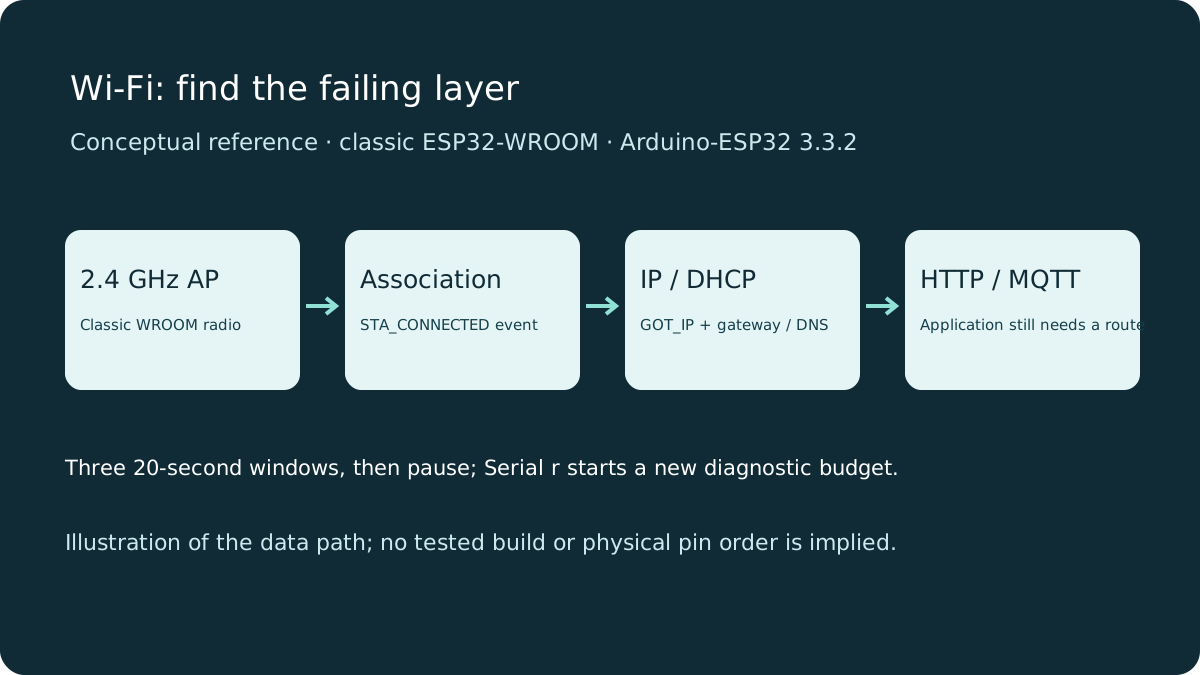
- Serial at 115200 reports events, IP/gateway/DNS, channel and RSSI; three failed connection windows pause until you send r.
- Review limits
- Documentation/API review and local content/browser checks only. Sketch compilation, physical hardware and playback testing were not performed.
Start with the actual radio and network
Classic ESP32-WROOM uses 2.4 GHz 802.11b/g/n Wi-Fi; it cannot join a 5 GHz-only SSID. A dual-band router is fine if its 2.4 GHz network is enabled. This demonstration uses WPA2-Personal credentials, not enterprise login, captive-portal authentication or an open public hotspot. Check the router mode as well as the password.
Other ESP32 families differ: a board name alone does not establish bands or native Wi-Fi support. Check the chip/module documentation before adapting this example. Start close to the router with stable USB power and keep the antenna away from metal. Do not print or publish your real password.
Find the layer that failed
| Observation | What it establishes | Useful next check |
|---|---|---|
| No association / disconnected event | No usable station connection yet | SSID spelling, 2.4 GHz availability, security mode, password, signal and reason code. |
| STA_CONNECTED, no GOT_IP | Radio association succeeded; DHCP may still be pending | Router DHCP/address pool and restrictions; do not call this internet access. |
| GOT_IP and a local address | The station has an IP configuration | Gateway/DNS and application destination; router client isolation can still block local devices. |
| Local connection works, remote hostname fails | Radio alone is not the whole problem | DNS, captive portal, firewall, internet availability and service credentials. |
A disconnect reason is diagnostic evidence, not a unique verdict. Authentication failures can involve router policy as well as credentials. Interpret the code with the linked ESP-IDF 5.5 reference. RSSI is a signal clue, not a guaranteed throughput or distance measurement.
Run the bounded diagnostic
Replace SSID and PASSWORD, upload the complete sketch and open Serial Monitor at 115200. The connection call starts an attempt; loop keeps running. Each unsuccessful window lasts 20 seconds, followed by a five-second gap. After three windows it pauses; send lowercase r after correcting settings. A later loss of a working connection starts another bounded budget.
Callbacks run in a different task. They copy event IDs/reasons into a small queue; loop prints and controls retries. A full diagnostic queue can drop logs during an event storm, so current WiFi.status() also drives the policy. This sketch is a bench diagnostic, not a production reconnection supervisor.
Wiring and matching Arduino code
Station diagnostic with three connection windows
Power the stated DevKit from USB. No GPIO wiring or onboard LED is required.
wifi-diagnostics.ino
#include <WiFi.h>
#include <freertos/FreeRTOS.h>
#include <freertos/queue.h>

const char* SSID = "YOUR_WIFI_SSID";
const char* PASSWORD = "YOUR_WIFI_PASSWORD";
constexpr uint32_t ATTEMPT_MS = 20000, RETRY_MS = 5000;
constexpr uint8_t MAX_ATTEMPTS = 3;
struct Event { WiFiEvent_t id; uint16_t reason; };
QueueHandle_t events;
bool ready = false, trying = false, paused = false, wasConnected = false;
uint8_t attempts = 0;
uint32_t started = 0, lastEnded = 0, lastStats = 0;

void onWiFi(WiFiEvent_t id, WiFiEventInfo_t info) {
  Event e{id, 0};
  if (id == ARDUINO_EVENT_WIFI_STA_DISCONNECTED)
    e.reason = info.wifi_sta_disconnected.reason;
  xQueueSend(events, &e, 0); // Callback task: copy only; never wait here.
}
void startAttempt() {
  ++attempts;
  started = millis(); trying = true;
  Serial.printf("Wi-Fi attempt %u/%u\n", attempts, MAX_ATTEMPTS);
  WiFi.begin(SSID, PASSWORD); // Starts connection; no waiting loop.
}
void setup() {
  Serial.begin(115200);
  events = xQueueCreate(12, sizeof(Event));
  if (!events || !WiFi.mode(WIFI_STA)) {
    Serial.println("Queue/Wi-Fi initialization failed; reset after checking board.");
    return;
  }
  WiFi.setAutoReconnect(false); // This sketch owns the bounded retry policy.
  WiFi.onEvent(onWiFi);
  ready = true;
  startAttempt();
}
void loop() {
  if (!ready) { delay(10); return; }
  const uint32_t now = millis();
  Event e;
  while (xQueueReceive(events, &e, 0) == pdTRUE) {
    if (e.id == ARDUINO_EVENT_WIFI_STA_CONNECTED)
      Serial.println("Associated with AP; still waiting for an IP address.");
    if (e.id == ARDUINO_EVENT_WIFI_STA_GOT_IP)
      Serial.println("GOT_IP: IP networking can start.");
    if (e.id == ARDUINO_EVENT_WIFI_STA_DISCONNECTED)
      Serial.printf("Disconnected: reason=%u (see version-matched Wi-Fi reference)\n", e.reason);
  }
  const bool connected = WiFi.status() == WL_CONNECTED;
  if (connected) {
    trying = false; attempts = 0; paused = false;
    if (!wasConnected || now - lastStats >= 10000) {
      lastStats = now;
      Serial.print("IP: "); Serial.println(WiFi.localIP());
      Serial.print("Gateway: "); Serial.println(WiFi.gatewayIP());
      Serial.print("DNS: "); Serial.println(WiFi.dnsIP());
      Serial.printf("Channel: %d, RSSI: %d dBm\n", WiFi.channel(), WiFi.RSSI());
    }
  } else {
    if (wasConnected) lastEnded = now;
    if (trying && now - started >= ATTEMPT_MS) {
      WiFi.disconnect(false); trying = false; lastEnded = now;
      Serial.println("20-second connection window ended.");
    }
    if (!trying && attempts < MAX_ATTEMPTS && now - lastEnded >= RETRY_MS)
      startAttempt();
    if (!trying && attempts >= MAX_ATTEMPTS && !paused) {
      paused = true;
      Serial.println("Retries paused. Correct network settings; send r to retry.");
    }
  }
  wasConnected = connected;
  if (Serial.available() && Serial.read() == 'r' && !connected) {
    WiFi.disconnect(false); attempts = 0; paused = false; trying = false;
    lastEnded = now - RETRY_MS;
  }
  delay(10); // Yield without an endless connection wait.
}
Interpret the result
Expect association before GOT_IP, then IP, gateway, DNS, channel and RSSI. Values and event ordering beyond that depend on the router. No output here is a recorded hardware measurement. Try a wrong password, then restore it and send r; the loop should remain responsive throughout the retry budget.
A reset or brownout message is a power/reset problem, not a Wi-Fi reason code. Check the cable and supply before adding reconnect logic. If a valid IP cannot reach another local device, check that both use the same network and that guest/client isolation is disabled for your trusted test devices.
Recover the application too
Losing Wi-Fi invalidates network sockets. MQTT clients must reconnect and resubscribe; an IP address after reconnection may change. Use the printed address rather than remembering an old one. A local HTTP page does not need internet, while NTP or a cloud broker may need DNS and an external route. Do not solve credential or DHCP failures with an endless while loop.
Next steps
Use the last successful layer to choose your next check: radio, IP configuration, then the application. Keep retries bounded and preserve useful diagnostics.
Technical references
- Classic ESP32 datasheet — Classic radio/band capabilities.
- WiFiClientEvents at Arduino-ESP32 3.3.2 — Event signatures and callback task context.
- WiFiSTA API at 3.3.2 — Station, diagnostics and reconnection API.
- ESP-IDF 5.5 Wi-Fi events and reason codes — Association, IP acquisition and disconnect recovery.