
Before you start
- Hardware
- Classic ESP32-WROOM DevKit, USB data cable and computer. No sensor, LED or other external circuit.
- Software baseline
- Arduino IDE 2 and Arduino-ESP32 3.3.2 for the stated classic ESP32 examples. This is an API review baseline, not a latest-version claim.
- Before this lesson
- Finish the Serial-only first upload and the setup()/loop() lesson. Open Serial Monitor at 115200 baud; use your exact board and port.
- Your goal
- Choose a type for a count, a flag and a decimal value; explain why 5 / 2 differs from 5.0f / 2.0f.
- Verification limits
- Documentation/API and local content/browser review only. No sketch compilation, board upload or physical hardware test was performed for this lesson.
Start with the value you need to represent
A variable is a named object with a type and a value. In int sampleCount = 5;, int is the type, sampleCount is the name and 5 initializes it. Later assignment changes the value; it does not change the declared type. Use a meaningful name and initialize local variables before reading them. An uninitialized local integer does not provide a useful default reading.
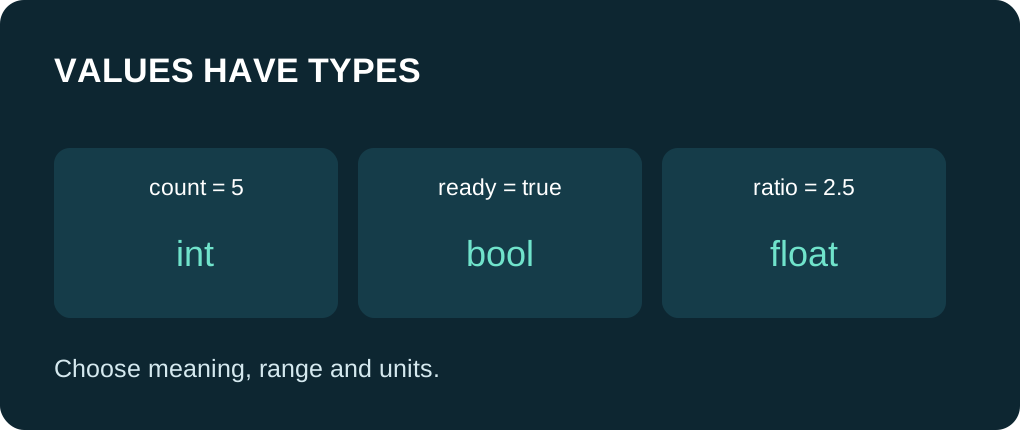
Use bool for a true/false condition, an integer for whole counts and a floating-point type when a fraction is needed. A value called temperature is not automatically a sensor measurement: this lesson uses a fixed illustrative number. Keep units in names such as temperatureC or intervalMs so later calculations are easier to review.
Choose by range and meaning
| Need | Example type | What to check |
|---|---|---|
| Whole count | int | Signed range depends on target; avoid signed overflow. |
| Fixed-width quantity | uint32_t | Exactly 32 bits when the type is provided; no negative values. |
| True / false | bool | Use true and false, not text such as "false". |
| Fractional value | float | Binary approximation; printed decimals are formatting, not accuracy. |
| One character | char | Use single quotes, for example 'C'. |
| Elapsed-time value | unsigned long | Use the millis() type and elapsed subtraction pattern. |
The operands decide the division
The expression 5 / 2 performs integer division and yields 2. Assigning that result to float afterwards produces 2.0; the fraction was already lost. In 5.0f / 2.0f the operands are floating-point, so the expected result is 2.5. Conversion must happen before the operation when you want fractional arithmetic.
Serial.println(value, 2) requests two decimal places for a floating-point value. It does not make the underlying value more precise. Avoid using exact equality as a general test for calculated decimal values. Also check for a zero denominator before dividing values that come from inputs.
Separate lifetime from visibility
The global savedCount is initialized before setup() and can be used by both sketch functions. The local insideCount belongs to setup(). A local static value retains its value across calls but has local visibility. Persistent variables are still RAM state; reset or power loss restarts this example. Saving settings to flash is a separate topic.
constexpr identifies a compile-time constant here. It helps express fixed configuration; it does not save a changing value across reset. const also prevents normal modification through that name, but not every const object is a compile-time expression. Do not fix a scope error by making every variable global.
Read the source walkthrough
Expected key results: integer quotient 2, fractional quotient 2.50, temperature 23.75 C and ready 1. sizeof prints the byte size on the selected target. Use those results on your own toolchain rather than copying AVR Uno size assumptions into ESP32 code. This lesson does not assert that all Arduino boards use the same int, long or double widths.
The fixed-width counter begins at 7 and increments to 8. Unsigned arithmetic has defined wraparound, but that does not make wrapping correct for every application. A counter meant to stop at a limit needs an explicit limit. Signed overflow must be avoided; changing the printed format does not enlarge the stored range.
Diagnose a surprising value
If a fraction disappears, inspect the operand types before the assignment. If an identifier is not declared, check spelling and the braces that determine its scope. If a number becomes unexpectedly large, check conversions between signed and unsigned values. If a decimal only appears rounded, compare print precision with the original calculation.
Practice: predict both quotient lines, change sampleCount to 7, then recompute the expected results before uploading. Replace the fixed temperature with another illustrative decimal and keep its unit label. Change one thing at a time; do not treat these printed constants as sensor evidence.
Run one complete sketch
Save the complete example as variables_demo.ino. Keep only this sketch in its folder, select your board and port, and upload. Open Serial Monitor at 115200 baud, then press EN/reset if the initial output was missed. The program prints its demonstration once in setup(); the empty-working loop yields with delay(10). No GPIO wiring or extra library is required.
Wiring and matching Arduino code
Complete USB and Serial-only example
USB only. No GPIO wiring. Serial Monitor: 115200 baud.
variables_demo.ino
#include <Arduino.h>
#include <stdint.h>

constexpr int DIVISOR = 2;
uint32_t savedCount = 7;

void setup() {
  Serial.begin(115200);
  delay(1000);
  int sampleCount = 5;
  int insideCount = 3;
  bool ready = true;
  char unit = 'C';
  float temperatureC = 23.75f;  // Illustrative, not a sensor reading.
  int integerQuotient = sampleCount / DIVISOR;
  float fractionalQuotient = static_cast<float>(sampleCount) / DIVISOR;

  Serial.print("integer quotient: "); Serial.println(integerQuotient);
  Serial.print("fractional quotient: "); Serial.println(fractionalQuotient, 2);
  Serial.print("temperature: "); Serial.print(temperatureC, 2);
  Serial.print(' '); Serial.println(unit);
  Serial.print("ready: "); Serial.println(ready);
  Serial.print("local count: "); Serial.println(insideCount);
  ++savedCount;
  Serial.print("saved RAM count: "); Serial.println(savedCount);
  Serial.print("sizeof int: "); Serial.println(sizeof(int));
  Serial.print("sizeof float: "); Serial.println(sizeof(float));
  Serial.print("sizeof double: "); Serial.println(sizeof(double));
}

void loop() {
  delay(10);
}
Expected results below are a source walkthrough, not a captured hardware log. No firmware compilation or board upload was performed for this lesson.
Continue your learning path
Next steps
Choose types deliberately, predict arithmetic first and use the next lesson to make a decision from a value.
FAQ
No. Convert an operand before division, not only the result afterwards.
No. A global RAM variable has application lifetime, not persistent storage.
Technical references
- Arduino integer types — Integer declarations and signed-range limitations; board sizes differ.
- Arduino floating-point values — Approximate fractional arithmetic; do not apply AVR-specific double claims to every target.
- Arduino variable scope — Visibility of global and local declarations.
- Arduino sizeof — Measure an object or type size in bytes on the target.
- Arduino-ESP32 3.3.2 Print API — Serial formatting overloads in the reviewed API baseline.