
Before you start
- Hardware
- Classic ESP32-WROOM DevKit, USB data cable and computer. No sensor, LED or other external circuit.
- Software baseline
- Arduino IDE 2 and Arduino-ESP32 3.3.2 for the stated classic ESP32 examples. This is an API review baseline, not a latest-version claim.
- Before this lesson
- Finish the Serial-only first upload and the setup()/loop() lesson. Open Serial Monitor at 115200 baud; use your exact board and port.
- Your goal
- Predict a single classification at each boundary and select a command without accidental fall-through.
- Verification limits
- Documentation/API and local content/browser review only. No sketch compilation, board upload or physical hardware test was performed for this lesson.
Choose a range or a specific command
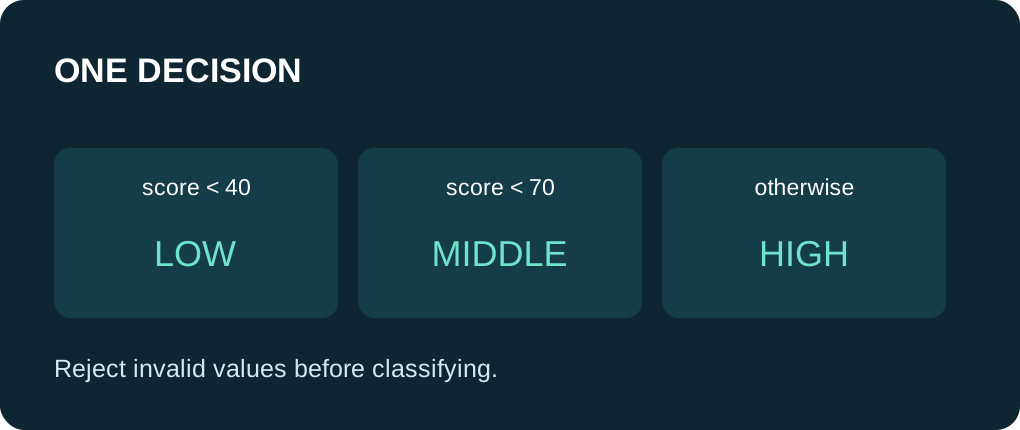
Use if when a condition is true or false. An else if chain evaluates later conditions only when earlier ones failed; its final else provides a fallback. Separate if statements are independent and can execute more than one branch. That matters when two ranges overlap.
Use switch for matching an integral or enumeration value against constant case labels. A character command such as 'r' is suitable. A fractional range or a whole String is not a direct replacement for those labels. Choose the structure that expresses the decision clearly, rather than forcing every problem into one form.
Write the boundaries before the code
| Illustrative score | Chosen branch | Reason |
|---|---|---|
| Less than 0 | Invalid | Reject the lower out-of-range values first. |
| 0 through 39 | Low | The first range includes zero. |
| 40 through 69 | Middle | The previous comparison already rejected lower scores. |
| 70 through 100 | High | Both endpoints are included. |
| Greater than 100 | Invalid | Reject the upper out-of-range values first. |
Keep assignment and comparison distinct
The operator = assigns a value. The operator == compares two values. Accidentally writing if (score = 40) changes score and then tests the assigned value. Use braces around each branch and keep assignments outside the condition while learning. A semicolon immediately after if(condition) makes that conditional body empty.
Logical && means both conditions must be true; || means at least one must be true. The example rejects score < 0 || score > 100 before classifying valid scores. Check the two boundaries explicitly instead of assuming a middle test handles invalid input.
Make switch exits visible
A matching case continues through following statements unless control leaves the switch. break ends this switch; it does not stop the whole sketch. default handles an unmatched command. The example intentionally has a break after every case.
A Serial terminal can send a line ending after a command. Ignore carriage return and newline explicitly if you later connect this decision to Serial.read(). This fixed-input demonstration has no terminal command parser, no physical output and no safety interlock. A real alarm or actuator needs input validation, failure handling and its own electrical design.
Walk through every branch
Expected source walkthrough: -1 and 101 are invalid; 0 and 39 are low; 40 and 69 are middle; 70 and 100 are high. The fixed command 'r' prints a report request once. These are predictions from the code, not captured board output.
The decisions run once in setup(). To inspect the startup text, open Serial Monitor at 115200 baud and reset if necessary. No sensor is connected, and no value has been read from the room or from a GPIO.
Check one boundary at a time
Change command to 's', then to 'x', and predict the case or default message before uploading. Add scores 1, 41 and 99 to your paper walkthrough. Do not change the range limits and test values together.
If two messages appear for one value in your own rewrite, check whether you used independent if blocks. If a command runs another command too, check break. If the compiler rejects a case label, check that it is a constant of an appropriate type and has not been used twice.
Run one complete sketch
Save the complete example as decisions_demo.ino. Keep only this sketch in its folder, select your board and port, and upload. Open Serial Monitor at 115200 baud, then press EN/reset if the initial output was missed. The program prints its demonstration once in setup(); the empty-working loop yields with delay(10). No GPIO wiring or extra library is required.
Wiring and matching Arduino code
Complete USB and Serial-only example
USB only. No GPIO wiring. Serial Monitor: 115200 baud.
decisions_demo.ino
#include <Arduino.h>

void classifyScore(int score) {
  Serial.print(score);
  Serial.print(": ");
  if (score < 0 || score > 100) {
    Serial.println("invalid");
  } else if (score < 40) {
    Serial.println("low");
  } else if (score < 70) {
    Serial.println("middle");
  } else {
    Serial.println("high");
  }
}

void setup() {
  Serial.begin(115200);
  delay(1000);
  classifyScore(-1);
  classifyScore(0);
  classifyScore(39);
  classifyScore(40);
  classifyScore(69);
  classifyScore(70);
  classifyScore(100);
  classifyScore(101);

  const char command = 'r';
  switch (command) {
    case 'r':
      Serial.println("report requested");
      break;
    case 's':
      Serial.println("stop requested (message only)");
      break;
    default:
      Serial.println("unknown command");
      break;
  }
}

void loop() {
  delay(10);
}
Expected results below are a source walkthrough, not a captured hardware log. No firmware compilation or board upload was performed for this lesson.
Continue your learning path
Next steps
Test below, at and above every boundary before connecting decisions to real outputs.
FAQ
Yes. Use an else if chain when one and only one classification should be chosen.
No. Use comparisons in if/else for ranges and fractional values.
Technical references
- Arduino if — Conditions and comparison versus assignment.
- Arduino else — Alternative branches.
- Arduino switch/case — Case constants, break and fall-through.
- Arduino-ESP32 3.3.2 Print API — Serial formatting overloads in the reviewed API baseline.