
Before you start
- Hardware
- Classic ESP32-WROOM DevKit, USB data cable and computer. No external sensor or output circuit for this exercise.
- Software baseline
- Arduino IDE 2 and Arduino-ESP32 3.3.2 for the stated classic ESP32 examples. This is an API review baseline, not a latest-version claim.
- Before this lesson
- Complete the first Serial-only upload. For the logic lessons, read the variables, decisions, loops and functions references first.
- Your goal
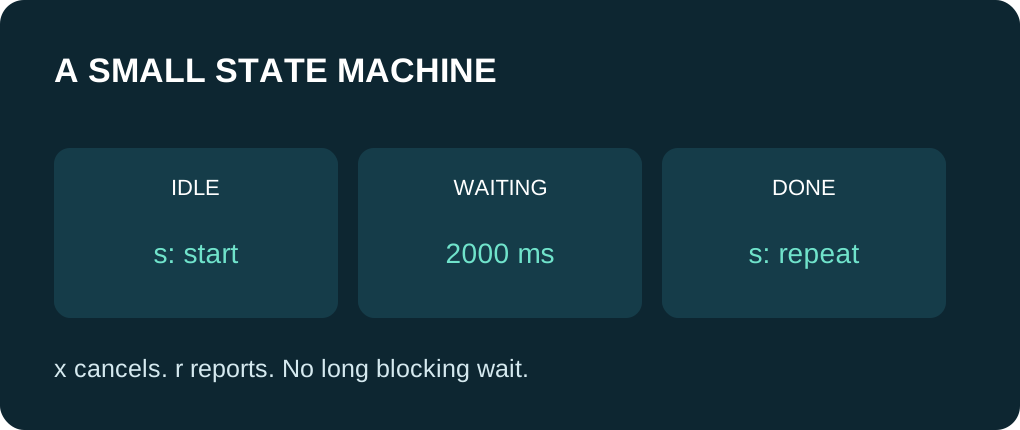
- Trace IDLE, WAITING and DONE, including start, report, cancel and elapsed-time transitions.
- Verification limits
- Documentation/API and local content/browser review only. No sketch compilation, board upload or physical hardware test was performed for this lesson.
Separate the current state from the event
A state describes what the application is doing now. An event is a reason to consider changing it: a command or an elapsed interval in this lesson. Store the state explicitly rather than using several independent booleans that can accidentally describe contradictory modes.
This USB-only exercise represents a small timed job. It has no relay, motor or sensor. Commands are lowercase single characters: s starts, r reports and x cancels/resets to IDLE. DONE remains visible until another command changes it. A real application needs its own fault and recovery states.
Explicit helper declarations follow the enum definition so functions that use JobState do not depend on automatic .ino prototype generation.
Write the transitions first
| Current state | Event | Next state / action |
|---|---|---|
| IDLE or DONE | s | Enter WAITING and save the start time. |
| WAITING | s | Ignore restart; keep the original start time. |
| WAITING | At least 2000 ms elapsed | Enter DONE once. |
| Any | r | Print the current state without changing it. |
| Any | x | Enter IDLE, cancelling a pending wait. |
| Any | Carriage return / newline | Ignore terminal line ending. |
Wait by checking elapsed time
The WAITING branch compares unsigned now - enteredAt with 2000UL. It does a small check and returns, so later loop passes can still inspect Serial commands. This is the same elapsed-time pattern as the millis() reference. Reaching DONE once prevents repeatedly printing the completion action on every later loop pass.
Unsigned subtraction supports normal timer wraparound when the interval and polling assumptions are respected. Keep intervals short relative to the counter’s wrap period and service the state regularly; this is not a clock that can recover arbitrary missed wraps. Do not compare now against enteredAt + interval as a substitute without considering wraparound.
Bound command work per loop pass
At most eight buffered bytes are handled in one pass. After those commands, the code takes a fresh millis() value before the timer check. This avoids comparing a timestamp captured before a later command with a newer state-entry time. If x is processed before the timer check, cancellation wins for that pass.
This is a cooperative sketch, not parallel execution or a real-time guarantee. Serial output can take time, and delay(1) deliberately yields briefly. A blocking library call inside a state would still block. There is no packet parser, authentication or persistence; terminal line endings are simply ignored.
Try a sequence you can predict
Expected walkthrough after startup: IDLE. Send s to enter WAITING, then r to report WAITING while the interval is pending. After at least two seconds as observed by later loop checks, DONE prints once. Send s again to start another job. Send x during a wait and it should return to IDLE without a later DONE for that cancelled wait.
These are predicted transitions, not captured hardware logs. Latency depends on loop service and Serial traffic. A late-opened monitor may miss startup output; reset once if needed. Repeated s commands during WAITING intentionally do not postpone completion.
Add behavior through the transition policy
On paper, add a requirement that a job can start only from IDLE. Identify the one command condition that would change and how DONE should reset. Test the transition list before adding hardware or another state.
If the job continually restarts, inspect where enteredAt is assigned. If completion prints repeatedly, check that the state actually leaves WAITING. If commands seem ignored, check baud rate, lowercase letters and whether another function blocks the loop. Keep decisions and elapsed timing separate enough to trace.
Use one complete example
Save this full sketch as state_machine_demo.ino, select your exact ESP32 board and port, and use Verify before Upload. Open Serial Monitor at 115200 baud after upload; press EN/reset if you missed startup text. No extra library is needed. The example uses no GPIO wiring. The stated results are predictions from source, not a recorded board run.
Wiring and matching Arduino code
Complete USB and Serial-only example
USB only; no GPIO wiring. Serial Monitor: 115200 baud.
state_machine_demo.ino
#include <Arduino.h>

enum class JobState { Idle, Waiting, Done };
const char* stateName(JobState value);
void enterState(JobState next, unsigned long now);
void handleCommand(char command, unsigned long now);

JobState state = JobState::Idle;
unsigned long enteredAt = 0;
constexpr unsigned long WAIT_MS = 2000UL;

const char* stateName(JobState value) {
  switch (value) {
    case JobState::Idle: return "IDLE";
    case JobState::Waiting: return "WAITING";
    case JobState::Done: return "DONE";
  }
  return "UNKNOWN";
}

void enterState(JobState next, unsigned long now) {
  state = next;
  enteredAt = now;
  Serial.println(stateName(state));
}

void handleCommand(char command, unsigned long now) {
  switch (command) {
    case 's':
      if (state != JobState::Waiting) {
        enterState(JobState::Waiting, now);
      }
      break;
    case 'x':
      enterState(JobState::Idle, now);
      break;
    case 'r':
      Serial.println(stateName(state));
      break;
    case '\r':
    case '\n':
      break;
    default:
      Serial.println("Use s=start, r=report, x=cancel");
      break;
  }
}

void setup() {
  Serial.begin(115200);
  delay(1000);
  Serial.println("s=start, r=report, x=cancel");
  enterState(JobState::Idle, millis());
}

void loop() {
  for (int n = 0; n < 8 && Serial.available() > 0; ++n) {
    const int incoming = Serial.read();
    if (incoming < 0) { break; }
    handleCommand(static_cast<char>(incoming), millis());
  }
  const unsigned long now = millis();
  if (state == JobState::Waiting && now - enteredAt >= WAIT_MS) {
    enterState(JobState::Done, now);
  }
  delay(1);
}
Expected behavior in this guide is a source walkthrough. No firmware compilation or physical board upload was performed for this lesson.
Continue your learning path
Next steps
Write the transition table first, then verify cancellation and repeated commands before extending the machine.
FAQ
No. Any blocking call still waits when executed. Keep state work short and review each API separately.
The transition leaves WAITING. Later timer checks therefore do not repeat the completion action.
Technical references
- Arduino switch/case — Select behavior from the stored state or command.
- Arduino elapsed-time example — Unsigned elapsed-time pattern; this lesson uses Serial rather than an assumed built-in LED.
- Arduino-ESP32 3.3.2 timing — millis and deliberate yielding in the reviewed core.
- Arduino-ESP32 3.3.2 Print interface — Formatting API baseline; no firmware execution claim.