
Before you start
- Hardware
- Classic ESP32-WROOM DevKit, USB data cable and computer. No external sensor or output circuit for this exercise.
- Software baseline
- Arduino IDE 2 and Arduino-ESP32 3.3.2 for the stated classic ESP32 examples. This is an API review baseline, not a latest-version claim.
- Before this lesson
- Complete the first Serial-only upload. For the logic lessons, read the variables, decisions, loops and functions references first.
- Your goal
- Predict when a high-level flag turns on, turns off or keeps its previous state inside a threshold band.
- Verification limits
- Documentation/API and local content/browser review only. No sketch compilation, board upload or physical hardware test was performed for this lesson.
A single threshold can chatter
A signal close to one decision boundary can alternate above and below it. A comparison such as level >= 50 would repeatedly change a flag for values 49, 51, 49 and 51. Whether that matters depends on the application; frequent transitions can make displays or control logic unstable.
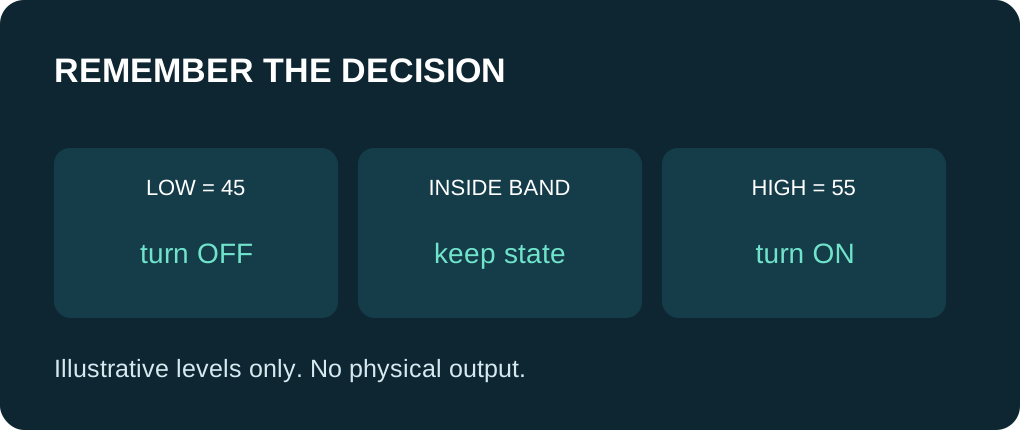
Hysteresis uses a different boundary to enter a state than to leave it. Its memory is the current flag. This demonstration uses a made-up integer level from 0 through 100, with no physical unit, sensor, GPIO or actuator. The thresholds are teaching values, not a thermostat or safety recommendation.
Give both thresholds an explicit policy
| Previous flag | Valid input | Next flag |
|---|---|---|
| OFF | 55 or higher | ON |
| ON | 45 or lower | OFF |
| Either | Strictly between 45 and 55 | Keep the previous flag. |
| OFF | 45 or lower | Stay OFF. |
| ON | 55 or higher | Stay ON. |
| Either | Outside 0–100 | Report invalid; do not update the remembered flag. |
Decide the initial state and invalid policy
The stored flag begins OFF. A first valid sample inside the band therefore leaves it OFF. If you need a different startup rule, define it explicitly; there is no previous physical history for the program to recover automatically after reset. The code checks low < high with a compile-time assertion.
An invalid sample is reported and skipped. Retaining a software flag is only the policy of this no-output demonstration. A real actuator may need a separate fault state, timeout or independent protection. For floating-point sensor data, also reject non-finite values such as NaN before applying comparisons; the integer sample stream here cannot represent NaN.
Trace both travel directions
The fixed sequence is 49, 51, 50, 54, 55, 53, 46, 45, 44, -1, 56. Starting OFF, the flag stays OFF through 54, turns ON at 55, stays ON at 53 and 46, then turns OFF at 45. It stays OFF at 44, reports -1 as invalid, and turns ON at 56. These are source predictions, not captured sensor readings.
The function returns the next flag from a valid sample and the prior flag. It does not turn on an output or read a sensor. Its explicit input and return value make the policy easier to inspect than a collection of hidden global side effects.
Hysteresis and smoothing solve different problems
Hysteresis stabilizes a decision by keeping state inside a band. A moving average changes the values being considered and introduces a response tradeoff. You can combine them deliberately, but averaging alone does not guarantee the decision will stop toggling near a threshold.
Choose a band using the real signal range, noise, desired sensitivity and acceptable response. A narrow band may still chatter when noise crosses both thresholds; a wide one may ignore changes you care about. Respect the sensor’s valid reading interval. Reading a cached value repeatedly is not a stream of independent measurements.
Test equalities and invalid values
Practice on paper with 45, 46, 54 and 55 for both starting states. Then change the constants to low = 40 and high = 60 and predict the same sample stream again. Keep low below high. Do not silently reinterpret the arbitrary levels as degrees, humidity or ADC volts.
If a real adaptation toggles unexpectedly, log the raw value, validity and prior/next state together. Check units and boundary operators before widening the band. Before connecting hardware, use the exact sensor guide’s electrical and sampling requirements and define what a failed reading should do.
Use one complete example
Save this full sketch as hysteresis_demo.ino, select your exact ESP32 board and port, and use Verify before Upload. Open Serial Monitor at 115200 baud after upload; press EN/reset if you missed startup text. No extra library is needed. The example uses no GPIO wiring. The stated results are predictions from source, not a recorded board run.
Wiring and matching Arduino code
Complete USB and Serial-only example
USB only; no GPIO wiring. Serial Monitor: 115200 baud.
hysteresis_demo.ino
#include <Arduino.h>

constexpr int LOW_LEVEL = 45;
constexpr int HIGH_LEVEL = 55;
static_assert(LOW_LEVEL < HIGH_LEVEL, "Thresholds must be ordered");
const int samples[] = {49, 51, 50, 54, 55, 53, 46, 45, 44, -1, 56};
bool highFlag = false;

bool nextFlag(int validLevel, bool previous) {
  if (!previous && validLevel >= HIGH_LEVEL) { return true; }
  if (previous && validLevel <= LOW_LEVEL) { return false; }
  return previous;
}

void setup() {
  Serial.begin(115200);
  delay(1000);
  for (size_t i = 0; i < sizeof(samples) / sizeof(samples[0]); ++i) {
    const int value = samples[i];
    Serial.print(value); Serial.print(": ");
    if (value < 0 || value > 100) {
      Serial.println("INVALID; flag not updated");
      continue;
    }
    highFlag = nextFlag(value, highFlag);
    Serial.println(highFlag ? "ON" : "OFF");
  }
}

void loop() {
  delay(10);
}
Expected behavior in this guide is a source walkthrough. No firmware compilation or physical board upload was performed for this lesson.
Continue your learning path
Next steps
Check both boundaries and startup behavior before choosing a real application’s thresholds.
FAQ
No. It chooses a decision using the current value and previous state; averaging is a separate operation.
No. This demonstration has no physical output. A real controller must define and test an appropriate fault policy.
Technical references
- TI hysteresis concept — Two-threshold noise rejection in a comparator; conceptual background, not an ESP32 circuit to copy.
- Arduino if — Comparison branches for a remembered state.
- Arduino arrays — Bounded traversal of the illustrative sample stream.
- Arduino-ESP32 3.3.2 Print interface — Formatting API baseline; no firmware execution claim.