
Before you start
- Hardware
- Classic ESP32-WROOM DevKit, USB data cable and computer. No external sensor or output circuit for this exercise.
- Software baseline
- Arduino IDE 2 and Arduino-ESP32 3.3.2 for the stated classic ESP32 examples. This is an API review baseline, not a latest-version claim.
- Before this lesson
- Complete the first Serial-only upload. For the logic lessons, read the variables, decisions, loops and functions references first.
- Your goal
- Maintain a four-sample window, avoid zero-padding during startup and explain why a step response takes several samples.
- Verification limits
- Documentation/API and local content/browser review only. No sketch compilation, board upload or physical hardware test was performed for this lesson.
Keep a window of valid samples
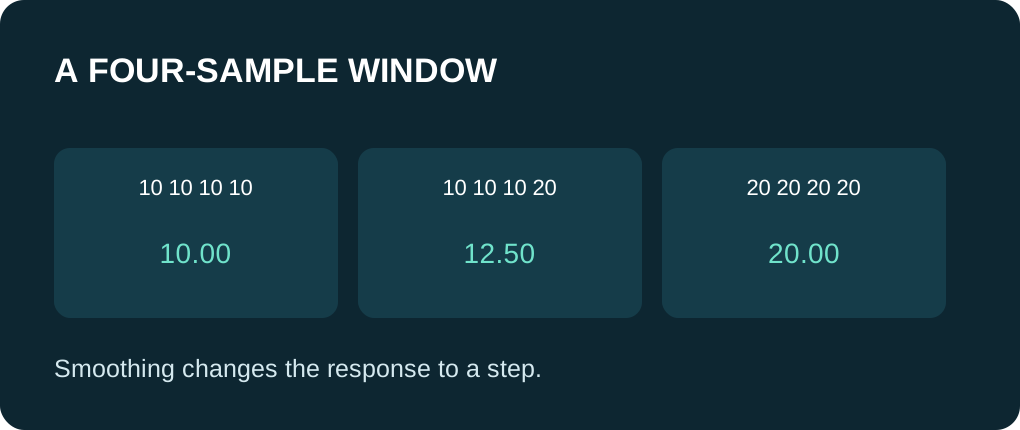
A simple moving average adds the most recent N samples and divides by the number included. This lesson uses N = 4 and a fixed integer level range 0–100. Its data is an illustrative sequence in software; there is no ADC, temperature sensor or measured accuracy claim.
A ring buffer reuses four slots. Before writing a new sample into a full buffer, subtract the outgoing value from the running sum. Add the new value, advance the write index and wrap it back to zero after the last slot. This keeps storage bounded instead of growing an array indefinitely.
Divide by samples received, not empty slots
The array starts with zero-filled storage, but those empty slots are not treated as measured zeros. During the first four accepted samples, count grows from one to four. Divide the running sum by count. Once the window is full, count stays at four and each new valid sample replaces the oldest.
The sum uses int32_t and is sufficient for this explicit domain: at most four values of 100, totaling 400. A wider signal range or larger window requires a new range check for the accumulator. Floating-point division preserves fractions such as 12.5 instead of truncating them with integer arithmetic.
Follow a change through the buffer
| Accepted sample number | New illustrative value | Current mean |
|---|---|---|
| 1 | 10 | 10.00; no zero-padding. |
| 4 | 10 | 10.00; four samples are now included. |
| 5 | 20 | 12.50; three tens and one twenty. |
| 6 | 20 | 15.00 |
| 7 | 20 | 17.50 |
| 8 | 20 | 20.00; old tens have left the window. |
Reject invalid input before updating history
The next -1 in the example is outside the defined range, so the code reports it and skips the update. It does not add a zero or increase count. The later valid 20 leaves the mean at 20.00. A run of invalid samples would leave old history in memory; an unchanged mean must not be presented as fresh data.
In a real sensor application, track sample validity and age separately. Reset or expire the window after a long gap if that matches your application. A floating-point adaptation must also reject non-finite input before arithmetic, because one NaN can contaminate the sum. This integer example does not perform floating-point sensor reads.
Understand what smoothing cannot fix
A window can make some sample-to-sample variation less prominent, but it also spreads a sudden change across multiple outputs. A larger window needs more new valid samples to replace all old history. It does not calibrate a sensor, repair wiring or guarantee that every kind of interference disappears.
The example processes a fixed list once, so its table is indexed by sample number rather than elapsed time. If readings are taken at regular intervals, you can relate that window to time. With irregular intervals this is a sample-weighted average, not a time-weighted measurement. Honor the actual sensor’s minimum reading interval; repeated cached values do not add independent information.
Compare the raw and filtered sequence
The sketch prints each valid raw value alongside the current mean, making the step response visible. Expected values are the worked table plus the invalid message and final 20.00; they are not captured device output. Change WINDOW to two on your own copy and predict how quickly the old tens disappear. Keep the range/accumulator check when extending the example.
When applying a threshold to the mean, decide whether the added response delay is acceptable and whether hysteresis is also needed. Do not smooth a fault code into a plausible-looking measurement. Save the raw value and timestamp when diagnosing a surprising result.
Use one complete example
Save this full sketch as moving_average_demo.ino, select your exact ESP32 board and port, and use Verify before Upload. Open Serial Monitor at 115200 baud after upload; press EN/reset if you missed startup text. No extra library is needed. The example uses no GPIO wiring. The stated results are predictions from source, not a recorded board run.
Wiring and matching Arduino code
Complete USB and Serial-only example
USB only; no GPIO wiring. Serial Monitor: 115200 baud.
moving_average_demo.ino
#include <Arduino.h>
#include <stdint.h>

constexpr size_t WINDOW = 4;
static_assert(WINDOW > 0, "Window must not be empty");
int values[WINDOW] = {};
size_t nextSlot = 0;
size_t count = 0;
int32_t total = 0;
const int samples[] = {10, 10, 10, 10, 20, 20, 20, 20, -1, 20};

float addValidSample(int value) {
  if (count == WINDOW) {
    total -= values[nextSlot];
  } else {
    ++count;
  }
  values[nextSlot] = value;
  total += value;
  nextSlot = (nextSlot + 1) % WINDOW;
  return static_cast<float>(total) / count;
}

void setup() {
  Serial.begin(115200);
  delay(1000);
  for (size_t i = 0; i < sizeof(samples) / sizeof(samples[0]); ++i) {
    const int value = samples[i];
    if (value < 0 || value > 100) {
      Serial.println("INVALID; average history not updated");
      continue;
    }
    const float mean = addValidSample(value);
    Serial.print("raw: "); Serial.print(value);
    Serial.print(" mean: "); Serial.println(mean, 2);
  }
}

void loop() {
  delay(10);
}
Expected behavior in this guide is a source walkthrough. No firmware compilation or physical board upload was performed for this lesson.
Continue your learning path
Next steps
Keep raw values, validity and age visible while selecting a useful window size.
FAQ
Not in this lesson. The populated count avoids biasing the first valid samples toward zero.
No. It trades response to change for smoothing and does not fix calibration, invalid data or electrical problems.
Technical references
- Arduino smoothing example — Running-sum window concept. This lesson adds populated-count warm-up and fixed synthetic inputs; no AVR analog pin assumption.
- Arduino arrays — Fixed storage and valid array index bounds.
- Arduino float arithmetic — Fractional results versus integer division; target-specific type assumptions remain separate.
- Arduino-ESP32 3.3.2 Print interface — Formatting API baseline; no firmware execution claim.