
Before you start
- Hardware
- Classic ESP32-WROOM DevKit, USB data cable and computer. No sensor, LED or other external circuit.
- Software baseline
- Arduino IDE 2 and Arduino-ESP32 3.3.2 for the stated classic ESP32 examples. This is an API review baseline, not a latest-version claim.
- Before this lesson
- Finish the Serial-only first upload and the setup()/loop() lesson. Open Serial Monitor at 115200 baud; use your exact board and port.
- Your goal
- Call a helper with two inputs, use its returned result and separate calculation from printing.
- Verification limits
- Documentation/API and local content/browser review only. No sketch compilation, board upload or physical hardware test was performed for this lesson.
Give a helper one clear job
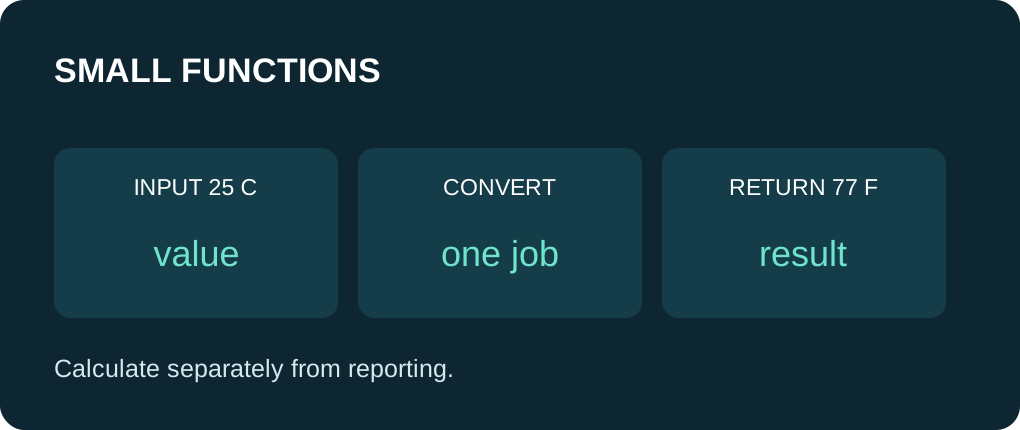
A helper function names a piece of work so it can be called without duplicating its body. Decide its inputs, result and side effects before writing it. The conversion helper in this lesson takes a Celsius value and returns a Fahrenheit value; it does not read a sensor, print text or control a pin.
The reporting helper has a different job: print an input and its converted value. Keeping those roles separate makes it easier to use the same calculation later with an OLED or a network response. Small functions improve structure; they do not automatically make a blocking operation faster.
Read the function contract
| Part | Example | Meaning |
|---|---|---|
| Return type | float | The caller receives a floating-point result. |
| Name | celsiusToFahrenheit | Identifies the operation; names are case-sensitive. |
| Parameter | float celsius | A local input initialized by the call. |
| Return statement | return ...; | Ends this call with a value. |
| No result | void reportConversion(...) | Performs reporting; no calculated return value. |
Convert before mixing in hardware
The formula here is F = C × 9/5 + 32. The code uses 9.0f / 5.0f so the multiplier is fractional rather than integer division. Inputs 0 and 25 are chosen to make the expected results easy to check. They are illustrative constants, not measured temperatures.
Every normal path through a non-void function must return an appropriate value. A return inside a helper ends that helper call, not the caller or the Arduino application. Always use the returned value when you need the calculation; calling a calculation helper and discarding its result does not update your original variable.
Understand what the helper can change
An ordinary parameter such as int value is passed by value in this example: changing the parameter changes a local copy. incrementCopy(7) returns 8 while the caller’s original remains 7. Assign the returned result if you want to replace the original. References and pointers can let a function modify caller-owned data, but are a separate contract and are not used here.
Local variables hide implementation details from other functions. A local static can deliberately retain state; it also makes results depend on previous calls. Start with stateless calculation helpers when the result should depend only on the inputs.
Make declarations visible before use
This complete sketch defines helpers before setup(), so their signatures are visible where called. Arduino’s .ino preprocessing can generate prototypes for many simple functions, but explicit ordering avoids relying on that convenience here. In a larger project, put declarations in an appropriate header and definitions in a source file.
The function body uses braces; a call uses parentheses and a final semicolon. Do not paste a second setup() or loop() from another sketch. Extract the repeated job into a helper and call it from your existing pair of sketch functions.
Check one function independently
Expected source walkthrough: 0.00 C converts to 32.00 F and 25.00 C converts to 77.00 F. original prints 7 while incremented prints 8. Open Serial Monitor at 115200 baud and reset to see the one-time output. This is not a captured hardware run.
Practice: predict the result for -40 C, then add one reportConversion call. Keep the formula helper unchanged while changing only the reporting label. If compilation fails, compare the declared return type, number of arguments and argument types. If output never appears, first check the port and baud rate with the known first-upload sketch.
Run one complete sketch
Save the complete example as functions_demo.ino. Keep only this sketch in its folder, select your board and port, and upload. Open Serial Monitor at 115200 baud, then press EN/reset if the initial output was missed. The program prints its demonstration once in setup(); the empty-working loop yields with delay(10). No GPIO wiring or extra library is required.
Wiring and matching Arduino code
Complete USB and Serial-only example
USB only. No GPIO wiring. Serial Monitor: 115200 baud.
functions_demo.ino
#include <Arduino.h>

float celsiusToFahrenheit(float celsius) {
  return celsius * (9.0f / 5.0f) + 32.0f;
}

void reportConversion(float celsius) {
  const float fahrenheit = celsiusToFahrenheit(celsius);
  Serial.print(celsius, 2);
  Serial.print(" C -> ");
  Serial.print(fahrenheit, 2);
  Serial.println(" F");
}

int incrementCopy(int value) {
  return value + 1;  // Only small illustrative inputs are used here.
}

void setup() {
  Serial.begin(115200);
  delay(1000);
  reportConversion(0.0f);
  reportConversion(25.0f);
  const int original = 7;
  const int incremented = incrementCopy(original);
  Serial.print("original: "); Serial.println(original);
  Serial.print("incremented: "); Serial.println(incremented);
}

void loop() {
  delay(10);
}
Expected results below are a source walkthrough, not a captured hardware log. No firmware compilation or board upload was performed for this lesson.
Continue your learning path
Next steps
Use one small calculation helper twice, then group several related values in an array.
FAQ
No. Return a result and assign it, or deliberately design a reference/pointer interface in a later lesson.
No. A delay or other blocking call still waits when it runs inside a helper.
Technical references
- Arduino functions guide — Function declarations, parameters and return values.
- Arduino return — Returning control and an optional value from a function.
- Arduino scope — Local names and visibility boundaries.
- Arduino sketch build process — Sketch preprocessing and generated prototypes.
- Arduino-ESP32 3.3.2 Print API — Serial formatting overloads in the reviewed API baseline.