
Before you start
- Hardware
- For calculation: LED datasheet, resistor values and calculator. For assembly: the exact parts in the linked external-LED Blink guide.
- Software baseline
- Arduino IDE 2 and Arduino-ESP32 3.3.2 for the stated classic ESP32 examples. This is an API review baseline, not a latest-version claim.
- Before this lesson
- Complete the Serial-only first upload in the Arduino IDE setup guide. Check your exact board family and selected port.
- Your goal
- Calculate an illustrative resistor value and explain why LED colour alone is insufficient.
- Verification limits
- Documentation/API and local content/browser review only. No sketch compilation, board upload or physical hardware test was performed for this lesson.
The resistor limits current
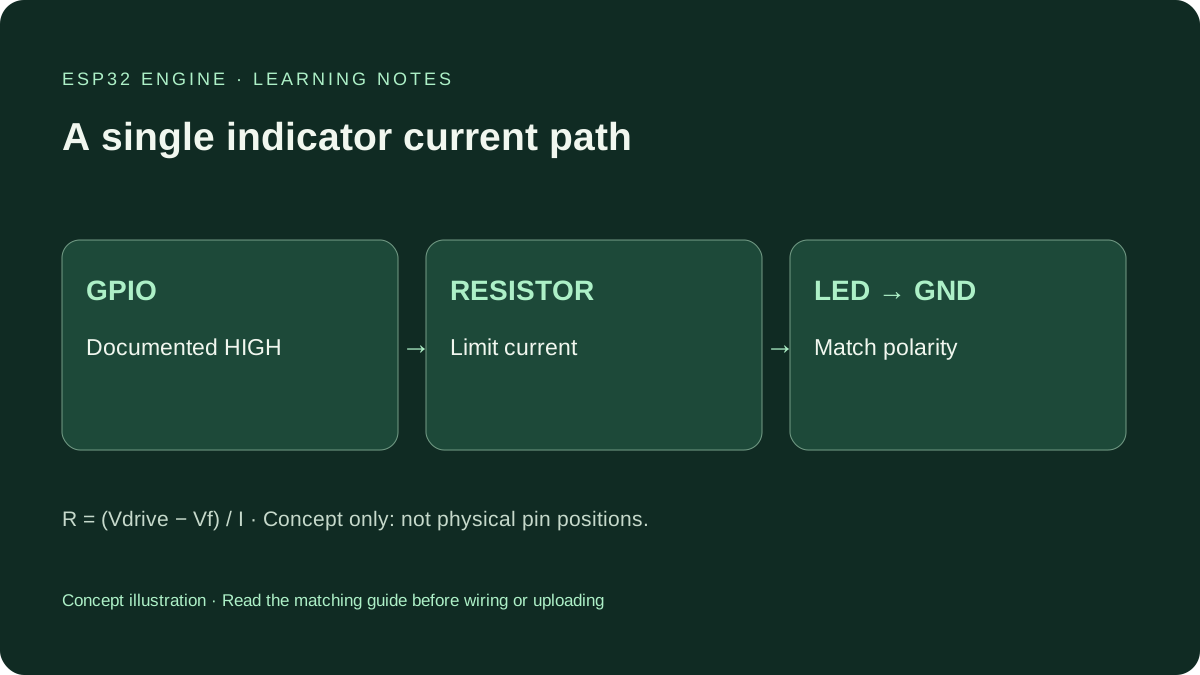
An ordinary indicator LED is not a fixed resistance. Its current changes sharply with voltage, so a direct GPIO connection can damage the LED or output. Put a current-limiting resistor in the same series path. A button pull-up resistor serves another purpose; do not substitute its wiring arrangement.
This lesson concerns one low-current indicator, not LED strips, high-power emitters or motor drivers. Some LED modules already include a resistor or driver. Check the exact circuit before adding a resistor or assuming a module can connect directly.
Write down the assumptions
You need the drive voltage available under load, the LED forward voltage at the intended current and a modest target current supported by both LED and board. GPIO HIGH is nominally a logic level, not an ideal bench supply. Loaded output voltage and total chip/board current budgets matter. Absolute-maximum ratings are not recommended operating currents.
Use the actual LED datasheet. Do not assign one forward voltage to every red, green or blue LED. The contributed Blink photos show a green LED but do not establish its exact part, forward voltage or current. A calculation is not a measurement of that photograph.
Work a labelled example
Illustrative assumptions only: drive voltage 3.3 V, LED forward voltage 2.0 V at target current 0.002 A (2 mA). The remaining voltage is 1.3 V. R = (Vdrive − Vf) / I gives 650 ohms. The next larger available value, 680 ohms, gives approximately 1.3 / 680 = 0.00191 A, or 1.91 mA under those assumptions.
This is not a universal 680-ohm recommendation. If the documented LED forward voltage is close to the actual GPIO HIGH voltage, there may be insufficient headroom for a predictable visible result. Do not remove the resistor to compensate. Use a compatible low-current indicator or a suitable driver design.
Compare values using the same assumptions
| Resistor | Calculated current | Interpretation |
|---|---|---|
| 220 ohms | About 5.91 mA | Above this illustrative 2 mA target. |
| 330 ohms | About 3.94 mA | Less current than 220 ohms in this example. |
| 680 ohms | About 1.91 mA | Near this illustrative target. |
| 1000 ohms | About 1.30 mA | Less current; visibility is LED-specific. |
Check tolerance and power
To estimate maximum current, consider the highest plausible drive voltage, lowest plausible forward voltage and lowest resistance permitted by tolerance. For the same illustrative 3.3 V and 2.0 V, a 680-ohm resistor at minus 5% is 646 ohms; current rises to approximately 2.01 mA. That shows only resistor tolerance, not a complete worst-case check of an unidentified LED.
Resistor dissipation is I²R, or voltage across the resistor multiplied by current. At the nominal 680-ohm example, it is about 0.00249 W. Choose a rating above actual worst-case dissipation with suitable margin. A higher power rating cannot repair a resistance that permits excessive current.
Apply it to the documented Blink circuit
Disconnect USB before rewiring. Follow the linked guide’s logical path: GPIO2 → series resistor → LED anode → LED cathode → GND on the stated classic ESP32 board. A resistor can sit on either side electrically if it remains in that single series path; breadboard rows still determine the physical connections.
Use the Blink guide’s documented parts and the real LED specification. Its 220–330-ohm example and this 680-ohm calculation have different stated assumptions; this lesson does not silently change that guide’s parts list. GPIO2 is a boot-strapping pin on classic ESP32, so retain its upload precautions. Do not connect a GPIO directly to an external supply.
If the LED is dim or off
Unplug power and check polarity, GPIO labels, resistor markings and breadboard connectivity. Verify a suspect resistor with a meter on an unpowered circuit. A lit board power indicator does not prove the external LED path is correct.
For a dim LED, inspect its specification and calculation before reducing resistance. If something becomes hot, unplug and investigate; do not increase GPIO drive strength as a shortcut. Measure current only with a correctly configured meter in series and suitable supervision. A current-range meter placed across a supply can short it.
Try the calculation before the hardware
Choose two hypothetical, documented LED forward voltages and calculate current for the same resistor. Explain which case produces more current. Record assumed drive voltage, Vf, target current, chosen standard value and power estimate.
Then use the complete Blink guide for wiring and code. This calculation lesson intentionally has no new sketch: software does not replace the missing electrical specification.
Continue your learning path
Next steps
Use stated assumptions, then check the actual component and board limits before assembly.
FAQ
No. Calculate with actual output conditions, LED specification and permitted current. The linked Blink circuit states one indicator example.
Do not apply this single-LED example unchanged. Separate branches generally need separate current limiting; design for the actual driver and load.
Technical references
- Adafruit: LED forward voltage and voltage law — LED voltage drop and current-limiting calculation.
- Adafruit: revisiting resistors — Resistance, current and brightness.
- Classic ESP32 datasheet — Electrical characteristics; use the actual chip and board specifications.