
Before you start
- Hardware
- Classic ESP32-WROOM DevKit, USB data cable and computer. No sensor, LED or other external circuit.
- Software baseline
- Arduino IDE 2 and Arduino-ESP32 3.3.2 for the stated classic ESP32 examples. This is an API review baseline, not a latest-version claim.
- Before this lesson
- Finish the Serial-only first upload and the setup()/loop() lesson. Open Serial Monitor at 115200 baud; use your exact board and port.
- Your goal
- Trace the exact number of repetitions and explain what makes each loop end.
- Verification limits
- Documentation/API and local content/browser review only. No sketch compilation, board upload or physical hardware test was performed for this lesson.
Distinguish loop() from a loop statement
Arduino loop() is a function the core calls repeatedly. A for or while statement repeats work inside the current function before execution continues after it. A statement inside setup() can repeat even though setup() itself is called only once per startup.
Use for when initialization, a continuation test and a counter update make the repetition clear. Use while when continuing depends on a condition, but still identify what changes that condition. Neither statement automatically runs its body in parallel with the rest of your sketch.
Trace start, test, body and update
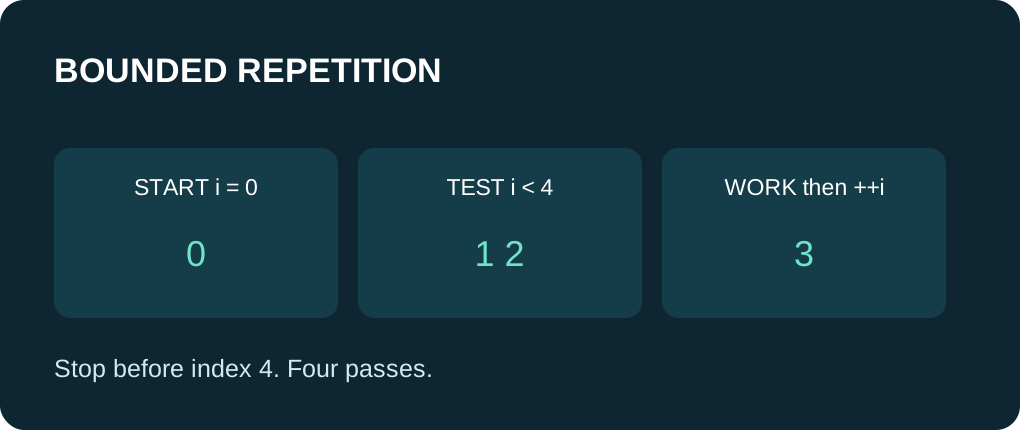
In for (int i = 0; i < 4; ++i), i starts at zero, the condition is checked, the body runs, and i increments. The body sees 0, 1, 2 and 3. It does not see 4 because the next condition is false. This four-pass pattern is useful for an array with four elements.
Changing < to <= adds a pass. With an array, that can access outside its bounds. Avoid unsigned reverse-loop tests such as i >= 0 that never become false. Write the expected first index, last index and count on paper before using them in a circuit.
A while loop needs progress toward an exit
The countdown example starts at three, prints the current value and decrements it. It prints 3, 2 and 1, then exits when the value reaches zero. A while test happens before the body, so an initially false condition causes zero iterations. A do/while has a different first-pass rule and is outside this example.
An accidental semicolon after while creates an empty body. Omitting the decrement leaves the same condition true. An infinite loop might hang the application or contribute to watchdog problems depending on task configuration; do not rely on a watchdog as your normal exit strategy.
Bound work even when input keeps arriving
The example calls Serial.available() only while taking at most eight bytes in one batch. The processed counter advances on every byte read. A sender that continually sends more bytes therefore cannot make this one batch run indefinitely. This is an optional demonstration, not a promise to process an entire command or packet.
A batch limit bounds iteration count; Serial writes and other calls can still take time. A timeout test also only takes effect when execution reaches it. Calling a blocking library function inside a timed loop does not make that call non-blocking. Keep a real application responsive with small pieces of work and the millis() scheduling lesson.
Know where control goes next
| Statement | Effect | Common mistake |
|---|---|---|
| break | Exit the nearest enclosing loop or switch. | Assuming it exits every nested loop. |
| continue in for | Skip to the update expression, then test again. | Forgetting that this pass skipped later work. |
| continue in while | Return to the condition test. | Skipping the only counter update and never making progress. |
| return | Leave the current function. | Confusing it with just ending one repetition. |
Predict counts before running
Expected source walkthrough: the for loop prints four indices 0 through 3; the countdown prints 3, 2 and 1. The optional byte count is between zero and eight depending on bytes already buffered when setup() reaches that section. It is often zero; no input is required to finish the demonstration. No output here is presented as a hardware log.
Practice: change the for limit to three and predict the new count. Start the countdown at zero and explain why it prints nothing. If your own program stops progressing, inspect the condition and update before adding arbitrary delays. For work that must continue receiving commands, avoid long batches and indefinite waits.
Run one complete sketch
Save the complete example as loops_demo.ino. Keep only this sketch in its folder, select your board and port, and upload. Open Serial Monitor at 115200 baud, then press EN/reset if the initial output was missed. The program prints its demonstration once in setup(); the empty-working loop yields with delay(10). No GPIO wiring or extra library is required.
Wiring and matching Arduino code
Complete USB and Serial-only example
USB only. No GPIO wiring. Serial Monitor: 115200 baud.
loops_demo.ino
#include <Arduino.h>

void setup() {
  Serial.begin(115200);
  delay(1000);
  Serial.println("for indices:");
  for (int i = 0; i < 4; ++i) {
    Serial.println(i);
  }

  Serial.println("countdown:");
  int remaining = 3;
  while (remaining > 0) {
    Serial.println(remaining);
    --remaining;
  }

  int processed = 0;
  while (processed < 8 && Serial.available() > 0) {
    const int incoming = Serial.read();
    if (incoming < 0) {
      break;
    }
    ++processed;
  }
  Serial.print("optional buffered bytes consumed: ");
  Serial.println(processed);
  Serial.println("demonstration finished");
}

void loop() {
  delay(10);
}
Expected results below are a source walkthrough, not a captured hardware log. No firmware compilation or board upload was performed for this lesson.
Continue your learning path
Next steps
Give every repeated block an intentional exit, then move a small repeated job into a helper function.
FAQ
No. Later sketch statements wait for this for statement to finish; background system tasks are a separate concern.
No. The condition is tested first, so it can run zero times.
Technical references
- Arduino for — Initialization, continuation test and update order.
- Arduino while — A pre-test condition controls repeated execution.
- Arduino break — Exit the nearest loop or switch.
- Arduino continue — Skip the rest of a repetition; preserve condition updates.
- Arduino-ESP32 3.3.2 Print API — Serial formatting overloads in the reviewed API baseline.