
Before you start
- Hardware
- Classic ESP32-WROOM DevKit, USB data cable and phone/computer with a BLE GATT client such as nRF Connect. No GPIO wiring.
- Software
- Arduino-ESP32 3.3.2 is the explicit API review baseline, not a latest-release claim. Bundled BLE library from Arduino-ESP32 3.3.2; do not install the old standalone ESP32 BLE Arduino library.
- Prerequisite
- Complete the Arduino IDE Serial-only first upload; select ESP32 Dev Module for the stated classic WROOM board.
- Expected result
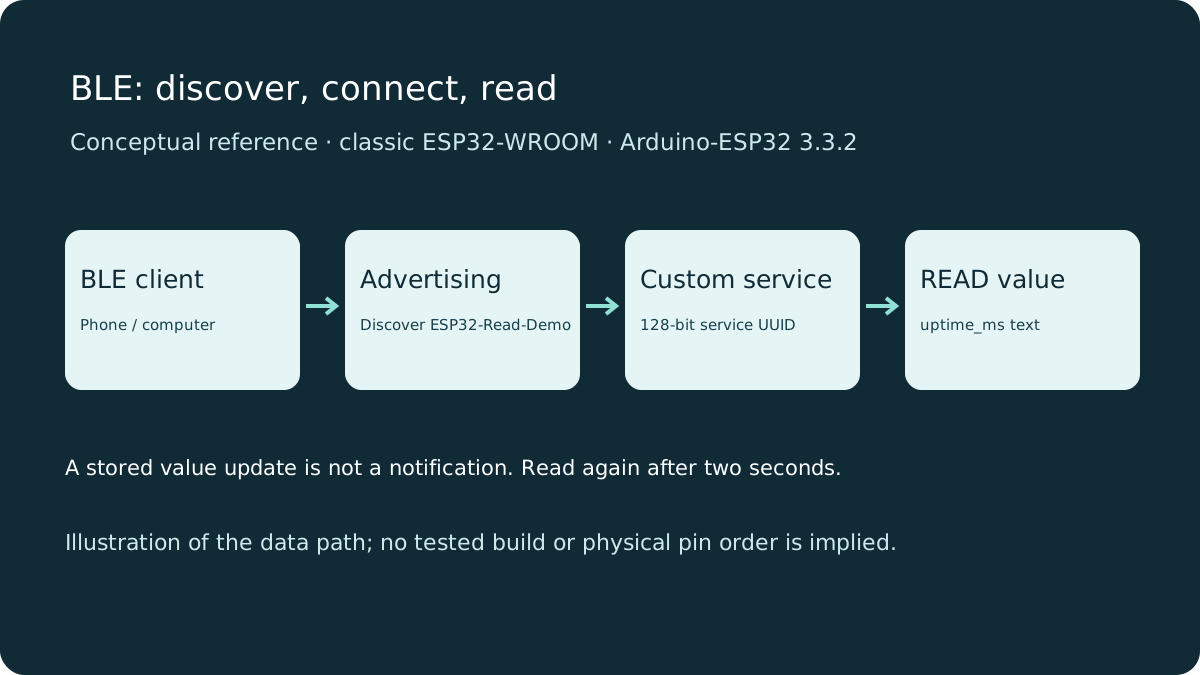
- A BLE client discovers ESP32-Read-Demo, connects to its custom service and reads uptime_ms text; it can reconnect after disconnect.
- Review limits
- Documentation/API review and local content/browser checks only. Sketch compilation, physical hardware and playback testing were not performed.
BLE capability is board-specific
Classic ESP32 has Bluetooth Classic and Bluetooth LE, but this example uses BLE only. ESP32-S2 has no Bluetooth radio. Other ESP32 variants have different Bluetooth capabilities and USB/board settings; this review targets classic WROOM with its bundled BLE implementation, not every ESP32-family build. Upload the IDE Serial test first.
BLE advertising lets a nearby client discover a device. GATT is the connected attribute interface used to read the value here. The existing iBeacon project demonstrates advertising identifiers without this service/characteristic workflow; it is a separate learning goal.
A small data model
| Term | Role in this example |
|---|---|
| Peripheral / GATT server | ESP32 advertises and hosts the attributes. |
| Central / GATT client | Phone or computer connects and requests a read. |
| Service UUID | Groups the demo’s attributes under a custom 128-bit identifier. |
| Characteristic UUID | Identifies the readable uptime value within that service. |
| PROPERTY_READ | Permits explicit reads; no write or notify property is provided. |
The two UUIDs are custom example identifiers, not assigned Bluetooth standard services or security tokens. Keep them the same in the sketch and client. A device name is a discovery aid, not a unique or trusted identity. The characteristic value is UTF-8/ASCII text such as uptime_ms=4200, not a binary sensor measurement.
Upload the read-only service
Use the complete sketch and the bundled BLE library. Select the correct classic ESP32 board and open Serial at 115200. No pairing, GPIO output or router is required. The sketch updates the stored value every two seconds and restarts advertising after a disconnect. The callback signals loop through an atomic flag rather than delaying inside the Bluetooth task.
Wiring and matching Arduino code
Complete GATT read-only uptime example
Power the stated DevKit from USB. No GPIO wiring or onboard LED is required.
ble-read-demo.ino
#include <BLEDevice.h>
#include <BLEServer.h>
#include <BLEUtils.h>
#include <atomic>

const char* SERVICE_UUID = "63c80f8e-71b1-4ee8-973e-68e9182b8721";
const char* VALUE_UUID = "88c78480-46d5-4a48-a57c-cb7fc0ea59e1";
BLECharacteristic* value;
std::atomic<bool> disconnected{false};
class Callbacks : public BLEServerCallbacks {
  void onDisconnect(BLEServer*) override { disconnected.store(true); }
};
Callbacks callbacks;

void setup() {
  Serial.begin(115200);
  BLEDevice::init("ESP32-Read-Demo");
  BLEServer* server = BLEDevice::createServer();
  server->setCallbacks(&callbacks);
  BLEService* service = server->createService(SERVICE_UUID);
  value = service->createCharacteristic(VALUE_UUID, BLECharacteristic::PROPERTY_READ);
  value->setValue("uptime_ms=0");
  service->start();
  BLEAdvertising* advertising = BLEDevice::getAdvertising();
  advertising->addServiceUUID(SERVICE_UUID);
  advertising->setScanResponse(true);
  BLEDevice::startAdvertising();
  Serial.println("Scan for ESP32-Read-Demo; connect and read the custom characteristic.");
}
void loop() {
  static uint32_t updated = 0, restartAt = 0;
  static bool restartPending = false;
  const uint32_t now = millis();
  if (disconnected.exchange(false)) { restartAt = now; restartPending = true; }
  if (restartPending && now - restartAt >= 200) {
    BLEDevice::startAdvertising(); restartPending = false;
    Serial.println("Advertising restarted after disconnect.");
  }
  if (now - updated >= 2000) {
    updated = now;
    value->setValue(String("uptime_ms=") + String(now));
  }
  delay(10);
}
Read it from a BLE client
- Enable Bluetooth and grant the scanner permissions required by your operating system. On some Android versions nearby-device/location permissions affect scanning.
- Scan in a BLE GATT client, not only the phone’s paired-device settings. Look for ESP32-Read-Demo or the service UUID.
- Connect, discover services and expand the service ending in 8721.
- Read the characteristic ending in 59e1. Select text/UTF-8 display if the client shows hexadecimal bytes.
- Read again after a few seconds. The value should increase; it is updated every two seconds, so rapid reads may repeat.
- Disconnect, rescan and reconnect. Advertising should restart. These are checks for you to perform, not claimed hardware results.
Changing the stored value does not push a notification. Press Read again; this example intentionally omits notify/indicate and writes. millis is time since reset, wraps after about 49.7 days and is not a wall clock.
If discovery or reading fails
No advertising: check board radio support, correct library selection, successful upload and scanner permissions. A second client may already be connected. Move closer without assuming a guaranteed range.
No service/value: match the UUIDs and perform service discovery; a client may cache old attributes after you change firmware. Disconnect/reconnect and refresh its service cache using the app’s controls. A grey Write/Notify control is expected because this characteristic is read-only. A constant value across rapid reads is expected until the two-second update.
A long name can appear in scan-response data rather than the first advertisement. Discovery by service UUID can still work. Do not mistake a scan listing for a successful characteristic read.
This is not a secure control channel
The characteristic requires no pairing, bonding, encrypted link or application authentication. A nearby client can connect and read it. UUIDs and MAC/device names do not authenticate a person. Send no private data and attach no safety-critical controls. A product needs a separate, reviewed security and authorization design. No Wi-Fi, internet or advertising consent change is involved in this board demonstration.
Next steps
Start with one service and one explicit read. Add notifications, writes or security only when the data model and actual client behavior are understood.
Technical references
- BLE Server example at 3.3.2 — Service, characteristic, advertising and discovery pattern.
- BLECharacteristic API at 3.3.2 — Read properties and Arduino String value API.
- BLEServer callbacks at 3.3.2 — Disconnect callback used by the example.
- Classic ESP32 datasheet — Classic chip Bluetooth capabilities.
- ESP32-S2 datasheet — S2 radio capability; no Bluetooth.
- Nordic nRF Connect for Mobile — Client scanning, service discovery and characteristic reading.